How Spott captures incoming applications, scores them with AI, and moves them into your pipeline.
Inbound applications are all candidates who apply through your job board posting,
LinkedIn, or an integrated multiposter such as
Broadbean. Applications are
automatically linked to the right job, enriched with candidate data, and queued for
your review, so no application is missed.You review them in two places: on each job’s Applicants tab, and across every job at
once on the Jobs page.
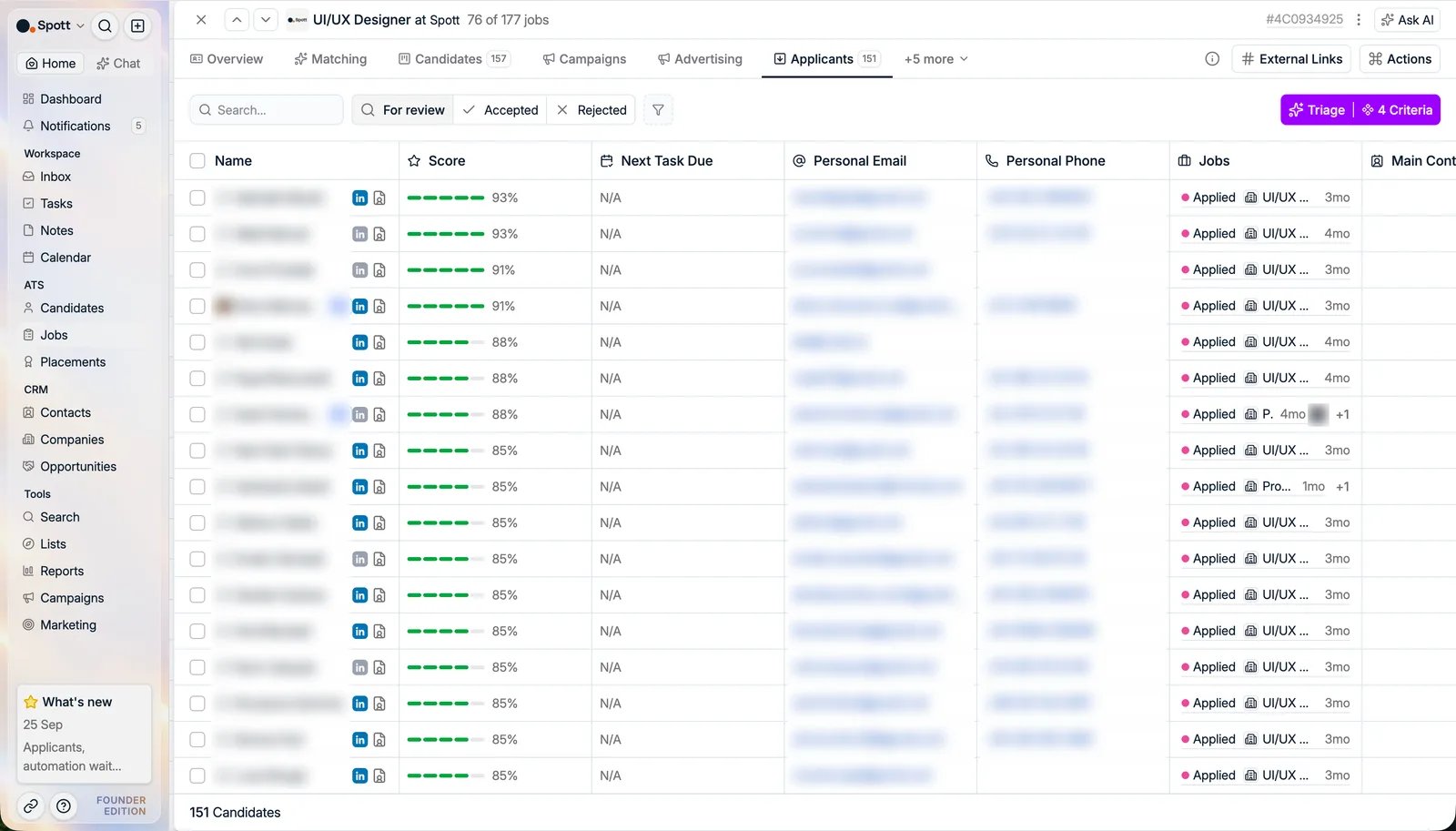
In Spott, go to Jobs, open the job, and click the Applicants tab. It used to be
called Inbound.Use the search box above the list to find an applicant by name, which is quicker than
scrolling once a popular job has collected a few hundred of them.You do not have to keep checking the tab. When applicants are waiting for review, the job’s
Candidates tab shows # applicants in the pipeline, linking straight here with the
For review filter on (see applicants waiting for review).
On the Jobs list, the Candidates by Stage column starts with an Applicants count too,
so the jobs with people waiting stand out without opening any of them.
Match score (0 to 100, from Very Weak to Very Strong Match). Click the score
for an explanation per criterion. The score only appears once you have run a
search on the job: without one there is nothing to score against, so the column
stays empty. See matching.
Email and phone
Work experience, with the latest roles expandable for details
Location
Match scores are based on the job’s description, details, and intake notes.
Detailed sourcing criteria on the job’s Overview tab give more accurate results.
Use the Triage button to adjust the AI criteria used for scoring.
Rejected: with two options: reject and keep in your database, or reject and
delete from the database
To reject someone with an email, do not reject them first. Press Send email,
write the rejection, and use the toggle in the composer to reject the application as
the mail goes out. That way the candidate hears from you and the application is
closed in one step.
Accept top candidates, individually or in bulk, straight into the pipeline stage
of your choice. The stage offered by default, the Default Job Advert Stage, is set
workspace-wide under Settings →
Stages, so you do
not have to configure it on every new job.
Reject applicants who do not meet the requirements.
When applications come in on a dozen jobs at once, opening each job to see who applied is
the slow part. The Inbound Applications tab on the Jobs page, next to Jobs,
Applications, and Speculative Presentations, gathers every inbound application in
the workspace into one list, whatever job it came in on.
Each row shows the candidate, the job, the client, the application’s state, its source,
when they applied, and the owner. The same For review, Accepted, and Rejected
toggle as on a job sits at the top, with a search box for names.The list starts with everything. Narrow it with the filter button, on Stage, Job,
Job Stage, Job Owners, Company, Owner, Label, Rejected By,
Rejection Label, or any of the candidate’s own fields. Filtering on Job Owners is
the quick way to see only the applications on your own jobs.
Select one applicant or several and pick an action:
Accept: choose the stage the candidate should land in, and they move into that job’s
pipeline.
Reject & keep in database: the application is closed and the candidate stays in
Spott. You can still Accept anyway later if you change your mind.
Reject & delete from database: the application is closed and the candidate is
removed.
Send email: write to the applicant. The composer has an Additional actions
section with three toggles, Accept, Reject & keep in database, and Reject &
delete from database, so the decision goes out with the email in one step. Switching a
toggle on does not ask for anything else.
Everything works the same for a single applicant and for a bulk selection, so a morning’s
worth of applications can be cleared from one screen.
Rejecting asks for the same details whether you reject one applicant or fifty, so a bulk
rejection no longer records everyone as Rejected by us by default and your rejection
reporting stays honest:
Rejected by, required: Rejected by us, Rejected by client, or Withdrawn by
candidate. Rejected by us is preselected.
Marked by, the colleague who made the call, which is you unless you change it.
One submission applies the same details to every selected applicant, up to 1,000 at a
time, on every job you can edit. Reject & add to Spott closes the applications and keeps
the candidates in your database. Reject & do not add to Spott, offered only on applicants
still under For review, leaves them out of it.This dialog sends no email. To reject with a message, use Send email with a reject toggle
under Additional actions, as described above.
Was this page helpful?
{"docsConfig":{"theme":"mint","$schema":"https://mintlify.com/docs.json","name":"Spott","description":"Documentation for Spott — the AI-native recruitment platform.","colors":{"primary":"#f0610f","light":"#f0610f","dark":"#f0610f"},"logo":{"light":"https://mintcdn.com/spott-docs/Zvbuq2vKGY56oD57/logo/light.svg?fit=max\u0026auto=format\u0026n=Zvbuq2vKGY56oD57\u0026q=85\u0026s=914d6f30a1192b291746dbcd2fc7e0fa","dark":"https://mintcdn.com/spott-docs/Zvbuq2vKGY56oD57/logo/dark.svg?fit=max\u0026auto=format\u0026n=Zvbuq2vKGY56oD57\u0026q=85\u0026s=e88bff4f96607e119e55398351566d54"},"favicon":"https://mintcdn.com/spott-docs/DowUiFW036iA_b71/favicon.png?fit=max\u0026auto=format\u0026n=DowUiFW036iA_b71\u0026q=85\u0026s=4729be45c4d1269ed0fafc43f45bc501","appearance":{"default":"light"},"navbar":{"links":[{"href":"https://spott.io","label":"Website"}],"primary":{"type":"button","label":"Go to app","href":"https://app.spott.io"}},"footer":{"socials":{"linkedin":"https://www.linkedin.com/company/spottai","website":"https://spott.io"}},"integrations":{"ga4":{"measurementId":"G-5GMF3213NR"}},"styling":{"latex":false},"navigation":{"global":{"anchors":[{"anchor":"Go to app","icon":"arrow-up-right-from-square","href":"https://app.spott.io"},{"anchor":"Support","icon":"life-ring","href":"/docs/get-started/faq"}]},"languages":[{"language":"en","default":true,"href":""},{"language":"fr","href":"fr"},{"language":"nl","href":"nl"},{"language":"de","href":"de"},{"language":"es","href":"es"}]}},"deployment":{"deploymentMetadataValue":{"subdomain":"spott-docs","hasAudioNarration":false,"actualSubdomain":"spott-docs","customDomains":["docs.spott.io"],"gitSource":{"type":"github","owner":"spott-hr","repo":"spott-docs-external","deployBranch":"main","contentDirectory":"","isPrivate":true,"mountPath":"","label":""},"chroma":{"collectionId":"f0073665-2f52-4bb5-aaa0-43ce286699bb","liveDeploymentHistoryId":"6adf7247b1764000030afb98","schemaVersion":"v3","latestBuiltDeploymentHistoryId":"6adf7247b1764000030afb98"},"feedback":{"thumbs":true},"entitlements":{},"buildId":"6adf7247b1764000030afb98","clientVersion":"0.0.3971","searchFilterCounts":[{"language":"en","tag":"API","count":215},{"language":"en","tag":"Private API","count":211},{"language":"de","tag":"Anleitungen","count":90},{"language":"en","tag":"Guides","count":90},{"language":"es","tag":"Guías","count":90},{"language":"fr","tag":"Guides","count":90},{"language":"nl","tag":"Gidsen","count":90},{"language":"en","tag":"Webhooks","count":55},{"language":"en","tag":"Webhook events","count":54},{"language":"en","tag":"Candidates","count":46},{"language":"de","tag":"Integrationen","count":36},{"language":"en","tag":"Integrations","count":36},{"language":"es","tag":"Integraciones","count":36},{"language":"fr","tag":"Intégrations","count":36},{"language":"nl","tag":"Integraties","count":36},{"language":"de","tag":"Einstellungen und Verwaltung","count":26},{"language":"en","tag":"Settings \u0026 Admin","count":26},{"language":"es","tag":"Configuración y administración","count":26},{"language":"fr","tag":"Paramètres et administration","count":26},{"language":"nl","tag":"Instellingen en beheer","count":26},{"language":"en","tag":"Jobs","count":24},{"language":"en","tag":"Custom Attributes","count":22},{"language":"de","tag":"Einstieg","count":16},{"language":"es","tag":"Primeros pasos","count":16},{"language":"fr","tag":"Prise en main","count":16},{"language":"nl","tag":"Onboarding","count":16},{"language":"de","tag":"Stellen","count":12},{"language":"es","tag":"Vacantes","count":12},{"language":"fr","tag":"Postes","count":12},{"language":"nl","tag":"Vacatures","count":12},{"language":"de","tag":"Kandidaten","count":11},{"language":"de","tag":"Unternehmen, Kontakte und Opportunities","count":11},{"language":"de","tag":"Erste Schritte","count":11},{"language":"de","tag":"Telefonie und Messaging","count":11},{"language":"es","tag":"Candidatos","count":11},{"language":"es","tag":"Empresas, contactos y oportunidades","count":11},{"language":"es","tag":"Introducción","count":11},{"language":"es","tag":"Telefonía y mensajería","count":11},{"language":"fr","tag":"Candidats","count":11},{"language":"fr","tag":"Entreprises, contacts et opportunités","count":11},{"language":"fr","tag":"Démarrer","count":11},{"language":"fr","tag":"Téléphonie et messagerie","count":11},{"language":"nl","tag":"Kandidaten","count":11},{"language":"nl","tag":"Bedrijven, contacten en opportuniteiten","count":11},{"language":"nl","tag":"Aan de slag","count":11},{"language":"nl","tag":"Telefonie en berichten","count":11},{"language":"de","tag":"Kommunikation","count":10},{"language":"es","tag":"Comunicación","count":10},{"language":"fr","tag":"Communication","count":10},{"language":"nl","tag":"Communicatie","count":10}]},"assistantConfig":{"enableAskAiButton":false,"enableStarterQuestions":false,"enableContextualStarterQuestions":false,"enableAskAiSearchBar":true},"basePath":"","hasChatPermissions":false,"hasWebMcpPermissions":false,"toggles":[{"name":"kill-isr","enabled":true,"variant":{"name":"disabled","enabled":false,"feature_enabled":true},"impressionData":false},{"name":"agent-mintlify-slack","enabled":true,"variant":{"name":"disabled","enabled":false,"feature_enabled":true},"impressionData":false},{"name":"editor-v7-file-tree","enabled":true,"variant":{"name":"disabled","enabled":false,"feature_enabled":true},"impressionData":false},{"name":"agent-integrations-settings","enabled":true,"variant":{"name":"disabled","enabled":false,"feature_enabled":true},"impressionData":false},{"name":"automations-pr-grouping","enabled":true,"variant":{"name":"disabled","enabled":false,"feature_enabled":true},"impressionData":false},{"name":"custom-prefix","enabled":true,"variant":{"name":"disabled","enabled":false,"feature_enabled":true},"impressionData":false},{"name":"analytics-v7","enabled":true,"variant":{"name":"disabled","enabled":false,"feature_enabled":true},"impressionData":false},{"name":"user-flows-analytics","enabled":true,"variant":{"name":"disabled","enabled":false,"feature_enabled":true},"impressionData":false},{"name":"no-publish-flow","enabled":true,"variant":{"name":"disabled","enabled":false,"feature_enabled":true},"impressionData":false},{"name":"workos-onboarding","enabled":true,"variant":{"name":"disabled","enabled":false,"feature_enabled":true},"impressionData":false},{"name":"llms-txt-v2","enabled":true,"variant":{"name":"disabled","enabled":false,"feature_enabled":true},"impressionData":false},{"name":"pause-universal-search-reconcile","enabled":true,"variant":{"name":"disabled","enabled":false,"feature_enabled":true},"impressionData":false},{"name":"snapshot-serving-live","enabled":true,"variant":{"name":"disabled","enabled":false,"feature_enabled":true},"impressionData":false},{"name":"stripTemperatureMiddleware","enabled":true,"variant":{"name":"disabled","enabled":false,"feature_enabled":true},"impressionData":false},{"name":"per-site-search-delta","enabled":true,"variant":{"name":"disabled","enabled":false,"feature_enabled":true},"impressionData":false},{"name":"support-platform-pylon-zendesk","enabled":true,"variant":{"name":"disabled","enabled":false,"feature_enabled":true},"impressionData":false},{"name":"snapshot-serving","enabled":true,"variant":{"name":"disabled","enabled":false,"feature_enabled":true},"impressionData":false},{"name":"instant-rollback","enabled":true,"variant":{"name":"disabled","enabled":false,"feature_enabled":true},"impressionData":false},{"name":"granular-notifications-server","enabled":true,"variant":{"name":"disabled","enabled":false,"feature_enabled":true},"impressionData":false},{"name":"granular-notifications","enabled":true,"variant":{"name":"disabled","enabled":false,"feature_enabled":true},"impressionData":false},{"name":"editor-private-page-search","enabled":true,"variant":{"name":"disabled","enabled":false,"feature_enabled":true},"impressionData":false},{"name":"automations-fable","enabled":true,"variant":{"name":"disabled","enabled":false,"feature_enabled":true},"impressionData":false},{"name":"fixed-ai-action-pricing","enabled":true,"variant":{"name":"disabled","enabled":false,"feature_enabled":true},"impressionData":false},{"name":"automation-resolve-merge-conflict","enabled":true,"variant":{"name":"disabled","enabled":false,"feature_enabled":true},"impressionData":false},{"name":"scoped-publishing","enabled":true,"variant":{"name":"disabled","enabled":false,"feature_enabled":true},"impressionData":false},{"name":"mintql","enabled":true,"variant":{"name":"disabled","enabled":false,"feature_enabled":true},"impressionData":false},{"name":"page-level-analytics","enabled":true,"variant":{"name":"disabled","enabled":false,"feature_enabled":true},"impressionData":false},{"name":"editor-version-history-v2","enabled":true,"variant":{"name":"disabled","enabled":false,"feature_enabled":true},"impressionData":false},{"name":"editor-nav-generations","enabled":true,"variant":{"name":"disabled","enabled":false,"feature_enabled":true},"impressionData":false},{"name":"billing-page-v2","enabled":true,"variant":{"name":"disabled","enabled":false,"feature_enabled":true},"impressionData":false},{"name":"workspace-projects","enabled":true,"variant":{"name":"disabled","enabled":false,"feature_enabled":true},"impressionData":false},{"name":"assistant-v5","enabled":true,"variant":{"name":"disabled","enabled":false,"feature_enabled":true},"impressionData":false},{"name":"byok-sep-25","enabled":true,"variant":{"name":"disabled","enabled":false,"feature_enabled":true},"impressionData":false},{"name":"fork-pr-previews","enabled":true,"variant":{"name":"disabled","enabled":false,"feature_enabled":true},"impressionData":false},{"name":"revalidation-jwt","enabled":true,"variant":{"name":"disabled","enabled":false,"feature_enabled":true},"impressionData":false},{"name":"vite-origin","enabled":true,"variant":{"name":"disabled","enabled":false,"feature_enabled":true},"impressionData":false},{"name":"editor-agent-model-picker","enabled":true,"variant":{"name":"disabled","enabled":false,"feature_enabled":true},"impressionData":false},{"name":"billing-updated-9-15","enabled":true,"variant":{"name":"disabled","enabled":false,"feature_enabled":true},"impressionData":false},{"name":"workos-sso-scim","enabled":true,"variant":{"name":"disabled","enabled":false,"feature_enabled":true},"impressionData":false},{"name":"hobby-abuse-scan","enabled":true,"variant":{"name":"disabled","enabled":false,"feature_enabled":true},"impressionData":false},{"name":"dashboard-inbox","enabled":true,"variant":{"name":"disabled","enabled":false,"feature_enabled":true},"impressionData":false},{"name":"workos-signup","enabled":true,"variant":{"name":"disabled","enabled":false,"feature_enabled":true},"impressionData":false},{"name":"workos-enabled","enabled":true,"variant":{"name":"disabled","enabled":false,"feature_enabled":true},"impressionData":false}],"isAtlas":false,"googleFontsInlined":false},"customCss":[{"filePath":"style.css","content":"@media (min-width:1024px){#sidebar{top:112px!important;height:calc(100dvh - 112px)!important}}.your-turn{margin:2rem 0;padding:1.25rem 1.5rem;border:1px solid rgb(240 97 15/.25);border-left:3px solid #f0610f;border-radius:.75rem;background:rgb(240 97 15/.04)}.dark .your-turn{border-color:rgb(240 97 15/.3);border-left-color:#f0610f;background:rgb(240 97 15/.07)}.your-turn h2{margin-top:0;margin-bottom:.75rem;font-size:.8125rem;font-weight:600;letter-spacing:.06em;text-transform:uppercase;color:#f0610f}.your-turn>:last-child{margin-bottom:0}.your-turn ul.contains-task-list{margin:0;padding-left:0;list-style:none}.your-turn ul.contains-task-list li.task-list-item{position:relative;margin:0;padding:.25rem 0 .25rem 1.75rem;list-style:none}.your-turn ul.contains-task-list li.task-list-item::before,.your-turn ul.contains-task-list li.task-list-item::marker{content:none;display:none}.your-turn li.task-list-item input[type=checkbox]{position:absolute;left:0;top:.45rem;width:1rem;height:1rem;margin:0;accent-color:#f0610f}.your-turn[data-interactive=true] li.task-list-item,.your-turn[data-interactive=true] li.task-list-item input[type=checkbox]{cursor:pointer}.your-turn[data-interactive=true] li.task-list-item:hover{color:#f0610f}.your-turn li.task-list-item.is-done{opacity:.55;text-decoration:line-through;text-decoration-color:rgb(240 97 15/.5)}.in-this-section{margin:0 0 2rem;padding:1rem 1.25rem;border:1px solid rgb(15 23 42/.08);border-radius:.75rem;background:rgb(15 23 42/.025);font-size:.9375rem;line-height:1.65}.dark .in-this-section{border-color:rgb(255 255 255/.1);background:rgb(255 255 255/.03)}.in-this-section>:first-child{margin-top:0}.in-this-section>:last-child{margin-bottom:0}.in-this-section .section-links{margin-top:.875rem;padding-top:.875rem;border-top:1px solid rgb(15 23 42/.08)}.dark .in-this-section .section-links{border-top-color:rgb(255 255 255/.1)}.in-this-section .section-links ol{margin:0;padding-left:1.25rem}.in-this-section .section-links li{margin:.25rem 0}.nav-hint{margin:0 0 2rem;font-size:.875rem;line-height:1.6;color:rgb(15 23 42/.6)}.dark .nav-hint{color:rgb(255 255 255/.55)}.nav-hint strong{font-weight:600;color:inherit}.nav-hint>:first-child{margin-top:0}.nav-hint>:last-child{margin-bottom:0}.dark img[src*=\"/brands/chatgpt\"],.dark img[src*=\"/integrations/logos/daidalo\"],.dark img[src*=\"/integrations/logos/juicebox\"],.dark img[src*=\"/integrations/logos/pin.\"]{background:#fff;border-radius:3px;padding:1px;box-sizing:border-box}.mdx-content img[src^=\"/images/\"]{border-radius:12px}.shots{display:flex;flex-wrap:wrap;align-items:flex-start;gap:.75rem;margin:1rem 0 1.5rem}.shots>p,.shots>span{margin:0}.mdx-content .shots img{width:220px;max-width:100%;height:auto;margin:0;border:1px solid rgb(15 23 42/.1);border-radius:8px;box-shadow:0 1px 2px rgb(15 23 42/.06);cursor:zoom-in;transition:box-shadow .15s ease,border-color .15s ease}.mdx-content .shots img:hover{border-color:rgb(240 97 15/.5);box-shadow:0 4px 12px rgb(15 23 42/.12)}.dark .mdx-content .shots img{border-color:rgb(255 255 255/.12)}"}],"page":{"pagePath":"docs/jobs/inbound-applications","slug":"/docs/jobs/inbound-applications","pageMetadata":{"title":"Inbound Applications","icon":"inbox","description":"How Spott captures incoming applications, scores them with AI, and moves them into your pipeline.","href":"/docs/jobs/inbound-applications"},"description":{"compiledSource":"\"use strict\";\nconst {jsx: _jsx} = arguments[0];\nconst {useMDXComponents: _provideComponents} = arguments[0];\nfunction _createMdxContent(props) {\n const _components = {\n p: \"p\",\n ..._provideComponents(),\n ...props.components\n };\n return _jsx(_components.p, {\n children: \"How Spott captures incoming applications, scores them with AI, and moves them into your pipeline.\"\n });\n}\nfunction MDXContent(props = {}) {\n const {wrapper: MDXLayout} = {\n ..._provideComponents(),\n ...props.components\n };\n return MDXLayout ? _jsx(MDXLayout, {\n ...props,\n children: _jsx(_createMdxContent, {\n ...props\n })\n }) : _createMdxContent(props);\n}\nreturn {\n default: MDXContent\n};\n","frontmatter":{},"scope":{}},"pageType":"default","mdx":{"mdxSource":{"compiledSource":"\"use strict\";const{Fragment:_Fragment,jsx:_jsx,jsxs:_jsxs}=arguments[0];const{useMDXComponents:_provideComponents}=arguments[0];function _createMdxContent(props){const _components={a:`a`,li:`li`,p:`p`,strong:`strong`,ul:`ul`,..._provideComponents(),...props.components},{Frame,Heading,OptimizedImage,Tip}=_components;if(!Frame)_missingMdxReference(`Frame`,true);if(!Heading)_missingMdxReference(`Heading`,true);if(!OptimizedImage)_missingMdxReference(`OptimizedImage`,true);if(!Tip)_missingMdxReference(`Tip`,true);return _jsxs(_Fragment,{children:[_jsxs(_components.p,{children:[_jsx(_components.strong,{children:`Inbound applications`}),` are all candidates who apply through your job board posting,\nLinkedIn, or an integrated `,_jsx(_components.a,{href:`/docs/integrations/multiposting`,children:`multiposter`}),` such as\n`,_jsx(_components.a,{href:`/docs/integrations/broadbean`,children:`Broadbean`}),`. Applications are\nautomatically linked to the right job, enriched with candidate data, and queued for\nyour review, so no application is missed.`]}),`\n`,_jsxs(_components.p,{children:[`You review them in two places: on each job’s `,_jsx(_components.strong,{children:`Applicants`}),` tab, and across every job at\nonce on the Jobs page.`]}),`\n`,_jsx(Heading,{level:`2`,id:`access-a-job’s-applicants-tab`,children:`Access a job’s Applicants tab`}),`\n`,_jsx(Frame,{children:_jsx(OptimizedImage,{src:`https://mintcdn.com/spott-docs/HVxwpvvkcAA53kUZ/images/jobs/job-applicants-tab.webp?fit=max\u0026auto=format\u0026n=HVxwpvvkcAA53kUZ\u0026q=85\u0026s=ff969b95e14d69eb88dd3e6eaa96f7ed`,alt:`The Applicants tab with scored applicants`,\"data-og-width\":`1600`,width:`1600`,\"data-og-height\":`913`,height:`913`,\"data-path\":`images/jobs/job-applicants-tab.webp`,\"data-optimize\":`true`,\"data-opv\":`3`,srcset:`https://mintcdn.com/spott-docs/HVxwpvvkcAA53kUZ/images/jobs/job-applicants-tab.webp?w=280\u0026fit=max\u0026auto=format\u0026n=HVxwpvvkcAA53kUZ\u0026q=85\u0026s=8fdaeece6326df692d05d872bdfe5dc2 280w, https://mintcdn.com/spott-docs/HVxwpvvkcAA53kUZ/images/jobs/job-applicants-tab.webp?w=560\u0026fit=max\u0026auto=format\u0026n=HVxwpvvkcAA53kUZ\u0026q=85\u0026s=99ca7d556cafd1e79a2bd3a386bd5802 560w, https://mintcdn.com/spott-docs/HVxwpvvkcAA53kUZ/images/jobs/job-applicants-tab.webp?w=840\u0026fit=max\u0026auto=format\u0026n=HVxwpvvkcAA53kUZ\u0026q=85\u0026s=9d689401415ade286db39f3f606a4fe9 840w, https://mintcdn.com/spott-docs/HVxwpvvkcAA53kUZ/images/jobs/job-applicants-tab.webp?w=1100\u0026fit=max\u0026auto=format\u0026n=HVxwpvvkcAA53kUZ\u0026q=85\u0026s=84b5847a19e94b942bbc08401730563b 1100w, https://mintcdn.com/spott-docs/HVxwpvvkcAA53kUZ/images/jobs/job-applicants-tab.webp?w=1650\u0026fit=max\u0026auto=format\u0026n=HVxwpvvkcAA53kUZ\u0026q=85\u0026s=3886c63fd40b3d47900f1665fe9f01c0 1650w, https://mintcdn.com/spott-docs/HVxwpvvkcAA53kUZ/images/jobs/job-applicants-tab.webp?w=2500\u0026fit=max\u0026auto=format\u0026n=HVxwpvvkcAA53kUZ\u0026q=85\u0026s=d09095a569de370c2f0348a7372a0bf2 2500w`})}),`\n`,_jsxs(_components.p,{children:[`In Spott, go to `,_jsx(_components.strong,{children:`Jobs`}),`, open the job, and click the `,_jsx(_components.strong,{children:`Applicants`}),` tab. It used to be\ncalled `,_jsx(_components.strong,{children:`Inbound`}),`.`]}),`\n`,_jsxs(_components.p,{children:[`Use the `,_jsx(_components.strong,{children:`search box`}),` above the list to find an applicant by name, which is quicker than\nscrolling once a popular job has collected a few hundred of them.`]}),`\n`,_jsxs(_components.p,{children:[`You do not have to keep checking the tab. When applicants are waiting for review, the job’s\n`,_jsx(_components.strong,{children:`Candidates`}),` tab shows `,_jsx(_components.strong,{children:`# applicants`}),` in the pipeline, linking straight here with the\n`,_jsx(_components.strong,{children:`For review`}),` filter on (see `,_jsx(_components.a,{href:`/docs/jobs/job-pipeline#applicants-waiting-for-review`,children:`applicants waiting for review`}),`).\nOn the Jobs list, the `,_jsx(_components.strong,{children:`Candidates by Stage`}),` column starts with an `,_jsx(_components.strong,{children:`Applicants`}),` count too,\nso the jobs with people waiting stand out without opening any of them.`]}),`\n`,_jsx(Heading,{level:`2`,id:`candidate-list`,children:`Candidate list`}),`\n`,_jsx(_components.p,{children:`Each applicant row shows, among others:`}),`\n`,_jsxs(_components.ul,{children:[`\n`,_jsx(_components.li,{children:`Name and avatar`}),`\n`,_jsxs(_components.li,{children:[_jsx(_components.strong,{children:`Match score`}),` (0 to 100, from Very Weak to Very Strong Match). Click the score\nfor an explanation per criterion. The score only appears once you have `,_jsx(_components.strong,{children:`run a\nsearch on the job`}),`: without one there is nothing to score against, so the column\nstays empty. See `,_jsx(_components.a,{href:`/docs/jobs/matching`,children:`matching`}),`.`]}),`\n`,_jsx(_components.li,{children:`Email and phone`}),`\n`,_jsx(_components.li,{children:`Work experience, with the latest roles expandable for details`}),`\n`,_jsx(_components.li,{children:`Location`}),`\n`]}),`\n`,_jsx(Tip,{children:_jsx(_components.p,{children:`Match scores are based on the job’s description, details, and intake notes.\nDetailed sourcing criteria on the job’s Overview tab give more accurate results.`})}),`\n`,_jsxs(_components.p,{children:[`Use the `,_jsx(_components.strong,{children:`Triage`}),` button to adjust the AI criteria used for scoring.`]}),`\n`,_jsx(Heading,{level:`2`,id:`candidate-status`,children:`Candidate status`}),`\n`,_jsx(Frame,{children:_jsx(OptimizedImage,{src:`https://mintcdn.com/spott-docs/p014P0_PfappR2TU/images/jobs/job-inbound-bulk-accept.webp?fit=max\u0026auto=format\u0026n=p014P0_PfappR2TU\u0026q=85\u0026s=785fa50a6523612c82c69b259ceaa777`,alt:`Bulk accepting inbound applicants into a stage`,\"data-og-width\":`1600`,width:`1600`,\"data-og-height\":`129`,height:`129`,\"data-path\":`images/jobs/job-inbound-bulk-accept.webp`,\"data-optimize\":`true`,\"data-opv\":`3`,srcset:`https://mintcdn.com/spott-docs/p014P0_PfappR2TU/images/jobs/job-inbound-bulk-accept.webp?w=280\u0026fit=max\u0026auto=format\u0026n=p014P0_PfappR2TU\u0026q=85\u0026s=4076e3c1e15ac3ec0e240de99d0603ce 280w, https://mintcdn.com/spott-docs/p014P0_PfappR2TU/images/jobs/job-inbound-bulk-accept.webp?w=560\u0026fit=max\u0026auto=format\u0026n=p014P0_PfappR2TU\u0026q=85\u0026s=dcd59d023a1b8bbf05af6e46383bf239 560w, https://mintcdn.com/spott-docs/p014P0_PfappR2TU/images/jobs/job-inbound-bulk-accept.webp?w=840\u0026fit=max\u0026auto=format\u0026n=p014P0_PfappR2TU\u0026q=85\u0026s=e440d129bd4fada05822b803b1c82327 840w, https://mintcdn.com/spott-docs/p014P0_PfappR2TU/images/jobs/job-inbound-bulk-accept.webp?w=1100\u0026fit=max\u0026auto=format\u0026n=p014P0_PfappR2TU\u0026q=85\u0026s=91801b24ea6f7fcb4cc0e8d743086e45 1100w, https://mintcdn.com/spott-docs/p014P0_PfappR2TU/images/jobs/job-inbound-bulk-accept.webp?w=1650\u0026fit=max\u0026auto=format\u0026n=p014P0_PfappR2TU\u0026q=85\u0026s=563e73a1a449cfe4f014fcf7751862b0 1650w, https://mintcdn.com/spott-docs/p014P0_PfappR2TU/images/jobs/job-inbound-bulk-accept.webp?w=2500\u0026fit=max\u0026auto=format\u0026n=p014P0_PfappR2TU\u0026q=85\u0026s=b0e55c63f54c85b423391e178b6577d7 2500w`})}),`\n`,_jsx(_components.p,{children:`Filter applicants by:`}),`\n`,_jsxs(_components.ul,{children:[`\n`,_jsxs(_components.li,{children:[_jsx(_components.strong,{children:`For Review`}),`: new applicants, the default list`]}),`\n`,_jsxs(_components.li,{children:[_jsx(_components.strong,{children:`Accepted`}),`: moved into the pipeline`]}),`\n`,_jsxs(_components.li,{children:[_jsx(_components.strong,{children:`Rejected`}),`: with two options: reject and keep in your database, or reject and\ndelete from the database`]}),`\n`]}),`\n`,_jsxs(_components.p,{children:[_jsx(_components.strong,{children:`To reject someone with an email`}),`, do not reject them first. Press `,_jsx(_components.strong,{children:`Send email`}),`,\nwrite the rejection, and use the toggle in the composer to reject the application as\nthe mail goes out. That way the candidate hears from you and the application is\nclosed in one step.`]}),`\n`,_jsx(Heading,{level:`2`,id:`workflow`,children:`Workflow`}),`\n`,_jsxs(_components.ul,{children:[`\n`,_jsx(_components.li,{children:`Review inbound applicants and their AI scores.`}),`\n`,_jsxs(_components.li,{children:[`Accept top candidates, individually or in bulk, straight into the pipeline stage\nof your choice. The stage offered by default, the `,_jsx(_components.strong,{children:`Default Job Advert Stage`}),`, is set\nworkspace-wide under `,_jsxs(_components.strong,{children:[`Settings →\n`,_jsx(_components.a,{href:`/docs/settings/stages#the-default-job-advert-stage`,children:`Stages`})]}),`, so you do\nnot have to configure it on every new job.`]}),`\n`,_jsx(_components.li,{children:`Reject applicants who do not meet the requirements.`}),`\n`]}),`\n`,_jsx(Heading,{level:`2`,id:`review-applicants-across-all-jobs`,children:`Review applicants across all jobs`}),`\n`,_jsxs(_components.p,{children:[`When applications come in on a dozen jobs at once, opening each job to see who applied is\nthe slow part. The `,_jsx(_components.strong,{children:`Inbound Applications`}),` tab on the Jobs page, next to `,_jsx(_components.strong,{children:`Jobs`}),`,\n`,_jsx(_components.strong,{children:`Applications`}),`, and `,_jsx(_components.strong,{children:`Speculative Presentations`}),`, gathers every inbound application in\nthe workspace into one list, whatever job it came in on.`]}),`\n`,_jsx(Frame,{children:_jsx(OptimizedImage,{src:`https://mintcdn.com/spott-docs/HVxwpvvkcAA53kUZ/images/jobs/inbound-applications-all-jobs.webp?fit=max\u0026auto=format\u0026n=HVxwpvvkcAA53kUZ\u0026q=85\u0026s=24c03db1455946d8102114c1f64b1853`,alt:`The Inbound Applications tab on the Jobs page, listing applicants from several jobs`,\"data-og-width\":`1210`,width:`1210`,\"data-og-height\":`389`,height:`389`,\"data-path\":`images/jobs/inbound-applications-all-jobs.webp`,\"data-optimize\":`true`,\"data-opv\":`3`,srcset:`https://mintcdn.com/spott-docs/HVxwpvvkcAA53kUZ/images/jobs/inbound-applications-all-jobs.webp?w=280\u0026fit=max\u0026auto=format\u0026n=HVxwpvvkcAA53kUZ\u0026q=85\u0026s=108b8bac03e94257236db875931b4a01 280w, https://mintcdn.com/spott-docs/HVxwpvvkcAA53kUZ/images/jobs/inbound-applications-all-jobs.webp?w=560\u0026fit=max\u0026auto=format\u0026n=HVxwpvvkcAA53kUZ\u0026q=85\u0026s=53500ca90d899eae53a330b7cfd51f5d 560w, https://mintcdn.com/spott-docs/HVxwpvvkcAA53kUZ/images/jobs/inbound-applications-all-jobs.webp?w=840\u0026fit=max\u0026auto=format\u0026n=HVxwpvvkcAA53kUZ\u0026q=85\u0026s=983ae583f727d52ad3d53977aa72ee69 840w, https://mintcdn.com/spott-docs/HVxwpvvkcAA53kUZ/images/jobs/inbound-applications-all-jobs.webp?w=1100\u0026fit=max\u0026auto=format\u0026n=HVxwpvvkcAA53kUZ\u0026q=85\u0026s=217a49b1025caec42275f795819b657b 1100w, https://mintcdn.com/spott-docs/HVxwpvvkcAA53kUZ/images/jobs/inbound-applications-all-jobs.webp?w=1650\u0026fit=max\u0026auto=format\u0026n=HVxwpvvkcAA53kUZ\u0026q=85\u0026s=4b165d186d515567b77a18dd30cdae8a 1650w, https://mintcdn.com/spott-docs/HVxwpvvkcAA53kUZ/images/jobs/inbound-applications-all-jobs.webp?w=2500\u0026fit=max\u0026auto=format\u0026n=HVxwpvvkcAA53kUZ\u0026q=85\u0026s=187707df989468d5d777ad35b0f7ed46 2500w`})}),`\n`,_jsxs(_components.p,{children:[`Each row shows the candidate, the job, the client, the application’s state, its `,_jsx(_components.strong,{children:`source`}),`,\nwhen they applied, and the owner. The same `,_jsx(_components.strong,{children:`For review`}),`, `,_jsx(_components.strong,{children:`Accepted`}),`, and `,_jsx(_components.strong,{children:`Rejected`}),`\ntoggle as on a job sits at the top, with a search box for names.`]}),`\n`,_jsxs(_components.p,{children:[`The list starts with everything. Narrow it with the filter button, on `,_jsx(_components.strong,{children:`Stage`}),`, `,_jsx(_components.strong,{children:`Job`}),`,\n`,_jsx(_components.strong,{children:`Job Stage`}),`, `,_jsx(_components.strong,{children:`Job Owners`}),`, `,_jsx(_components.strong,{children:`Company`}),`, `,_jsx(_components.strong,{children:`Owner`}),`, `,_jsx(_components.strong,{children:`Label`}),`, `,_jsx(_components.strong,{children:`Rejected By`}),`,\n`,_jsx(_components.strong,{children:`Rejection Label`}),`, or any of the candidate’s own fields. Filtering on `,_jsx(_components.strong,{children:`Job Owners`}),` is\nthe quick way to see only the applications on your own jobs.`]}),`\n`,_jsx(Heading,{level:`3`,id:`act-on-applicants`,children:`Act on applicants`}),`\n`,_jsx(_components.p,{children:`Select one applicant or several and pick an action:`}),`\n`,_jsxs(_components.ul,{children:[`\n`,_jsxs(_components.li,{children:[_jsx(_components.strong,{children:`Accept`}),`: choose the stage the candidate should land in, and they move into that job’s\npipeline.`]}),`\n`,_jsxs(_components.li,{children:[_jsx(_components.strong,{children:`Reject \u0026 keep in database`}),`: the application is closed and the candidate stays in\nSpott. You can still `,_jsx(_components.strong,{children:`Accept anyway`}),` later if you change your mind.`]}),`\n`,_jsxs(_components.li,{children:[_jsx(_components.strong,{children:`Reject \u0026 delete from database`}),`: the application is closed and the candidate is\nremoved.`]}),`\n`,_jsxs(_components.li,{children:[_jsx(_components.strong,{children:`Send email`}),`: write to the applicant. The composer has an `,_jsx(_components.strong,{children:`Additional actions`}),`\nsection with three toggles, `,_jsx(_components.strong,{children:`Accept`}),`, `,_jsx(_components.strong,{children:`Reject \u0026 keep in database`}),`, and `,_jsx(_components.strong,{children:`Reject \u0026\ndelete from database`}),`, so the decision goes out with the email in one step. Switching a\ntoggle on does not ask for anything else.`]}),`\n`]}),`\n`,_jsx(_components.p,{children:`Everything works the same for a single applicant and for a bulk selection, so a morning’s\nworth of applications can be cleared from one screen.`}),`\n`,_jsx(Heading,{level:`3`,id:`reject-with-the-full-details`,children:`Reject with the full details`}),`\n`,_jsxs(_components.p,{children:[`Rejecting asks for the same details whether you reject one applicant or fifty, so a bulk\nrejection no longer records everyone as `,_jsx(_components.strong,{children:`Rejected by us`}),` by default and your rejection\nreporting stays honest:`]}),`\n`,_jsxs(_components.ul,{children:[`\n`,_jsxs(_components.li,{children:[_jsx(_components.strong,{children:`Rejected by`}),`, required: `,_jsx(_components.strong,{children:`Rejected by us`}),`, `,_jsx(_components.strong,{children:`Rejected by client`}),`, or `,_jsx(_components.strong,{children:`Withdrawn by\ncandidate`}),`. `,_jsx(_components.strong,{children:`Rejected by us`}),` is preselected.`]}),`\n`,_jsxs(_components.li,{children:[_jsx(_components.strong,{children:`Marked by`}),`, the colleague who made the call, which is you unless you change it.`]}),`\n`,_jsxs(_components.li,{children:[_jsx(_components.strong,{children:`Rejection reason`}),`, one or more of your `,_jsx(_components.a,{href:`/docs/settings/labels`,children:`rejection labels`}),`.`]}),`\n`,_jsxs(_components.li,{children:[_jsx(_components.strong,{children:`Additional information`}),`, a free-text note.`]}),`\n`]}),`\n`,_jsxs(_components.p,{children:[`One submission applies the same details to every selected applicant, up to `,_jsx(_components.strong,{children:`1,000`}),` at a\ntime, on every job you can edit. `,_jsx(_components.strong,{children:`Reject \u0026 add to Spott`}),` closes the applications and keeps\nthe candidates in your database. `,_jsx(_components.strong,{children:`Reject \u0026 do not add to Spott`}),`, offered only on applicants\nstill under `,_jsx(_components.strong,{children:`For review`}),`, leaves them out of it.`]}),`\n`,_jsxs(_components.p,{children:[`This dialog sends no email. To reject with a message, use `,_jsx(_components.strong,{children:`Send email`}),` with a reject toggle\nunder `,_jsx(_components.strong,{children:`Additional actions`}),`, as described above.`]})]})}function MDXContent(props={}){const{wrapper:MDXLayout}={..._provideComponents(),...props.components};return MDXLayout?_jsx(MDXLayout,{...props,children:_jsx(_createMdxContent,{...props})}):_createMdxContent(props)}return{default:MDXContent};function _missingMdxReference(id,component){throw new Error(`Expected `+(component?`component`:`object`)+\" `\"+id+\"` to be defined: you likely forgot to import, pass, or provide it.\")}","frontmatter":{},"scope":{"config":{},"pageMetadata":{"title":"Inbound Applications","icon":"inbox","description":"How Spott captures incoming applications, scores them with AI, and moves them into your pipeline.","href":"/docs/jobs/inbound-applications"}}},"mdxSourceWithNoJs":null},"mdxExtracts":{"tableOfContents":[{"title":"Access a job’s Applicants tab","slug":"access-a-job’s-applicants-tab","depth":2,"children":[]},{"title":"Candidate list","slug":"candidate-list","depth":2,"children":[]},{"title":"Candidate status","slug":"candidate-status","depth":2,"children":[]},{"title":"Workflow","slug":"workflow","depth":2,"children":[]},{"title":"Review applicants across all jobs","slug":"review-applicants-across-all-jobs","depth":2,"children":[{"title":"Act on applicants","slug":"act-on-applicants","depth":3,"children":[]},{"title":"Reject with the full details","slug":"reject-with-the-full-details","depth":3,"children":[]}]}],"codeExamples":{}},"jsLinks":[],"subdomain":"spott-docs","siteName":"Spott","title":"Inbound Applications - Spott","navMaps":{"firstHrefInVersion":{},"firstHrefInLanguage":{"en":{"href":"/docs/jobs/inbound-applications","matchLevel":0},"fr":{"href":"/fr/docs/jobs/inbound-applications","matchLevel":1},"nl":{"href":"/nl/docs/jobs/inbound-applications","matchLevel":1},"de":{"href":"/de/docs/jobs/inbound-applications","matchLevel":1},"es":{"href":"/es/docs/jobs/inbound-applications","matchLevel":1}}},"lastModified":"2026-10-19T10:07:27.980Z","originalFileLocation":"docs/jobs/inbound-applications.mdx","locale":"en"},"headHtml":"\u003cscript data-mint-head>(function(){var d=document.documentElement,p=null;if(!p){try{p=localStorage.getItem(\"isDarkMode\")}catch(e){}if(p==='true')p='dark';else if(p==='false')p='light';if(p!=='light'\u0026\u0026p!=='dark'\u0026\u0026p!=='system')p=\"light\"}var r=p==='system'?(matchMedia(\"(prefers-color-scheme: dark)\").matches?'dark':'light'):p;d.classList.remove(r==='dark'?'light':'dark');d.classList.add(r);d.setAttribute(\"data-theme-preference\",p)})();\u003c/script>\u003cmeta data-mint-head name=\"description\" content=\"How Spott captures incoming applications, scores them with AI, and moves them into your pipeline.\">\u003cmeta data-mint-head name=\"application-name\" content=\"Spott\">\u003cmeta data-mint-head name=\"generator\" content=\"Mintlify\">\u003clink data-mint-head rel=\"icon\" type=\"image/png\" sizes=\"192x192\" href=\"/mintlify-assets/_mintlify/favicons/spott-docs/TptR6ytKqBew31dM/_generated/favicon/android-chrome-192x192.png\" media=\"(prefers-color-scheme: light)\">\u003clink data-mint-head rel=\"apple-touch-icon\" type=\"image/png\" sizes=\"180x180\" href=\"/mintlify-assets/_mintlify/favicons/spott-docs/TptR6ytKqBew31dM/_generated/favicon/apple-touch-icon.png\">\u003clink data-mint-head rel=\"icon\" type=\"image/png\" sizes=\"16x16\" href=\"/mintlify-assets/_mintlify/favicons/spott-docs/TptR6ytKqBew31dM/_generated/favicon/favicon-16x16.png\" media=\"(prefers-color-scheme: light)\">\u003clink data-mint-head rel=\"icon\" type=\"image/png\" sizes=\"32x32\" href=\"/mintlify-assets/_mintlify/favicons/spott-docs/TptR6ytKqBew31dM/_generated/favicon/favicon-32x32.png\" media=\"(prefers-color-scheme: light)\">\u003clink data-mint-head rel=\"shortcut icon\" type=\"image/x-icon\" href=\"/mintlify-assets/_mintlify/favicons/spott-docs/TptR6ytKqBew31dM/_generated/favicon/favicon.ico\" media=\"(prefers-color-scheme: light)\">\u003clink data-mint-head rel=\"icon\" type=\"image/png\" sizes=\"192x192\" href=\"/mintlify-assets/_mintlify/favicons/spott-docs/TptR6ytKqBew31dM/_generated/favicon-dark/android-chrome-192x192.png\" media=\"(prefers-color-scheme: dark)\">\u003clink data-mint-head rel=\"icon\" type=\"image/png\" sizes=\"16x16\" href=\"/mintlify-assets/_mintlify/favicons/spott-docs/TptR6ytKqBew31dM/_generated/favicon-dark/favicon-16x16.png\" media=\"(prefers-color-scheme: dark)\">\u003clink data-mint-head rel=\"icon\" type=\"image/png\" sizes=\"32x32\" href=\"/mintlify-assets/_mintlify/favicons/spott-docs/TptR6ytKqBew31dM/_generated/favicon-dark/favicon-32x32.png\" media=\"(prefers-color-scheme: dark)\">\u003clink data-mint-head rel=\"shortcut icon\" type=\"image/x-icon\" href=\"/mintlify-assets/_mintlify/favicons/spott-docs/TptR6ytKqBew31dM/_generated/favicon-dark/favicon.ico\" media=\"(prefers-color-scheme: dark)\">\u003cmeta data-mint-head property=\"og:title\" content=\"Inbound Applications - Spott\">\u003cmeta data-mint-head property=\"og:description\" content=\"How Spott captures incoming applications, scores them with AI, and moves them into your pipeline.\">\u003cmeta data-mint-head property=\"og:site_name\" content=\"Spott\">\u003cmeta data-mint-head property=\"og:url\" content=\"https://docs.spott.io/docs/jobs/inbound-applications\">\u003cmeta data-mint-head property=\"og:type\" content=\"website\">\u003cmeta data-mint-head property=\"og:image\" content=\"https://spott-docs.mintlify.app/_mintlify/api/og/v2?division=Working+with+a+job\u0026amp;title=Inbound+Applications\u0026amp;description=How+Spott+captures+incoming+applications%2C+scores+them+with+AI%2C+and+moves+them+into+your+pipeline.\u0026amp;theme=0d0ef5e0ee35d235d111fccd\u0026amp;signature=75e786cf5ac8d3cba7d637e6e228906d60568ebf6ea619d5fe08996328483314\">\u003cmeta data-mint-head property=\"og:image:width\" content=\"1200\">\u003cmeta data-mint-head property=\"og:image:height\" content=\"630\">\u003cmeta data-mint-head name=\"twitter:card\" content=\"summary_large_image\">\u003cmeta data-mint-head name=\"twitter:title\" content=\"Inbound Applications - Spott\">\u003cmeta data-mint-head name=\"twitter:description\" content=\"How Spott captures incoming applications, scores them with AI, and moves them into your pipeline.\">\u003cmeta data-mint-head name=\"twitter:image\" content=\"https://spott-docs.mintlify.app/_mintlify/api/og/v2?division=Working+with+a+job\u0026amp;title=Inbound+Applications\u0026amp;description=How+Spott+captures+incoming+applications%2C+scores+them+with+AI%2C+and+moves+them+into+your+pipeline.\u0026amp;theme=0d0ef5e0ee35d235d111fccd\u0026amp;signature=75e786cf5ac8d3cba7d637e6e228906d60568ebf6ea619d5fe08996328483314\">\u003cmeta data-mint-head name=\"twitter:image:width\" content=\"1200\">\u003cmeta data-mint-head name=\"twitter:image:height\" content=\"630\">\u003cmeta data-mint-head name=\"msapplication-config\" content=\"/mintlify-assets/_mintlify/favicons/spott-docs/TptR6ytKqBew31dM/_generated/favicon/browserconfig.xml\">\u003cmeta data-mint-head name=\"apple-mobile-web-app-title\" content=\"Spott\">\u003cmeta data-mint-head name=\"msapplication-TileColor\" content=\"#f0610f\">\u003clink data-mint-head rel=\"canonical\" href=\"https://docs.spott.io/docs/jobs/inbound-applications\">\u003clink data-mint-head rel=\"alternate\" type=\"application/xml\" href=\"/sitemap.xml\">\u003clink data-mint-head rel=\"alternate\" type=\"text/markdown\" href=\"/docs/jobs/inbound-applications.md\">\u003clink data-mint-head rel=\"alternate\" hreflang=\"en\" href=\"https://docs.spott.io/docs/jobs/inbound-applications\">\u003clink data-mint-head rel=\"alternate\" hreflang=\"fr\" href=\"https://docs.spott.io/fr/docs/jobs/inbound-applications\">\u003clink data-mint-head rel=\"alternate\" hreflang=\"nl\" href=\"https://docs.spott.io/nl/docs/jobs/inbound-applications\">\u003clink data-mint-head rel=\"alternate\" hreflang=\"de\" href=\"https://docs.spott.io/de/docs/jobs/inbound-applications\">\u003clink data-mint-head rel=\"alternate\" hreflang=\"es\" href=\"https://docs.spott.io/es/docs/jobs/inbound-applications\">\u003clink data-mint-head rel=\"alternate\" hreflang=\"x-default\" href=\"https://docs.spott.io/docs/jobs/inbound-applications\">\u003cscript data-mint-head type=\"application/ld+json\">{\"@context\":\"https://schema.org\",\"@graph\":[{\"@type\":\"Organization\",\"@id\":\"https://docs.spott.io/#organization\",\"name\":\"Spott\",\"url\":\"https://docs.spott.io\",\"logo\":{\"@type\":\"ImageObject\",\"url\":\"https://mintcdn.com/spott-docs/Zvbuq2vKGY56oD57/logo/light.svg?fit=max\u0026auto=format\u0026n=Zvbuq2vKGY56oD57\u0026q=85\u0026s=914d6f30a1192b291746dbcd2fc7e0fa\"}},{\"@type\":\"WebSite\",\"@id\":\"https://docs.spott.io#website\",\"name\":\"Spott\",\"url\":\"https://docs.spott.io\",\"publisher\":{\"@id\":\"https://docs.spott.io/#organization\"}},{\"@type\":\"WebPage\",\"@id\":\"https://docs.spott.io/docs/jobs/inbound-applications#webpage\",\"url\":\"https://docs.spott.io/docs/jobs/inbound-applications\",\"name\":\"Inbound Applications\",\"description\":\"How Spott captures incoming applications, scores them with AI, and moves them into your pipeline.\",\"dateModified\":\"2026-10-19T10:07:27.980Z\",\"isPartOf\":{\"@id\":\"https://docs.spott.io#website\"},\"breadcrumb\":{\"@id\":\"https://docs.spott.io/docs/jobs/inbound-applications#breadcrumb\"}},{\"@type\":\"BreadcrumbList\",\"@id\":\"https://docs.spott.io/docs/jobs/inbound-applications#breadcrumb\",\"itemListElement\":[{\"@type\":\"ListItem\",\"position\":1,\"name\":\"Jobs\",\"item\":\"https://docs.spott.io/docs/jobs/quickstart\"},{\"@type\":\"ListItem\",\"position\":2,\"name\":\"Working with a job\",\"item\":\"https://docs.spott.io/docs/jobs/job-details\"},{\"@type\":\"ListItem\",\"position\":3,\"name\":\"Inbound Applications\",\"item\":\"https://docs.spott.io/docs/jobs/inbound-applications\"}]},{\"@type\":[\"Article\",\"TechArticle\"],\"@id\":\"https://docs.spott.io/docs/jobs/inbound-applications#article\",\"headline\":\"Inbound Applications\",\"name\":\"Inbound Applications\",\"description\":\"How Spott captures incoming applications, scores them with AI, and moves them into your pipeline.\",\"url\":\"https://docs.spott.io/docs/jobs/inbound-applications\",\"mainEntityOfPage\":{\"@id\":\"https://docs.spott.io/docs/jobs/inbound-applications#webpage\"},\"dateModified\":\"2026-10-19T10:07:27.980Z\",\"publisher\":{\"@id\":\"https://docs.spott.io/#organization\"},\"isPartOf\":{\"@id\":\"https://docs.spott.io#website\"}}]}\u003c/script>\u003cscript data-mint-head type=\"application/ld+json\">{\"@context\":\"https://schema.org\",\"@type\":\"WebSite\",\"name\":\"Spott\",\"creator\":{\"@type\":\"Organization\",\"name\":\"Mintlify\",\"url\":\"https://mintlify.com\"}}\u003c/script>","siteName":"Spott","nav":{"global":{"anchors":[{"anchor":"Go to app","icon":"arrow-up-right-from-square","href":"https://app.spott.io"},{"anchor":"Support","icon":"life-ring","href":"/docs/get-started/faq"}]},"languages":[{"language":"en","default":true,"tabs":[{"tab":"Guides","groups":[{"group":"Get Started","icon":"rocket","pages":[{"title":"Welcome to Spott","icon":"house","href":""},{"title":"Quickstart","icon":"rocket","href":"/quickstart"},{"title":"Spott in Five Minutes","icon":"sitemap","href":"/docs/get-started/how-spott-is-organized"},{"title":"Global Search","icon":"magnifying-glass","href":"/docs/get-started/global-search"},{"title":"Fill a role, end to end","icon":"diagram-project","href":"/docs/get-started/recruiting-workflow"},{"title":"AI in Spott","icon":"wand-magic-sparkles","href":"/docs/get-started/ai-in-spott"},{"title":"Ask Spott","icon":"comments","href":"/docs/get-started/ask-spott"},{"title":"Ask Spott - Skills","icon":"wand-magic-sparkles","href":"/docs/get-started/ask-spott-skills"},{"title":"Dashboard","icon":"gauge","href":"/docs/get-started/dashboard"},{"title":"Data Migration","icon":"database","href":"/docs/get-started/data-migration"},{"title":"FAQ","icon":"circle-question","href":"/docs/get-started/faq"}]},{"group":"Candidates","icon":"user","pages":[{"title":"Adding Candidates","icon":"user-plus","href":"/docs/candidates/adding-candidates"},{"title":"Import from CSV or Excel","icon":"file-import","href":"/docs/get-started/import-csv"},{"title":"Updating a Candidate Profile","icon":"id-card","href":"/docs/candidates/update-profile-from-cv"},{"title":"Managing Candidates","icon":"users-gear","href":"/docs/candidates/managing-candidates"},{"title":"Merging Duplicate People","icon":"clone","href":"/docs/candidates/merge-duplicates"},{"title":"Tracking Applications","icon":"file-lines","href":"/docs/candidates/candidate-applications"},{"title":"Presenting Candidates","icon":"share","href":"/docs/candidates/presenting-candidates"},{"title":"CVs \u0026 Client Documents","icon":"file-word","href":"/docs/candidates/client-documents"},{"title":"Interview Scorecards","icon":"clipboard-check","href":"/docs/candidates/interview-scorecards"},{"title":"Searching Candidates","icon":"magnifying-glass","href":"/docs/candidates/search-candidates"},{"title":"Contact Enrichment","icon":"user-plus","href":"/docs/candidates/contact-enrichment"},{"title":"Last Interaction","icon":"clock-rotate-left","href":"/docs/candidates/last-interaction"}]},{"group":"Companies, Contacts \u0026 Opportunities","icon":"building","pages":[{"title":"Companies Quickstart","icon":"building","href":"/docs/companies/quickstart"},{"title":"Adding a Company","icon":"building-circle-arrow-right","href":"/docs/companies/adding-a-company"},{"title":"The Company Record","icon":"building","href":"/docs/companies/company-record"},{"title":"Company Hierarchy","icon":"sitemap","href":"/docs/companies/company-hierarchy"},{"title":"Organizing Companies","icon":"folder-tree","href":"/docs/companies/organizing-companies"},{"title":"Merging Records","icon":"code-merge","href":"/docs/companies/merge-companies"},{"title":"Contacts Quickstart","icon":"address-book","href":"/docs/contacts/quickstart"},{"title":"Adding and Managing Contacts","icon":"user-plus","href":"/docs/contacts/adding-a-contact"},{"title":"Import from CSV or Excel","icon":"file-import","href":"/docs/get-started/import-csv"},{"title":"Searching Contacts","icon":"magnifying-glass","href":"/docs/contacts/search-contacts"},{"title":"Opportunities","icon":"handshake","href":"/docs/opportunities/opportunities"}]},{"group":"Jobs","icon":"briefcase","pages":[{"title":"Jobs Quickstart","icon":"briefcase","href":"/docs/jobs/quickstart"},{"title":"Adding and Managing Jobs","icon":"plus","href":"/docs/jobs/adding-a-job"},{"title":"Searching Jobs","icon":"magnifying-glass","href":"/docs/jobs/search-jobs"},{"group":"Working with a job","icon":"folder-open","pages":[{"title":"Job Overview","icon":"circle-info","href":"/docs/jobs/job-details"},{"title":"Job Visibility","icon":"eye-slash","href":"/docs/jobs/job-visibility"},{"title":"Job Matching","icon":"wand-magic-sparkles","href":"/docs/jobs/matching"},{"title":"Job Pipeline","icon":"bars-staggered","href":"/docs/jobs/job-pipeline"},{"title":"The Application Record","icon":"file-lines","href":"/docs/jobs/applications"},{"title":"Advertising","icon":"globe","href":"/docs/jobs/job-portal"},{"title":"LinkedIn Job Board Posts","icon":"linkedin","description":"Link a LinkedIn job board post to Spott and receive inbound applications from LinkedIn for review.","href":"/docs/jobs/linkedin-job-posting"},{"title":"Inbound Applications","icon":"inbox","href":"/docs/jobs/inbound-applications"},{"title":"Company Portal","icon":"building-user","description":"Give clients direct, secure access to the candidates you present for their roles.","href":"/docs/jobs/company-portal"},{"title":"Job Tasks","icon":"list-check","href":"/docs/jobs/job-tasks"}]}]},{"group":"Placements","icon":"handshake-angle","pages":[{"title":"Placements","icon":"handshake-angle","href":"/docs/placements/placements"},{"title":"Timesheets","icon":"clock","href":"/docs/placements/timesheets"}]},{"group":"Communication","icon":"comments","pages":[{"title":"Inbox","icon":"inbox","href":"/docs/inbox/inbox"},{"title":"Message Templates","icon":"envelope","href":"/docs/inbox/message-templates"},{"title":"SMS","icon":"comment-sms","href":"/docs/inbox/sms"},{"title":"Phone Calls","icon":"phone","href":"/docs/calls/phone-calls"},{"title":"Scheduler","icon":"calendar","href":"/docs/calendar/scheduler"},{"title":"Calendar","icon":"calendar-plus","href":"/docs/calendar/schedule-a-meeting"},{"title":"Notes Quickstart","icon":"note-sticky","href":"/docs/notes/quickstart"},{"title":"Adding Notes","icon":"pen","href":"/docs/notes/adding-notes"},{"title":"Note Taker","icon":"microphone","href":"/docs/notes/note-taker"},{"title":"Comments","icon":"comment-dots","href":"/docs/notes/comments"}]},{"group":"Tasks \u0026 Lists","icon":"list-check","pages":[{"title":"Tasks","icon":"square-check","href":"/docs/tasks/tasks"},{"title":"Lists","icon":"list","href":"/docs/lists/lists"}]},{"group":"Outreach \u0026 Analytics","icon":"chart-line","pages":[{"title":"Campaigns","icon":"bullhorn","href":"/docs/outreach/campaigns"},{"title":"Marketing","icon":"envelopes-bulk","href":"/docs/outreach/marketing"},{"title":"Email Deliverability Best Practices","icon":"envelope-circle-check","href":"/docs/outreach/email-deliverability"},{"title":"Reports","icon":"chart-line","href":"/docs/outreach/reports"},{"title":"Building Reports","icon":"chart-mixed","href":"/docs/get-started/reports"}]},{"group":"Settings \u0026 Admin","icon":"gear","pages":[{"title":"Settings Overview","icon":"gear","href":"/docs/settings/overview"},{"title":"Personal Preferences","icon":"sliders","href":"/docs/settings/preferences"},{"title":"Your Profile","icon":"user","href":"/docs/settings/profile"},{"title":"Notifications","icon":"bell","href":"/docs/settings/notifications"},{"title":"Connected Accounts","icon":"link","href":"/docs/settings/accounts"},{"title":"Workspace \u0026 Branding","icon":"building","href":"/docs/settings/general"},{"title":"Pipeline Stages","icon":"bars-staggered","href":"/docs/settings/stages"},{"title":"Multi-track Pipelines","icon":"code-branch","href":"/docs/settings/job-multi-track"},{"title":"Labels","icon":"tags","href":"/docs/settings/labels"},{"title":"Data Model","icon":"table-cells","href":"/docs/settings/data-model"},{"title":"Custom Attributes","icon":"sliders","href":"/docs/settings/customizing-candidate-profiles"},{"title":"Features","icon":"toggle-on","href":"/docs/settings/features"},{"title":"Auto-updating Profiles","icon":"arrows-rotate","href":"/docs/settings/auto-updating-profiles"},{"title":"Templates","icon":"copy","href":"/docs/settings/templates"},{"title":"Prompts","icon":"message-code","href":"/docs/settings/prompts"},{"title":"Automations","icon":"robot","href":"/docs/settings/automations"},{"title":"Managing Access","icon":"lock","href":"/docs/settings/managing-access"},{"title":"Managing Teams","icon":"users","href":"/docs/settings/managing-teams"},{"title":"Sending Domains","icon":"globe","href":"/docs/settings/domains"},{"title":"Billing \u0026 Credits","icon":"credit-card","href":"/docs/settings/billing"},{"title":"Using Views","icon":"table-cells","href":"/docs/settings/using-views"},{"title":"AI-Filled Columns","icon":"wand-magic-sparkles","href":"/docs/settings/ai-filled-columns"},{"title":"Browser Extension","icon":"https://mintlify.s3.us-west-1.amazonaws.com/spott-docs/images/brands/chrome-extension.png","href":"/docs/settings/chrome-extension"},{"title":"Keyboard Shortcuts","icon":"keyboard","href":"/docs/settings/keyboard-shortcuts"},{"title":"Consent Management","icon":"shield-halved","href":"/docs/settings/gdpr-consent"},{"title":"Compliance","icon":"clipboard-check","href":"/docs/settings/compliance"}]}]},{"tab":"Get Onboarded","pages":[{"title":"Get Onboarded","href":"/docs/onboarding/welcome"}]},{"tab":"Integrations","pages":[{"title":"Integrations","href":"/docs/integrations/overview"}]},{"tab":"Mobile","pages":[{"title":"Mobile","href":"/docs/mobile/overview"}]},{"tab":"API","pages":[{"title":"API","href":"/docs/developers/api-overview"}]},{"tab":"MCP","pages":[{"title":"MCP","href":"/docs/developers/mcp"}]},{"tab":"Webhooks","pages":[{"title":"Webhooks","href":"/docs/developers/webhooks"}]},{"tab":"What's New","pages":[{"title":"What's New","href":"/whats-new"}]}]},{"language":"fr","pages":[{"title":"fr","href":"/fr/docs/jobs/inbound-applications"}]},{"language":"nl","pages":[{"title":"nl","href":"/nl/docs/jobs/inbound-applications"}]},{"language":"de","pages":[{"title":"de","href":"/de/docs/jobs/inbound-applications"}]},{"language":"es","pages":[{"title":"es","href":"/es/docs/jobs/inbound-applications"}]}]},"title":"Inbound Applications - Spott","buildId":"dpl_DFJrtvUi8HS5F9nkooKuDJsuD5BM","deploymentId":"dpl_DFJrtvUi8HS5F9nkooKuDJsuD5BM","dynamics":["07c022d89b","a74be98ba7"],"chunks":["Frame-COGkNuA6.js","DynamicMarkdown-85clUA0i.js","zoom-image-lightbox-BZxD9MAj.js","lightbox-handle-r17bVUz3.js"]}