

Job visibility is a premium feature, only available through the Enterprise plan.
Set the visibility policy
- In Spott, go to Settings.
- Open Security and go to the Visibility policy section.
- Under Job visibility, choose who can see jobs with restricted visibility:
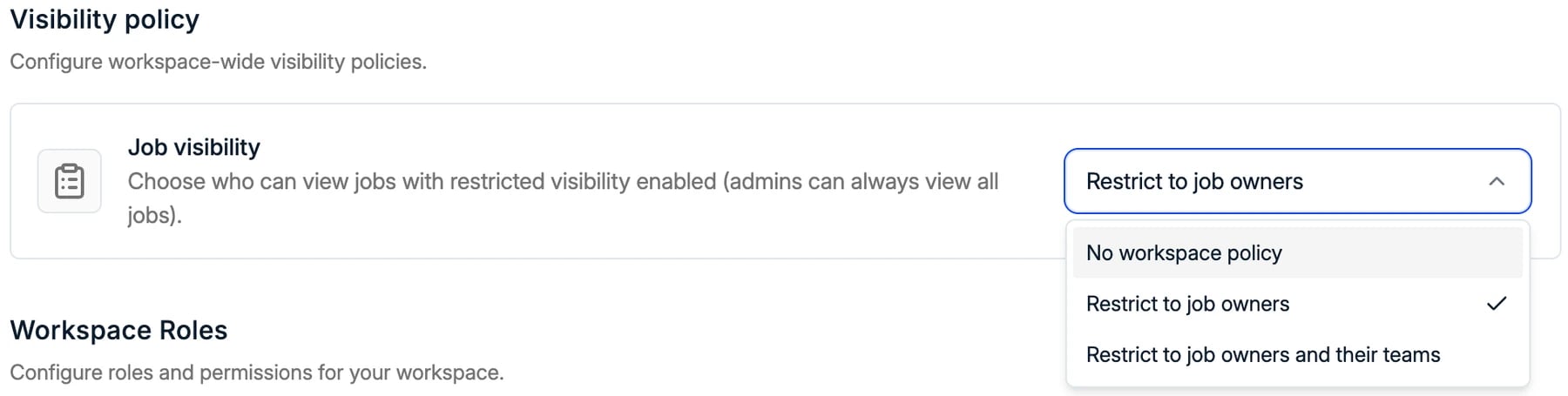
Restrict a job
When you create a job, tick Restrict visibility. Only the users the visibility policy allows can then see it.
Restricting a job is its own permission, Restrict job access, switched on per role
in Settings → Security. Users without it can work on jobs but cannot change their
visibility. See managing access.
What other users see
A restricted job is hidden along with everything that belongs to it. For a user outside the job:- The job does not appear in the jobs list, search or views. Opening it from a shared link shows an error page.
- Its applications and pipeline are hidden, because an application belongs to its job.
- Candidates stay visible. A candidate is a record in their own right, so the profile is still there. Only the application on the restricted job is hidden.
- Applications on other jobs stay visible. If the same candidate is also on a job the user can see, that application shows as normal.
- The Active applications column on candidates counts only applications on jobs the user can see.
- Placements on a restricted job are hidden. The user sees only placements on jobs they can access.
When to use it
- Confidential searches, where a client has asked that the role is not widely known.
- Internal recruitment, when you hire for your own team and the rest of the workspace should not see the applicants.
Related
Managing Access
Roles, permissions, and who can restrict a job.
Managing Teams
The teams a job owner belongs to.
Adding and Managing Jobs
Create a job and restrict it from the start.
Placements
What happens to placements on a restricted job.