Configure your organization name, public URLs, and the branding of your public-facing pages.
Settings → General holds the workspace-wide settings that shape how Spott looks to
your team and to candidates. These settings apply to everyone in your organization.
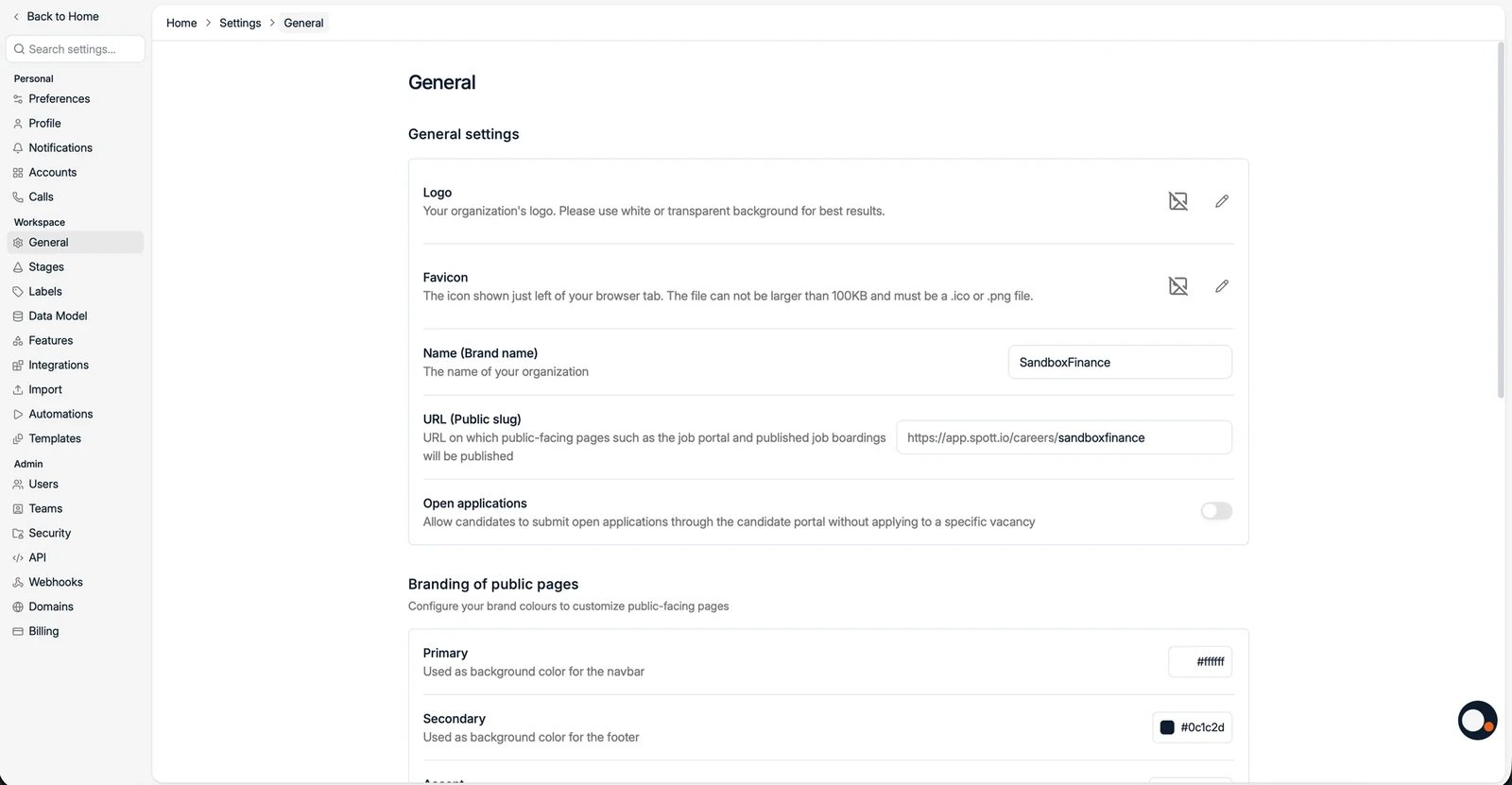
Logo for your workspace. Use a white or transparent background.
Favicon, the small icon in the browser tab. It has to be an .ico or .png file,
and stay under 100KB.
Name (Brand name), your organization’s name.
URL (Public slug), the slug used for public-facing pages such as the job portal
and published job adverts, for example app.spott.io/careers/yourslug.
Open applications, allow candidates to submit open applications through the
candidate portal without applying to a specific vacancy.
Maximum company hierarchy depth, how many levels a
company hierarchy may go down, chosen from a list
starting at two. Groups that are already deeper than the value you pick are kept, and
can only be shrunk until they are back within it.
Hide closed jobs in autocomplete, keep closed jobs out of search suggestions and
job pickers across the workspace.
Default job description language, the language used for a new job description when
no language is chosen on the job itself.
Speculative Presentations, “Allow users to create speculative presentations”, is on by
default. Switch it off if your team never presents candidates without a vacancy, and the
feature disappears from the interface rather than sitting there unused:
the Speculative Presentations tab under Jobs, and the Speculative tab on
candidates, contacts, and companies
Add Speculative Presentation on records, the Create Speculative Presentation bulk
action, and the switch in the present dialog
Speculative Presentation Stages under Settings → Stages
the speculative campaign type, and the two speculative triggers when you create an
automation
Nothing is deleted. Automations that already use a speculative trigger keep working, and
existing presentations come back when you switch it on again. Changing it needs the
permission to manage the workspace. See
presenting candidates.
Set the Primary color (navbar background), Secondary color (footer
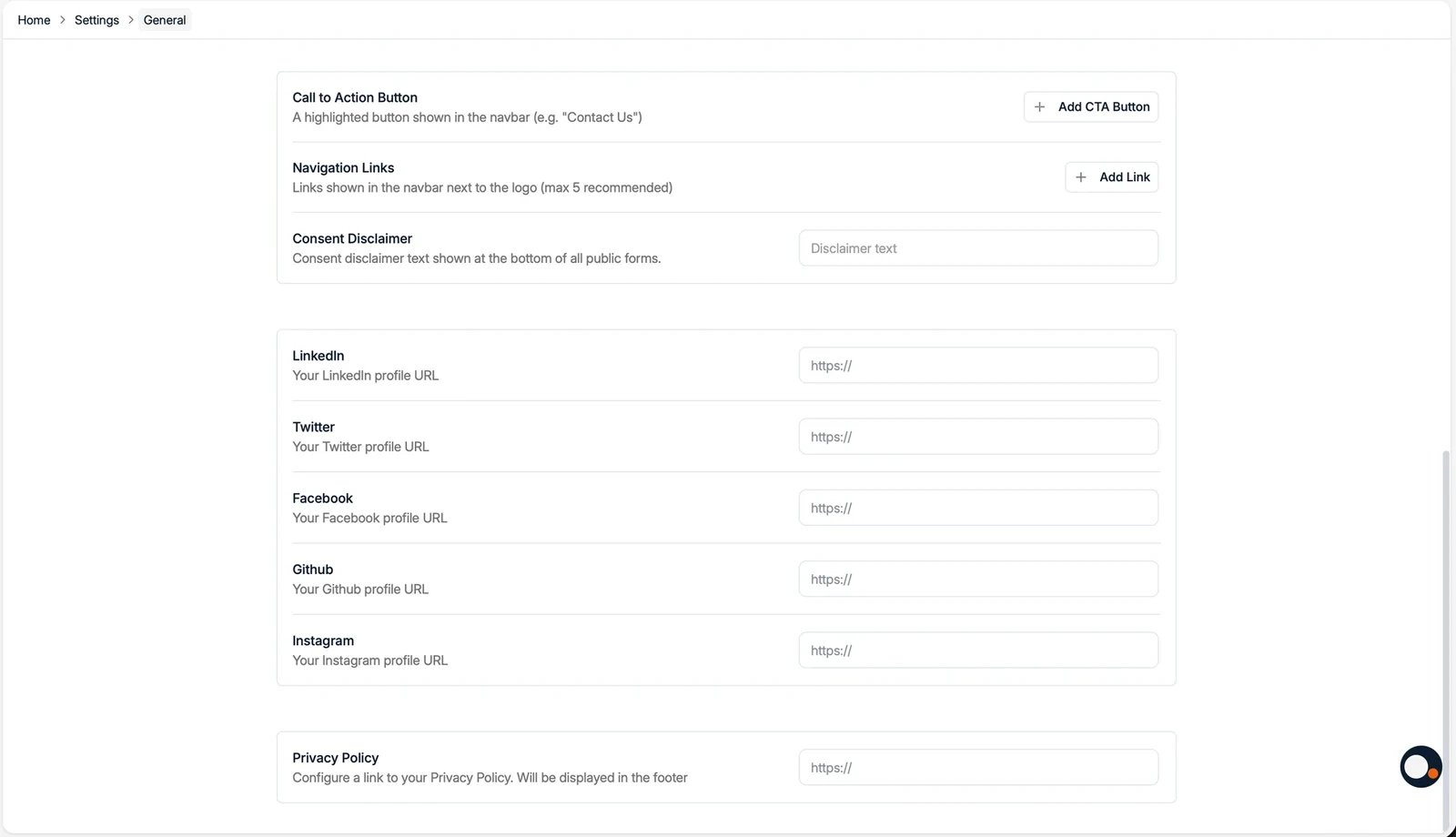
background), and Accent color (the buttons) to match your brand on public pages.You can also add:
A Call to Action Button and Navigation Links shown in the public navbar.
A Consent Disclaimer shown at the bottom of all public forms.
Social links (LinkedIn, Twitter, Facebook, GitHub, Instagram) shown in the footer.
A Privacy Policy link, also shown in the footer.
The consent disclaimer becomes a required checkbox at the bottom of every public form,
directly above the submit button:
Email editor colors is a separate palette for the emails you design in Spott. Click
Add color, enter a hex code, and it appears as a swatch in the email editor’s color
picker, so nobody has to remember or paste your brand’s exact shade of red.The palette applies to two editors only: the Marketing email
builder and the Company Portal invite email. It does not change
the Primary, Secondary, or Accent colors of your public pages, and those do not feed into it.
Every Company Portal is configured per job, which means
someone has to decide the same set of toggles again for every new role. Company
Portal Defaults is where an admin decides those answers once, and every portal
created afterwards starts from them.
The defaults cover the same ground as the per-job controls:
Candidate visibility: whether new portals show all candidates in real time,
and whether they show candidate stages.
Portal display: whether scorecards and the salary range are shown. The
rejection and application label toggles are not here: they start off on every new
portal and are switched on per job.
Candidate attributes: one default per attribute, in the same list you see on a
job, so a workspace that never shares date of birth can turn it off once instead of
remembering every time.
The hiring team and the allowed actions given to a client.
You can also set files to be attached by default, which is what makes this worth
doing for most agencies: your Terms of Business goes onto every new portal without
anyone attaching it.Only admins can set these, and a default is a starting point rather than a lock: each
job’s portal can still be adjusted individually afterwards.
If you change a default that controls what a client can see, open a portal you have
already shared and check its toggles on the job itself, rather than assuming the change
did or did not reach it. Candidate data already shared with a client is not worth
guessing about.
Was this page helpful?
{"docsConfig":{"theme":"mint","$schema":"https://mintlify.com/docs.json","name":"Spott","description":"Documentation for Spott — the AI-native recruitment platform.","colors":{"primary":"#f0610f","light":"#f0610f","dark":"#f0610f"},"logo":{"light":"https://mintcdn.com/spott-docs/Zvbuq2vKGY56oD57/logo/light.svg?fit=max\u0026auto=format\u0026n=Zvbuq2vKGY56oD57\u0026q=85\u0026s=914d6f30a1192b291746dbcd2fc7e0fa","dark":"https://mintcdn.com/spott-docs/Zvbuq2vKGY56oD57/logo/dark.svg?fit=max\u0026auto=format\u0026n=Zvbuq2vKGY56oD57\u0026q=85\u0026s=e88bff4f96607e119e55398351566d54"},"favicon":"https://mintcdn.com/spott-docs/DowUiFW036iA_b71/favicon.png?fit=max\u0026auto=format\u0026n=DowUiFW036iA_b71\u0026q=85\u0026s=4729be45c4d1269ed0fafc43f45bc501","appearance":{"default":"light"},"navbar":{"links":[{"href":"https://spott.io","label":"Website"}],"primary":{"type":"button","label":"Go to app","href":"https://app.spott.io"}},"footer":{"socials":{"linkedin":"https://www.linkedin.com/company/spottai","website":"https://spott.io"}},"integrations":{"ga4":{"measurementId":"G-5GMF3213NR"}},"styling":{"latex":false},"navigation":{"global":{"anchors":[{"anchor":"Go to app","icon":"arrow-up-right-from-square","href":"https://app.spott.io"},{"anchor":"Support","icon":"life-ring","href":"/docs/get-started/faq"}]},"languages":[{"language":"en","default":true,"href":""},{"language":"fr","href":"fr"},{"language":"nl","href":"nl"},{"language":"de","href":"de"},{"language":"es","href":"es"}]}},"deployment":{"deploymentMetadataValue":{"subdomain":"spott-docs","hasAudioNarration":false,"actualSubdomain":"spott-docs","customDomains":["docs.spott.io"],"gitSource":{"type":"github","owner":"spott-hr","repo":"spott-docs-external","deployBranch":"main","contentDirectory":"","isPrivate":true,"mountPath":"","label":""},"chroma":{"collectionId":"f0073665-2f52-4bb5-aaa0-43ce286699bb","liveDeploymentHistoryId":"6adf7247b1764000030afb98","schemaVersion":"v3","latestBuiltDeploymentHistoryId":"6adf7247b1764000030afb98"},"feedback":{"thumbs":true},"entitlements":{},"buildId":"6adf7247b1764000030afb98","clientVersion":"0.0.3971","searchFilterCounts":[{"language":"en","tag":"API","count":215},{"language":"en","tag":"Private API","count":211},{"language":"de","tag":"Anleitungen","count":90},{"language":"en","tag":"Guides","count":90},{"language":"es","tag":"Guías","count":90},{"language":"fr","tag":"Guides","count":90},{"language":"nl","tag":"Gidsen","count":90},{"language":"en","tag":"Webhooks","count":55},{"language":"en","tag":"Webhook events","count":54},{"language":"en","tag":"Candidates","count":46},{"language":"de","tag":"Integrationen","count":36},{"language":"en","tag":"Integrations","count":36},{"language":"es","tag":"Integraciones","count":36},{"language":"fr","tag":"Intégrations","count":36},{"language":"nl","tag":"Integraties","count":36},{"language":"de","tag":"Einstellungen und Verwaltung","count":26},{"language":"en","tag":"Settings \u0026 Admin","count":26},{"language":"es","tag":"Configuración y administración","count":26},{"language":"fr","tag":"Paramètres et administration","count":26},{"language":"nl","tag":"Instellingen en beheer","count":26},{"language":"en","tag":"Jobs","count":24},{"language":"en","tag":"Custom Attributes","count":22},{"language":"de","tag":"Einstieg","count":16},{"language":"es","tag":"Primeros pasos","count":16},{"language":"fr","tag":"Prise en main","count":16},{"language":"nl","tag":"Onboarding","count":16},{"language":"de","tag":"Stellen","count":12},{"language":"es","tag":"Vacantes","count":12},{"language":"fr","tag":"Postes","count":12},{"language":"nl","tag":"Vacatures","count":12},{"language":"de","tag":"Kandidaten","count":11},{"language":"de","tag":"Unternehmen, Kontakte und Opportunities","count":11},{"language":"de","tag":"Erste Schritte","count":11},{"language":"de","tag":"Telefonie und Messaging","count":11},{"language":"es","tag":"Candidatos","count":11},{"language":"es","tag":"Empresas, contactos y oportunidades","count":11},{"language":"es","tag":"Introducción","count":11},{"language":"es","tag":"Telefonía y mensajería","count":11},{"language":"fr","tag":"Candidats","count":11},{"language":"fr","tag":"Entreprises, contacts et opportunités","count":11},{"language":"fr","tag":"Démarrer","count":11},{"language":"fr","tag":"Téléphonie et messagerie","count":11},{"language":"nl","tag":"Kandidaten","count":11},{"language":"nl","tag":"Bedrijven, contacten en opportuniteiten","count":11},{"language":"nl","tag":"Aan de slag","count":11},{"language":"nl","tag":"Telefonie en berichten","count":11},{"language":"de","tag":"Kommunikation","count":10},{"language":"es","tag":"Comunicación","count":10},{"language":"fr","tag":"Communication","count":10},{"language":"nl","tag":"Communicatie","count":10}]},"assistantConfig":{"enableAskAiButton":false,"enableStarterQuestions":false,"enableContextualStarterQuestions":false,"enableAskAiSearchBar":true},"basePath":"","hasChatPermissions":false,"hasWebMcpPermissions":false,"toggles":[{"name":"kill-isr","enabled":true,"variant":{"name":"disabled","enabled":false,"feature_enabled":true},"impressionData":false},{"name":"agent-mintlify-slack","enabled":true,"variant":{"name":"disabled","enabled":false,"feature_enabled":true},"impressionData":false},{"name":"editor-v7-file-tree","enabled":true,"variant":{"name":"disabled","enabled":false,"feature_enabled":true},"impressionData":false},{"name":"agent-integrations-settings","enabled":true,"variant":{"name":"disabled","enabled":false,"feature_enabled":true},"impressionData":false},{"name":"automations-pr-grouping","enabled":true,"variant":{"name":"disabled","enabled":false,"feature_enabled":true},"impressionData":false},{"name":"custom-prefix","enabled":true,"variant":{"name":"disabled","enabled":false,"feature_enabled":true},"impressionData":false},{"name":"analytics-v7","enabled":true,"variant":{"name":"disabled","enabled":false,"feature_enabled":true},"impressionData":false},{"name":"user-flows-analytics","enabled":true,"variant":{"name":"disabled","enabled":false,"feature_enabled":true},"impressionData":false},{"name":"no-publish-flow","enabled":true,"variant":{"name":"disabled","enabled":false,"feature_enabled":true},"impressionData":false},{"name":"workos-onboarding","enabled":true,"variant":{"name":"disabled","enabled":false,"feature_enabled":true},"impressionData":false},{"name":"llms-txt-v2","enabled":true,"variant":{"name":"disabled","enabled":false,"feature_enabled":true},"impressionData":false},{"name":"pause-universal-search-reconcile","enabled":true,"variant":{"name":"disabled","enabled":false,"feature_enabled":true},"impressionData":false},{"name":"snapshot-serving-live","enabled":true,"variant":{"name":"disabled","enabled":false,"feature_enabled":true},"impressionData":false},{"name":"stripTemperatureMiddleware","enabled":true,"variant":{"name":"disabled","enabled":false,"feature_enabled":true},"impressionData":false},{"name":"per-site-search-delta","enabled":true,"variant":{"name":"disabled","enabled":false,"feature_enabled":true},"impressionData":false},{"name":"support-platform-pylon-zendesk","enabled":true,"variant":{"name":"disabled","enabled":false,"feature_enabled":true},"impressionData":false},{"name":"snapshot-serving","enabled":true,"variant":{"name":"disabled","enabled":false,"feature_enabled":true},"impressionData":false},{"name":"instant-rollback","enabled":true,"variant":{"name":"disabled","enabled":false,"feature_enabled":true},"impressionData":false},{"name":"granular-notifications-server","enabled":true,"variant":{"name":"disabled","enabled":false,"feature_enabled":true},"impressionData":false},{"name":"granular-notifications","enabled":true,"variant":{"name":"disabled","enabled":false,"feature_enabled":true},"impressionData":false},{"name":"editor-private-page-search","enabled":true,"variant":{"name":"disabled","enabled":false,"feature_enabled":true},"impressionData":false},{"name":"automations-fable","enabled":true,"variant":{"name":"disabled","enabled":false,"feature_enabled":true},"impressionData":false},{"name":"fixed-ai-action-pricing","enabled":true,"variant":{"name":"disabled","enabled":false,"feature_enabled":true},"impressionData":false},{"name":"automation-resolve-merge-conflict","enabled":true,"variant":{"name":"disabled","enabled":false,"feature_enabled":true},"impressionData":false},{"name":"scoped-publishing","enabled":true,"variant":{"name":"disabled","enabled":false,"feature_enabled":true},"impressionData":false},{"name":"mintql","enabled":true,"variant":{"name":"disabled","enabled":false,"feature_enabled":true},"impressionData":false},{"name":"page-level-analytics","enabled":true,"variant":{"name":"disabled","enabled":false,"feature_enabled":true},"impressionData":false},{"name":"editor-version-history-v2","enabled":true,"variant":{"name":"disabled","enabled":false,"feature_enabled":true},"impressionData":false},{"name":"editor-nav-generations","enabled":true,"variant":{"name":"disabled","enabled":false,"feature_enabled":true},"impressionData":false},{"name":"billing-page-v2","enabled":true,"variant":{"name":"disabled","enabled":false,"feature_enabled":true},"impressionData":false},{"name":"workspace-projects","enabled":true,"variant":{"name":"disabled","enabled":false,"feature_enabled":true},"impressionData":false},{"name":"assistant-v5","enabled":true,"variant":{"name":"disabled","enabled":false,"feature_enabled":true},"impressionData":false},{"name":"byok-sep-25","enabled":true,"variant":{"name":"disabled","enabled":false,"feature_enabled":true},"impressionData":false},{"name":"fork-pr-previews","enabled":true,"variant":{"name":"disabled","enabled":false,"feature_enabled":true},"impressionData":false},{"name":"revalidation-jwt","enabled":true,"variant":{"name":"disabled","enabled":false,"feature_enabled":true},"impressionData":false},{"name":"vite-origin","enabled":true,"variant":{"name":"disabled","enabled":false,"feature_enabled":true},"impressionData":false},{"name":"editor-agent-model-picker","enabled":true,"variant":{"name":"disabled","enabled":false,"feature_enabled":true},"impressionData":false},{"name":"billing-updated-9-15","enabled":true,"variant":{"name":"disabled","enabled":false,"feature_enabled":true},"impressionData":false},{"name":"workos-sso-scim","enabled":true,"variant":{"name":"disabled","enabled":false,"feature_enabled":true},"impressionData":false},{"name":"hobby-abuse-scan","enabled":true,"variant":{"name":"disabled","enabled":false,"feature_enabled":true},"impressionData":false},{"name":"dashboard-inbox","enabled":true,"variant":{"name":"disabled","enabled":false,"feature_enabled":true},"impressionData":false},{"name":"workos-signup","enabled":true,"variant":{"name":"disabled","enabled":false,"feature_enabled":true},"impressionData":false},{"name":"workos-enabled","enabled":true,"variant":{"name":"disabled","enabled":false,"feature_enabled":true},"impressionData":false}],"isAtlas":false,"googleFontsInlined":false},"customCss":[{"filePath":"style.css","content":"@media (min-width:1024px){#sidebar{top:112px!important;height:calc(100dvh - 112px)!important}}.your-turn{margin:2rem 0;padding:1.25rem 1.5rem;border:1px solid rgb(240 97 15/.25);border-left:3px solid #f0610f;border-radius:.75rem;background:rgb(240 97 15/.04)}.dark .your-turn{border-color:rgb(240 97 15/.3);border-left-color:#f0610f;background:rgb(240 97 15/.07)}.your-turn h2{margin-top:0;margin-bottom:.75rem;font-size:.8125rem;font-weight:600;letter-spacing:.06em;text-transform:uppercase;color:#f0610f}.your-turn>:last-child{margin-bottom:0}.your-turn ul.contains-task-list{margin:0;padding-left:0;list-style:none}.your-turn ul.contains-task-list li.task-list-item{position:relative;margin:0;padding:.25rem 0 .25rem 1.75rem;list-style:none}.your-turn ul.contains-task-list li.task-list-item::before,.your-turn ul.contains-task-list li.task-list-item::marker{content:none;display:none}.your-turn li.task-list-item input[type=checkbox]{position:absolute;left:0;top:.45rem;width:1rem;height:1rem;margin:0;accent-color:#f0610f}.your-turn[data-interactive=true] li.task-list-item,.your-turn[data-interactive=true] li.task-list-item input[type=checkbox]{cursor:pointer}.your-turn[data-interactive=true] li.task-list-item:hover{color:#f0610f}.your-turn li.task-list-item.is-done{opacity:.55;text-decoration:line-through;text-decoration-color:rgb(240 97 15/.5)}.in-this-section{margin:0 0 2rem;padding:1rem 1.25rem;border:1px solid rgb(15 23 42/.08);border-radius:.75rem;background:rgb(15 23 42/.025);font-size:.9375rem;line-height:1.65}.dark .in-this-section{border-color:rgb(255 255 255/.1);background:rgb(255 255 255/.03)}.in-this-section>:first-child{margin-top:0}.in-this-section>:last-child{margin-bottom:0}.in-this-section .section-links{margin-top:.875rem;padding-top:.875rem;border-top:1px solid rgb(15 23 42/.08)}.dark .in-this-section .section-links{border-top-color:rgb(255 255 255/.1)}.in-this-section .section-links ol{margin:0;padding-left:1.25rem}.in-this-section .section-links li{margin:.25rem 0}.nav-hint{margin:0 0 2rem;font-size:.875rem;line-height:1.6;color:rgb(15 23 42/.6)}.dark .nav-hint{color:rgb(255 255 255/.55)}.nav-hint strong{font-weight:600;color:inherit}.nav-hint>:first-child{margin-top:0}.nav-hint>:last-child{margin-bottom:0}.dark img[src*=\"/brands/chatgpt\"],.dark img[src*=\"/integrations/logos/daidalo\"],.dark img[src*=\"/integrations/logos/juicebox\"],.dark img[src*=\"/integrations/logos/pin.\"]{background:#fff;border-radius:3px;padding:1px;box-sizing:border-box}.mdx-content img[src^=\"/images/\"]{border-radius:12px}.shots{display:flex;flex-wrap:wrap;align-items:flex-start;gap:.75rem;margin:1rem 0 1.5rem}.shots>p,.shots>span{margin:0}.mdx-content .shots img{width:220px;max-width:100%;height:auto;margin:0;border:1px solid rgb(15 23 42/.1);border-radius:8px;box-shadow:0 1px 2px rgb(15 23 42/.06);cursor:zoom-in;transition:box-shadow .15s ease,border-color .15s ease}.mdx-content .shots img:hover{border-color:rgb(240 97 15/.5);box-shadow:0 4px 12px rgb(15 23 42/.12)}.dark .mdx-content .shots img{border-color:rgb(255 255 255/.12)}"}],"page":{"pagePath":"docs/settings/general","slug":"/docs/settings/general","pageMetadata":{"title":"Workspace \u0026 Branding","icon":"building","description":"Configure your organization name, public URLs, and the branding of your public-facing pages.","href":"/docs/settings/general"},"description":{"compiledSource":"\"use strict\";\nconst {jsx: _jsx} = arguments[0];\nconst {useMDXComponents: _provideComponents} = arguments[0];\nfunction _createMdxContent(props) {\n const _components = {\n p: \"p\",\n ..._provideComponents(),\n ...props.components\n };\n return _jsx(_components.p, {\n children: \"Configure your organization name, public URLs, and the branding of your public-facing pages.\"\n });\n}\nfunction MDXContent(props = {}) {\n const {wrapper: MDXLayout} = {\n ..._provideComponents(),\n ...props.components\n };\n return MDXLayout ? _jsx(MDXLayout, {\n ...props,\n children: _jsx(_createMdxContent, {\n ...props\n })\n }) : _createMdxContent(props);\n}\nreturn {\n default: MDXContent\n};\n","frontmatter":{},"scope":{}},"pageType":"default","mdx":{"mdxSource":{"compiledSource":"\"use strict\";const{Fragment:_Fragment,jsx:_jsx,jsxs:_jsxs}=arguments[0];const{useMDXComponents:_provideComponents}=arguments[0];function _createMdxContent(props){const _components={a:`a`,code:`code`,li:`li`,p:`p`,strong:`strong`,ul:`ul`,..._provideComponents(),...props.components},{Frame,Heading,OptimizedImage,Warning}=_components;if(!Frame)_missingMdxReference(`Frame`,true);if(!Heading)_missingMdxReference(`Heading`,true);if(!OptimizedImage)_missingMdxReference(`OptimizedImage`,true);if(!Warning)_missingMdxReference(`Warning`,true);return _jsxs(_Fragment,{children:[_jsxs(_components.p,{children:[_jsx(_components.strong,{children:`Settings → General`}),` holds the workspace-wide settings that shape how Spott looks to\nyour team and to candidates. These settings apply to everyone in your organization.`]}),`\n`,_jsx(Heading,{level:`2`,id:`general-settings`,children:`General settings`}),`\n`,_jsxs(_components.ul,{children:[`\n`,_jsxs(_components.li,{children:[_jsx(_components.strong,{children:`Logo`}),` for your workspace. Use a white or transparent background.`]}),`\n`,_jsxs(_components.li,{children:[_jsx(_components.strong,{children:`Favicon`}),`, the small icon in the browser tab. It has to be an `,_jsx(_components.strong,{children:`.ico or .png`}),` file,\nand stay under 100KB.`]}),`\n`,_jsxs(_components.li,{children:[_jsx(_components.strong,{children:`Name (Brand name)`}),`, your organization’s name.`]}),`\n`,_jsxs(_components.li,{children:[_jsx(_components.strong,{children:`URL (Public slug)`}),`, the slug used for public-facing pages such as the job portal\nand published job adverts, for example `,_jsx(_components.code,{children:`app.spott.io/careers/yourslug`}),`.`]}),`\n`,_jsxs(_components.li,{children:[_jsx(_components.strong,{children:`Open applications`}),`, allow candidates to submit open applications through the\ncandidate portal without applying to a specific vacancy.`]}),`\n`,_jsxs(_components.li,{children:[_jsx(_components.strong,{children:`Maximum company hierarchy depth`}),`, how many levels a\n`,_jsx(_components.a,{href:`/docs/companies/company-hierarchy`,children:`company hierarchy`}),` may go down, chosen from a list\nstarting at two. Groups that are already deeper than the value you pick are kept, and\ncan only be shrunk until they are back within it.`]}),`\n`,_jsxs(_components.li,{children:[_jsx(_components.strong,{children:`Hide closed jobs in autocomplete`}),`, keep closed jobs out of search suggestions and\njob pickers across the workspace.`]}),`\n`,_jsxs(_components.li,{children:[_jsx(_components.strong,{children:`Default job description language`}),`, the language used for a new job description when\nno language is chosen on the job itself.`]}),`\n`]}),`\n`,_jsx(Frame,{children:_jsx(OptimizedImage,{src:`https://mintcdn.com/spott-docs/lDU_xVu3wPZWcJCf/images/settings/general.webp?fit=max\u0026auto=format\u0026n=lDU_xVu3wPZWcJCf\u0026q=85\u0026s=766afae43ebbd70d45af084a9d0f0850`,alt:`General settings with brand name, public slug, and open applications`,\"data-og-width\":`1600`,width:`1600`,\"data-og-height\":`831`,height:`831`,\"data-path\":`images/settings/general.webp`,\"data-optimize\":`true`,\"data-opv\":`3`,srcset:`https://mintcdn.com/spott-docs/lDU_xVu3wPZWcJCf/images/settings/general.webp?w=280\u0026fit=max\u0026auto=format\u0026n=lDU_xVu3wPZWcJCf\u0026q=85\u0026s=4151282ba31efa80b25d376ae38ec1bc 280w, https://mintcdn.com/spott-docs/lDU_xVu3wPZWcJCf/images/settings/general.webp?w=560\u0026fit=max\u0026auto=format\u0026n=lDU_xVu3wPZWcJCf\u0026q=85\u0026s=fc08cf0337590fa10bfe8fff00abd8be 560w, https://mintcdn.com/spott-docs/lDU_xVu3wPZWcJCf/images/settings/general.webp?w=840\u0026fit=max\u0026auto=format\u0026n=lDU_xVu3wPZWcJCf\u0026q=85\u0026s=a5a23c42a0d5bd8981a70715eb66ad4d 840w, https://mintcdn.com/spott-docs/lDU_xVu3wPZWcJCf/images/settings/general.webp?w=1100\u0026fit=max\u0026auto=format\u0026n=lDU_xVu3wPZWcJCf\u0026q=85\u0026s=61069a6296f8b4195a59271d979a242b 1100w, https://mintcdn.com/spott-docs/lDU_xVu3wPZWcJCf/images/settings/general.webp?w=1650\u0026fit=max\u0026auto=format\u0026n=lDU_xVu3wPZWcJCf\u0026q=85\u0026s=8a4797949996280cfc0fabd1f1d1c661 1650w, https://mintcdn.com/spott-docs/lDU_xVu3wPZWcJCf/images/settings/general.webp?w=2500\u0026fit=max\u0026auto=format\u0026n=lDU_xVu3wPZWcJCf\u0026q=85\u0026s=e0e51b1c7b23744f728ab8033f967a39 2500w`})}),`\n`,_jsx(Heading,{level:`3`,id:`speculative-presentations`,children:`Speculative Presentations`}),`\n`,_jsxs(_components.p,{children:[_jsx(_components.strong,{children:`Speculative Presentations`}),`, “Allow users to create speculative presentations”, is on by\ndefault. Switch it off if your team never presents candidates without a vacancy, and the\nfeature disappears from the interface rather than sitting there unused:`]}),`\n`,_jsxs(_components.ul,{children:[`\n`,_jsxs(_components.li,{children:[`the `,_jsx(_components.strong,{children:`Speculative Presentations`}),` tab under Jobs, and the `,_jsx(_components.strong,{children:`Speculative`}),` tab on\ncandidates, contacts, and companies`]}),`\n`,_jsxs(_components.li,{children:[_jsx(_components.strong,{children:`Add Speculative Presentation`}),` on records, the `,_jsx(_components.strong,{children:`Create Speculative Presentation`}),` bulk\naction, and the switch in the present dialog`]}),`\n`,_jsxs(_components.li,{children:[_jsx(_components.strong,{children:`Speculative Presentation Stages`}),` under `,_jsx(_components.strong,{children:`Settings → Stages`})]}),`\n`,_jsx(_components.li,{children:`the speculative campaign type, and the two speculative triggers when you create an\nautomation`}),`\n`]}),`\n`,_jsxs(_components.p,{children:[`Nothing is deleted. Automations that already use a speculative trigger keep working, and\nexisting presentations come back when you switch it on again. Changing it needs the\npermission to manage the workspace. See\n`,_jsx(_components.a,{href:`/docs/candidates/presenting-candidates`,children:`presenting candidates`}),`.`]}),`\n`,_jsx(Heading,{level:`2`,id:`branding-of-public-pages`,children:`Branding of public pages`}),`\n`,_jsxs(_components.p,{children:[`Set the `,_jsx(_components.strong,{children:`Primary`}),` color (navbar background), `,_jsx(_components.strong,{children:`Secondary`}),` color (footer\nbackground), and `,_jsx(_components.strong,{children:`Accent`}),` color (the buttons) to match your brand on public pages.`]}),`\n`,_jsx(_components.p,{children:`You can also add:`}),`\n`,_jsxs(_components.ul,{children:[`\n`,_jsxs(_components.li,{children:[`A `,_jsx(_components.strong,{children:`Call to Action Button`}),` and `,_jsx(_components.strong,{children:`Navigation Links`}),` shown in the public navbar.`]}),`\n`,_jsxs(_components.li,{children:[`A `,_jsx(_components.strong,{children:`Consent Disclaimer`}),` shown at the bottom of all public forms.`]}),`\n`,_jsxs(_components.li,{children:[_jsx(_components.strong,{children:`Social links`}),` (LinkedIn, Twitter, Facebook, GitHub, Instagram) shown in the footer.`]}),`\n`,_jsxs(_components.li,{children:[`A `,_jsx(_components.strong,{children:`Privacy Policy`}),` link, also shown in the footer.`]}),`\n`]}),`\n`,_jsx(_components.p,{children:`The consent disclaimer becomes a required checkbox at the bottom of every public form,\ndirectly above the submit button:`}),`\n`,_jsx(Frame,{children:_jsx(OptimizedImage,{src:`https://mintcdn.com/spott-docs/Aiq95478rJE1i5AL/images/settings/branding-consent-disclaimer.webp?fit=max\u0026auto=format\u0026n=Aiq95478rJE1i5AL\u0026q=85\u0026s=da39d156c030cfc19a99a01fb9274223`,alt:`The consent checkbox at the bottom of a public application form`,\"data-og-width\":`1612`,width:`1612`,\"data-og-height\":`352`,height:`352`,\"data-path\":`images/settings/branding-consent-disclaimer.webp`,\"data-optimize\":`true`,\"data-opv\":`3`,srcset:`https://mintcdn.com/spott-docs/Aiq95478rJE1i5AL/images/settings/branding-consent-disclaimer.webp?w=280\u0026fit=max\u0026auto=format\u0026n=Aiq95478rJE1i5AL\u0026q=85\u0026s=53ba823164a1482fbfb4f3b03e66d219 280w, https://mintcdn.com/spott-docs/Aiq95478rJE1i5AL/images/settings/branding-consent-disclaimer.webp?w=560\u0026fit=max\u0026auto=format\u0026n=Aiq95478rJE1i5AL\u0026q=85\u0026s=e7bca18ec372939290602bd7a259694c 560w, https://mintcdn.com/spott-docs/Aiq95478rJE1i5AL/images/settings/branding-consent-disclaimer.webp?w=840\u0026fit=max\u0026auto=format\u0026n=Aiq95478rJE1i5AL\u0026q=85\u0026s=984d356d3f9605f734d916fc68710191 840w, https://mintcdn.com/spott-docs/Aiq95478rJE1i5AL/images/settings/branding-consent-disclaimer.webp?w=1100\u0026fit=max\u0026auto=format\u0026n=Aiq95478rJE1i5AL\u0026q=85\u0026s=1585d9a7ad8d3992949577a3f2ef48db 1100w, https://mintcdn.com/spott-docs/Aiq95478rJE1i5AL/images/settings/branding-consent-disclaimer.webp?w=1650\u0026fit=max\u0026auto=format\u0026n=Aiq95478rJE1i5AL\u0026q=85\u0026s=b2fb1bec41f423798b4677693eddee5e 1650w, https://mintcdn.com/spott-docs/Aiq95478rJE1i5AL/images/settings/branding-consent-disclaimer.webp?w=2500\u0026fit=max\u0026auto=format\u0026n=Aiq95478rJE1i5AL\u0026q=85\u0026s=5c50071708e95a92437c234c01d62475 2500w`})}),`\n`,_jsx(Frame,{children:_jsx(OptimizedImage,{src:`https://mintcdn.com/spott-docs/lDU_xVu3wPZWcJCf/images/settings/general-public.webp?fit=max\u0026auto=format\u0026n=lDU_xVu3wPZWcJCf\u0026q=85\u0026s=bd72f3b8e6a8f99a53849428f1478f5c`,alt:`Public page navigation, consent disclaimer, and social links`,\"data-og-width\":`1600`,width:`1600`,\"data-og-height\":`920`,height:`920`,\"data-path\":`images/settings/general-public.webp`,\"data-optimize\":`true`,\"data-opv\":`3`,srcset:`https://mintcdn.com/spott-docs/lDU_xVu3wPZWcJCf/images/settings/general-public.webp?w=280\u0026fit=max\u0026auto=format\u0026n=lDU_xVu3wPZWcJCf\u0026q=85\u0026s=a44cbf2771b73e70d0d07c14c32212b6 280w, https://mintcdn.com/spott-docs/lDU_xVu3wPZWcJCf/images/settings/general-public.webp?w=560\u0026fit=max\u0026auto=format\u0026n=lDU_xVu3wPZWcJCf\u0026q=85\u0026s=866b86948bbd2e18dacc91823bf87d19 560w, https://mintcdn.com/spott-docs/lDU_xVu3wPZWcJCf/images/settings/general-public.webp?w=840\u0026fit=max\u0026auto=format\u0026n=lDU_xVu3wPZWcJCf\u0026q=85\u0026s=0ad21b59b13e3817a28cd98058e1e04f 840w, https://mintcdn.com/spott-docs/lDU_xVu3wPZWcJCf/images/settings/general-public.webp?w=1100\u0026fit=max\u0026auto=format\u0026n=lDU_xVu3wPZWcJCf\u0026q=85\u0026s=d61a3c9c64d3212dfec029675894aa6d 1100w, https://mintcdn.com/spott-docs/lDU_xVu3wPZWcJCf/images/settings/general-public.webp?w=1650\u0026fit=max\u0026auto=format\u0026n=lDU_xVu3wPZWcJCf\u0026q=85\u0026s=d35d26e2e25c53d44eb15526cd1ec190 1650w, https://mintcdn.com/spott-docs/lDU_xVu3wPZWcJCf/images/settings/general-public.webp?w=2500\u0026fit=max\u0026auto=format\u0026n=lDU_xVu3wPZWcJCf\u0026q=85\u0026s=78aae82b8e8ede78f3f7fba77bb40186 2500w`})}),`\n`,_jsx(Heading,{level:`3`,id:`email-editor-colors`,children:`Email editor colors`}),`\n`,_jsxs(_components.p,{children:[_jsx(_components.strong,{children:`Email editor colors`}),` is a separate palette for the emails you design in Spott. Click\n`,_jsx(_components.strong,{children:`Add color`}),`, enter a hex code, and it appears as a swatch in the email editor’s color\npicker, so nobody has to remember or paste your brand’s exact shade of red.`]}),`\n`,_jsxs(_components.p,{children:[`The palette applies to two editors only: the `,_jsx(_components.a,{href:`/docs/outreach/marketing`,children:`Marketing`}),` email\nbuilder and the `,_jsx(_components.a,{href:`/docs/jobs/company-portal`,children:`Company Portal`}),` invite email. It does not change\nthe Primary, Secondary, or Accent colors of your public pages, and those do not feed into it.`]}),`\n`,_jsx(Heading,{level:`2`,id:`company-portal-defaults`,children:`Company Portal defaults`}),`\n`,_jsxs(_components.p,{children:[`Every `,_jsx(_components.a,{href:`/docs/jobs/company-portal`,children:`Company Portal`}),` is configured per job, which means\nsomeone has to decide the same set of toggles again for every new role. `,_jsx(_components.strong,{children:`Company\nPortal Defaults`}),` is where an admin decides those answers once, and every portal\ncreated afterwards starts from them.`]}),`\n`,_jsx(Frame,{children:_jsx(OptimizedImage,{src:`https://mintcdn.com/spott-docs/Qq1IDKQJfIP8jghu/images/settings/company-portal-defaults.webp?fit=max\u0026auto=format\u0026n=Qq1IDKQJfIP8jghu\u0026q=85\u0026s=d8286ed5dc55a14f3feedd661d33851b`,alt:`Company Portal Defaults, with the candidate visibility and portal display toggles applied to new portals`,\"data-og-width\":`1022`,width:`1022`,\"data-og-height\":`609`,height:`609`,\"data-path\":`images/settings/company-portal-defaults.webp`,\"data-optimize\":`true`,\"data-opv\":`3`,srcset:`https://mintcdn.com/spott-docs/Qq1IDKQJfIP8jghu/images/settings/company-portal-defaults.webp?w=280\u0026fit=max\u0026auto=format\u0026n=Qq1IDKQJfIP8jghu\u0026q=85\u0026s=9a7f443640ace64d8cf1e6b0dce24d7d 280w, https://mintcdn.com/spott-docs/Qq1IDKQJfIP8jghu/images/settings/company-portal-defaults.webp?w=560\u0026fit=max\u0026auto=format\u0026n=Qq1IDKQJfIP8jghu\u0026q=85\u0026s=4d3dd687842ee3311d2e1b8a77a55715 560w, https://mintcdn.com/spott-docs/Qq1IDKQJfIP8jghu/images/settings/company-portal-defaults.webp?w=840\u0026fit=max\u0026auto=format\u0026n=Qq1IDKQJfIP8jghu\u0026q=85\u0026s=1f101e8697803459afa943bd2838de41 840w, https://mintcdn.com/spott-docs/Qq1IDKQJfIP8jghu/images/settings/company-portal-defaults.webp?w=1100\u0026fit=max\u0026auto=format\u0026n=Qq1IDKQJfIP8jghu\u0026q=85\u0026s=36b57c2d49a2fe7ae5cba38887472d4c 1100w, https://mintcdn.com/spott-docs/Qq1IDKQJfIP8jghu/images/settings/company-portal-defaults.webp?w=1650\u0026fit=max\u0026auto=format\u0026n=Qq1IDKQJfIP8jghu\u0026q=85\u0026s=4afdb1deeb4be6a82f763898f7c66779 1650w, https://mintcdn.com/spott-docs/Qq1IDKQJfIP8jghu/images/settings/company-portal-defaults.webp?w=2500\u0026fit=max\u0026auto=format\u0026n=Qq1IDKQJfIP8jghu\u0026q=85\u0026s=bbc53f74f74fa6ce4acef2a09a8c980b 2500w`})}),`\n`,_jsx(_components.p,{children:`The defaults cover the same ground as the per-job controls:`}),`\n`,_jsxs(_components.ul,{children:[`\n`,_jsxs(_components.li,{children:[_jsx(_components.strong,{children:`Candidate visibility`}),`: whether new portals `,_jsx(_components.strong,{children:`show all candidates in real time`}),`,\nand whether they `,_jsx(_components.strong,{children:`show candidate stages`}),`.`]}),`\n`,_jsxs(_components.li,{children:[_jsx(_components.strong,{children:`Portal display`}),`: whether `,_jsx(_components.strong,{children:`scorecards`}),` and the `,_jsx(_components.strong,{children:`salary range`}),` are shown. The\nrejection and application label toggles are not here: they start off on every new\nportal and are switched on per job.`]}),`\n`,_jsxs(_components.li,{children:[_jsx(_components.strong,{children:`Candidate attributes`}),`: one default per attribute, in the same list you see on a\njob, so a workspace that never shares date of birth can turn it off once instead of\nremembering every time.`]}),`\n`,_jsxs(_components.li,{children:[`The `,_jsx(_components.strong,{children:`hiring team`}),` and the `,_jsx(_components.strong,{children:`allowed actions`}),` given to a client.`]}),`\n`]}),`\n`,_jsxs(_components.p,{children:[`You can also set `,_jsx(_components.strong,{children:`files to be attached by default`}),`, which is what makes this worth\ndoing for most agencies: your Terms of Business goes onto every new portal without\nanyone attaching it.`]}),`\n`,_jsx(_components.p,{children:`Only admins can set these, and a default is a starting point rather than a lock: each\njob’s portal can still be adjusted individually afterwards.`}),`\n`,_jsx(Warning,{children:_jsx(_components.p,{children:`If you change a default that controls what a client can see, open a portal you have\nalready shared and check its toggles on the job itself, rather than assuming the change\ndid or did not reach it. Candidate data already shared with a client is not worth\nguessing about.`})})]})}function MDXContent(props={}){const{wrapper:MDXLayout}={..._provideComponents(),...props.components};return MDXLayout?_jsx(MDXLayout,{...props,children:_jsx(_createMdxContent,{...props})}):_createMdxContent(props)}return{default:MDXContent};function _missingMdxReference(id,component){throw new Error(`Expected `+(component?`component`:`object`)+\" `\"+id+\"` to be defined: you likely forgot to import, pass, or provide it.\")}","frontmatter":{},"scope":{"config":{},"pageMetadata":{"title":"Workspace \u0026 Branding","icon":"building","description":"Configure your organization name, public URLs, and the branding of your public-facing pages.","href":"/docs/settings/general"}}},"mdxSourceWithNoJs":null},"mdxExtracts":{"tableOfContents":[{"title":"General settings","slug":"general-settings","depth":2,"children":[{"title":"Speculative Presentations","slug":"speculative-presentations","depth":3,"children":[]}]},{"title":"Branding of public pages","slug":"branding-of-public-pages","depth":2,"children":[{"title":"Email editor colors","slug":"email-editor-colors","depth":3,"children":[]}]},{"title":"Company Portal defaults","slug":"company-portal-defaults","depth":2,"children":[]}],"codeExamples":{}},"jsLinks":[],"subdomain":"spott-docs","siteName":"Spott","title":"Workspace \u0026 Branding - Spott","navMaps":{"firstHrefInVersion":{},"firstHrefInLanguage":{"en":{"href":"/docs/settings/general","matchLevel":0},"fr":{"href":"/fr/docs/settings/general","matchLevel":1},"nl":{"href":"/nl/docs/settings/general","matchLevel":1},"de":{"href":"/de/docs/settings/general","matchLevel":1},"es":{"href":"/es/docs/settings/general","matchLevel":1}}},"lastModified":"2026-10-26T10:51:42.665Z","originalFileLocation":"docs/settings/general.mdx","locale":"en"},"headHtml":"\u003cscript data-mint-head>(function(){var d=document.documentElement,p=null;if(!p){try{p=localStorage.getItem(\"isDarkMode\")}catch(e){}if(p==='true')p='dark';else if(p==='false')p='light';if(p!=='light'\u0026\u0026p!=='dark'\u0026\u0026p!=='system')p=\"light\"}var r=p==='system'?(matchMedia(\"(prefers-color-scheme: dark)\").matches?'dark':'light'):p;d.classList.remove(r==='dark'?'light':'dark');d.classList.add(r);d.setAttribute(\"data-theme-preference\",p)})();\u003c/script>\u003cmeta data-mint-head name=\"description\" content=\"Configure your organization name, public URLs, and the branding of your public-facing pages.\">\u003cmeta data-mint-head name=\"application-name\" content=\"Spott\">\u003cmeta data-mint-head name=\"generator\" content=\"Mintlify\">\u003clink data-mint-head rel=\"icon\" type=\"image/png\" sizes=\"192x192\" href=\"/mintlify-assets/_mintlify/favicons/spott-docs/TptR6ytKqBew31dM/_generated/favicon/android-chrome-192x192.png\" media=\"(prefers-color-scheme: light)\">\u003clink data-mint-head rel=\"apple-touch-icon\" type=\"image/png\" sizes=\"180x180\" href=\"/mintlify-assets/_mintlify/favicons/spott-docs/TptR6ytKqBew31dM/_generated/favicon/apple-touch-icon.png\">\u003clink data-mint-head rel=\"icon\" type=\"image/png\" sizes=\"16x16\" href=\"/mintlify-assets/_mintlify/favicons/spott-docs/TptR6ytKqBew31dM/_generated/favicon/favicon-16x16.png\" media=\"(prefers-color-scheme: light)\">\u003clink data-mint-head rel=\"icon\" type=\"image/png\" sizes=\"32x32\" href=\"/mintlify-assets/_mintlify/favicons/spott-docs/TptR6ytKqBew31dM/_generated/favicon/favicon-32x32.png\" media=\"(prefers-color-scheme: light)\">\u003clink data-mint-head rel=\"shortcut icon\" type=\"image/x-icon\" href=\"/mintlify-assets/_mintlify/favicons/spott-docs/TptR6ytKqBew31dM/_generated/favicon/favicon.ico\" media=\"(prefers-color-scheme: light)\">\u003clink data-mint-head rel=\"icon\" type=\"image/png\" sizes=\"192x192\" href=\"/mintlify-assets/_mintlify/favicons/spott-docs/TptR6ytKqBew31dM/_generated/favicon-dark/android-chrome-192x192.png\" media=\"(prefers-color-scheme: dark)\">\u003clink data-mint-head rel=\"icon\" type=\"image/png\" sizes=\"16x16\" href=\"/mintlify-assets/_mintlify/favicons/spott-docs/TptR6ytKqBew31dM/_generated/favicon-dark/favicon-16x16.png\" media=\"(prefers-color-scheme: dark)\">\u003clink data-mint-head rel=\"icon\" type=\"image/png\" sizes=\"32x32\" href=\"/mintlify-assets/_mintlify/favicons/spott-docs/TptR6ytKqBew31dM/_generated/favicon-dark/favicon-32x32.png\" media=\"(prefers-color-scheme: dark)\">\u003clink data-mint-head rel=\"shortcut icon\" type=\"image/x-icon\" href=\"/mintlify-assets/_mintlify/favicons/spott-docs/TptR6ytKqBew31dM/_generated/favicon-dark/favicon.ico\" media=\"(prefers-color-scheme: dark)\">\u003cmeta data-mint-head property=\"og:title\" content=\"Workspace \u0026amp; Branding - Spott\">\u003cmeta data-mint-head property=\"og:description\" content=\"Configure your organization name, public URLs, and the branding of your public-facing pages.\">\u003cmeta data-mint-head property=\"og:site_name\" content=\"Spott\">\u003cmeta data-mint-head property=\"og:url\" content=\"https://docs.spott.io/docs/settings/general\">\u003cmeta data-mint-head property=\"og:type\" content=\"website\">\u003cmeta data-mint-head property=\"og:image\" content=\"https://spott-docs.mintlify.app/_mintlify/api/og/v2?division=Settings+%26+Admin\u0026amp;title=Workspace+%26+Branding\u0026amp;description=Configure+your+organization+name%2C+public+URLs%2C+and+the+branding+of+your+public-facing+pages.\u0026amp;theme=0d0ef5e0ee35d235d111fccd\u0026amp;signature=a9ca059ff0873c2b98df94d07ea1b380d585a82910cd22bedb5f484792766b3d\">\u003cmeta data-mint-head property=\"og:image:width\" content=\"1200\">\u003cmeta data-mint-head property=\"og:image:height\" content=\"630\">\u003cmeta data-mint-head name=\"twitter:card\" content=\"summary_large_image\">\u003cmeta data-mint-head name=\"twitter:title\" content=\"Workspace \u0026amp; Branding - Spott\">\u003cmeta data-mint-head name=\"twitter:description\" content=\"Configure your organization name, public URLs, and the branding of your public-facing pages.\">\u003cmeta data-mint-head name=\"twitter:image\" content=\"https://spott-docs.mintlify.app/_mintlify/api/og/v2?division=Settings+%26+Admin\u0026amp;title=Workspace+%26+Branding\u0026amp;description=Configure+your+organization+name%2C+public+URLs%2C+and+the+branding+of+your+public-facing+pages.\u0026amp;theme=0d0ef5e0ee35d235d111fccd\u0026amp;signature=a9ca059ff0873c2b98df94d07ea1b380d585a82910cd22bedb5f484792766b3d\">\u003cmeta data-mint-head name=\"twitter:image:width\" content=\"1200\">\u003cmeta data-mint-head name=\"twitter:image:height\" content=\"630\">\u003cmeta data-mint-head name=\"msapplication-config\" content=\"/mintlify-assets/_mintlify/favicons/spott-docs/TptR6ytKqBew31dM/_generated/favicon/browserconfig.xml\">\u003cmeta data-mint-head name=\"apple-mobile-web-app-title\" content=\"Spott\">\u003cmeta data-mint-head name=\"msapplication-TileColor\" content=\"#f0610f\">\u003clink data-mint-head rel=\"canonical\" href=\"https://docs.spott.io/docs/settings/general\">\u003clink data-mint-head rel=\"alternate\" type=\"application/xml\" href=\"/sitemap.xml\">\u003clink data-mint-head rel=\"alternate\" type=\"text/markdown\" href=\"/docs/settings/general.md\">\u003clink data-mint-head rel=\"alternate\" hreflang=\"en\" href=\"https://docs.spott.io/docs/settings/general\">\u003clink data-mint-head rel=\"alternate\" hreflang=\"fr\" href=\"https://docs.spott.io/fr/docs/settings/general\">\u003clink data-mint-head rel=\"alternate\" hreflang=\"nl\" href=\"https://docs.spott.io/nl/docs/settings/general\">\u003clink data-mint-head rel=\"alternate\" hreflang=\"de\" href=\"https://docs.spott.io/de/docs/settings/general\">\u003clink data-mint-head rel=\"alternate\" hreflang=\"es\" href=\"https://docs.spott.io/es/docs/settings/general\">\u003clink data-mint-head rel=\"alternate\" hreflang=\"x-default\" href=\"https://docs.spott.io/docs/settings/general\">\u003cscript data-mint-head type=\"application/ld+json\">{\"@context\":\"https://schema.org\",\"@graph\":[{\"@type\":\"Organization\",\"@id\":\"https://docs.spott.io/#organization\",\"name\":\"Spott\",\"url\":\"https://docs.spott.io\",\"logo\":{\"@type\":\"ImageObject\",\"url\":\"https://mintcdn.com/spott-docs/Zvbuq2vKGY56oD57/logo/light.svg?fit=max\u0026auto=format\u0026n=Zvbuq2vKGY56oD57\u0026q=85\u0026s=914d6f30a1192b291746dbcd2fc7e0fa\"}},{\"@type\":\"WebSite\",\"@id\":\"https://docs.spott.io#website\",\"name\":\"Spott\",\"url\":\"https://docs.spott.io\",\"publisher\":{\"@id\":\"https://docs.spott.io/#organization\"}},{\"@type\":\"WebPage\",\"@id\":\"https://docs.spott.io/docs/settings/general#webpage\",\"url\":\"https://docs.spott.io/docs/settings/general\",\"name\":\"Workspace \u0026 Branding\",\"description\":\"Configure your organization name, public URLs, and the branding of your public-facing pages.\",\"dateModified\":\"2026-10-26T10:51:42.665Z\",\"isPartOf\":{\"@id\":\"https://docs.spott.io#website\"},\"breadcrumb\":{\"@id\":\"https://docs.spott.io/docs/settings/general#breadcrumb\"}},{\"@type\":\"BreadcrumbList\",\"@id\":\"https://docs.spott.io/docs/settings/general#breadcrumb\",\"itemListElement\":[{\"@type\":\"ListItem\",\"position\":1,\"name\":\"Settings \u0026 Admin\",\"item\":\"https://docs.spott.io/docs/settings/overview\"},{\"@type\":\"ListItem\",\"position\":2,\"name\":\"Workspace \u0026 Branding\",\"item\":\"https://docs.spott.io/docs/settings/general\"}]},{\"@type\":[\"Article\",\"TechArticle\"],\"@id\":\"https://docs.spott.io/docs/settings/general#article\",\"headline\":\"Workspace \u0026 Branding\",\"name\":\"Workspace \u0026 Branding\",\"description\":\"Configure your organization name, public URLs, and the branding of your public-facing pages.\",\"url\":\"https://docs.spott.io/docs/settings/general\",\"mainEntityOfPage\":{\"@id\":\"https://docs.spott.io/docs/settings/general#webpage\"},\"dateModified\":\"2026-10-26T10:51:42.665Z\",\"publisher\":{\"@id\":\"https://docs.spott.io/#organization\"},\"isPartOf\":{\"@id\":\"https://docs.spott.io#website\"}}]}\u003c/script>\u003cscript data-mint-head type=\"application/ld+json\">{\"@context\":\"https://schema.org\",\"@type\":\"WebSite\",\"name\":\"Spott\",\"creator\":{\"@type\":\"Organization\",\"name\":\"Mintlify\",\"url\":\"https://mintlify.com\"}}\u003c/script>","siteName":"Spott","nav":{"global":{"anchors":[{"anchor":"Go to app","icon":"arrow-up-right-from-square","href":"https://app.spott.io"},{"anchor":"Support","icon":"life-ring","href":"/docs/get-started/faq"}]},"languages":[{"language":"en","default":true,"tabs":[{"tab":"Guides","groups":[{"group":"Get Started","icon":"rocket","pages":[{"title":"Welcome to Spott","icon":"house","href":""},{"title":"Quickstart","icon":"rocket","href":"/quickstart"},{"title":"Spott in Five Minutes","icon":"sitemap","href":"/docs/get-started/how-spott-is-organized"},{"title":"Global Search","icon":"magnifying-glass","href":"/docs/get-started/global-search"},{"title":"Fill a role, end to end","icon":"diagram-project","href":"/docs/get-started/recruiting-workflow"},{"title":"AI in Spott","icon":"wand-magic-sparkles","href":"/docs/get-started/ai-in-spott"},{"title":"Ask Spott","icon":"comments","href":"/docs/get-started/ask-spott"},{"title":"Ask Spott - Skills","icon":"wand-magic-sparkles","href":"/docs/get-started/ask-spott-skills"},{"title":"Dashboard","icon":"gauge","href":"/docs/get-started/dashboard"},{"title":"Data Migration","icon":"database","href":"/docs/get-started/data-migration"},{"title":"FAQ","icon":"circle-question","href":"/docs/get-started/faq"}]},{"group":"Candidates","icon":"user","pages":[{"title":"Adding Candidates","icon":"user-plus","href":"/docs/candidates/adding-candidates"},{"title":"Import from CSV or Excel","icon":"file-import","href":"/docs/get-started/import-csv"},{"title":"Updating a Candidate Profile","icon":"id-card","href":"/docs/candidates/update-profile-from-cv"},{"title":"Managing Candidates","icon":"users-gear","href":"/docs/candidates/managing-candidates"},{"title":"Merging Duplicate People","icon":"clone","href":"/docs/candidates/merge-duplicates"},{"title":"Tracking Applications","icon":"file-lines","href":"/docs/candidates/candidate-applications"},{"title":"Presenting Candidates","icon":"share","href":"/docs/candidates/presenting-candidates"},{"title":"CVs \u0026 Client Documents","icon":"file-word","href":"/docs/candidates/client-documents"},{"title":"Interview Scorecards","icon":"clipboard-check","href":"/docs/candidates/interview-scorecards"},{"title":"Searching Candidates","icon":"magnifying-glass","href":"/docs/candidates/search-candidates"},{"title":"Contact Enrichment","icon":"user-plus","href":"/docs/candidates/contact-enrichment"},{"title":"Last Interaction","icon":"clock-rotate-left","href":"/docs/candidates/last-interaction"}]},{"group":"Companies, Contacts \u0026 Opportunities","icon":"building","pages":[{"title":"Companies Quickstart","icon":"building","href":"/docs/companies/quickstart"},{"title":"Adding a Company","icon":"building-circle-arrow-right","href":"/docs/companies/adding-a-company"},{"title":"The Company Record","icon":"building","href":"/docs/companies/company-record"},{"title":"Company Hierarchy","icon":"sitemap","href":"/docs/companies/company-hierarchy"},{"title":"Organizing Companies","icon":"folder-tree","href":"/docs/companies/organizing-companies"},{"title":"Merging Records","icon":"code-merge","href":"/docs/companies/merge-companies"},{"title":"Contacts Quickstart","icon":"address-book","href":"/docs/contacts/quickstart"},{"title":"Adding and Managing Contacts","icon":"user-plus","href":"/docs/contacts/adding-a-contact"},{"title":"Import from CSV or Excel","icon":"file-import","href":"/docs/get-started/import-csv"},{"title":"Searching Contacts","icon":"magnifying-glass","href":"/docs/contacts/search-contacts"},{"title":"Opportunities","icon":"handshake","href":"/docs/opportunities/opportunities"}]},{"group":"Jobs","icon":"briefcase","pages":[{"title":"Jobs Quickstart","icon":"briefcase","href":"/docs/jobs/quickstart"},{"title":"Adding and Managing Jobs","icon":"plus","href":"/docs/jobs/adding-a-job"},{"title":"Searching Jobs","icon":"magnifying-glass","href":"/docs/jobs/search-jobs"},{"group":"Working with a job","icon":"folder-open","pages":[{"title":"Job Overview","icon":"circle-info","href":"/docs/jobs/job-details"},{"title":"Job Visibility","icon":"eye-slash","href":"/docs/jobs/job-visibility"},{"title":"Job Matching","icon":"wand-magic-sparkles","href":"/docs/jobs/matching"},{"title":"Job Pipeline","icon":"bars-staggered","href":"/docs/jobs/job-pipeline"},{"title":"The Application Record","icon":"file-lines","href":"/docs/jobs/applications"},{"title":"Advertising","icon":"globe","href":"/docs/jobs/job-portal"},{"title":"LinkedIn Job Board Posts","icon":"linkedin","href":"/docs/jobs/linkedin-job-posting"},{"title":"Inbound Applications","icon":"inbox","href":"/docs/jobs/inbound-applications"},{"title":"Company Portal","icon":"building-user","href":"/docs/jobs/company-portal"},{"title":"Job Tasks","icon":"list-check","href":"/docs/jobs/job-tasks"}]}]},{"group":"Placements","icon":"handshake-angle","pages":[{"title":"Placements","icon":"handshake-angle","href":"/docs/placements/placements"},{"title":"Timesheets","icon":"clock","href":"/docs/placements/timesheets"}]},{"group":"Communication","icon":"comments","pages":[{"title":"Inbox","icon":"inbox","href":"/docs/inbox/inbox"},{"title":"Message Templates","icon":"envelope","href":"/docs/inbox/message-templates"},{"title":"SMS","icon":"comment-sms","href":"/docs/inbox/sms"},{"title":"Phone Calls","icon":"phone","href":"/docs/calls/phone-calls"},{"title":"Scheduler","icon":"calendar","href":"/docs/calendar/scheduler"},{"title":"Calendar","icon":"calendar-plus","href":"/docs/calendar/schedule-a-meeting"},{"title":"Notes Quickstart","icon":"note-sticky","href":"/docs/notes/quickstart"},{"title":"Adding Notes","icon":"pen","href":"/docs/notes/adding-notes"},{"title":"Note Taker","icon":"microphone","href":"/docs/notes/note-taker"},{"title":"Comments","icon":"comment-dots","href":"/docs/notes/comments"}]},{"group":"Tasks \u0026 Lists","icon":"list-check","pages":[{"title":"Tasks","icon":"square-check","href":"/docs/tasks/tasks"},{"title":"Lists","icon":"list","href":"/docs/lists/lists"}]},{"group":"Outreach \u0026 Analytics","icon":"chart-line","pages":[{"title":"Campaigns","icon":"bullhorn","href":"/docs/outreach/campaigns"},{"title":"Marketing","icon":"envelopes-bulk","href":"/docs/outreach/marketing"},{"title":"Email Deliverability Best Practices","icon":"envelope-circle-check","href":"/docs/outreach/email-deliverability"},{"title":"Reports","icon":"chart-line","href":"/docs/outreach/reports"},{"title":"Building Reports","icon":"chart-mixed","href":"/docs/get-started/reports"}]},{"group":"Settings \u0026 Admin","icon":"gear","pages":[{"title":"Settings Overview","icon":"gear","href":"/docs/settings/overview"},{"title":"Personal Preferences","icon":"sliders","href":"/docs/settings/preferences"},{"title":"Your Profile","icon":"user","href":"/docs/settings/profile"},{"title":"Notifications","icon":"bell","href":"/docs/settings/notifications"},{"title":"Connected Accounts","icon":"link","description":"Connect your email, calendar, and messaging accounts so data flows into Spott.","href":"/docs/settings/accounts"},{"title":"Workspace \u0026 Branding","icon":"building","href":"/docs/settings/general"},{"title":"Pipeline Stages","icon":"bars-staggered","description":"Customize the pipeline stages candidates move through in your jobs and speculative presentations.","href":"/docs/settings/stages"},{"title":"Multi-track Pipelines","icon":"code-branch","href":"/docs/settings/job-multi-track"},{"title":"Labels","icon":"tags","href":"/docs/settings/labels"},{"title":"Data Model","icon":"table-cells","href":"/docs/settings/data-model"},{"title":"Custom Attributes","icon":"sliders","href":"/docs/settings/customizing-candidate-profiles"},{"title":"Features","icon":"toggle-on","href":"/docs/settings/features"},{"title":"Auto-updating Profiles","icon":"arrows-rotate","href":"/docs/settings/auto-updating-profiles"},{"title":"Templates","icon":"copy","href":"/docs/settings/templates"},{"title":"Prompts","icon":"message-code","href":"/docs/settings/prompts"},{"title":"Automations","icon":"robot","href":"/docs/settings/automations"},{"title":"Managing Access","icon":"lock","href":"/docs/settings/managing-access"},{"title":"Managing Teams","icon":"users","href":"/docs/settings/managing-teams"},{"title":"Sending Domains","icon":"globe","href":"/docs/settings/domains"},{"title":"Billing \u0026 Credits","icon":"credit-card","href":"/docs/settings/billing"},{"title":"Using Views","icon":"table-cells","href":"/docs/settings/using-views"},{"title":"AI-Filled Columns","icon":"wand-magic-sparkles","href":"/docs/settings/ai-filled-columns"},{"title":"Browser Extension","icon":"https://mintlify.s3.us-west-1.amazonaws.com/spott-docs/images/brands/chrome-extension.png","href":"/docs/settings/chrome-extension"},{"title":"Keyboard Shortcuts","icon":"keyboard","href":"/docs/settings/keyboard-shortcuts"},{"title":"Consent Management","icon":"shield-halved","href":"/docs/settings/gdpr-consent"},{"title":"Compliance","icon":"clipboard-check","href":"/docs/settings/compliance"}]}]},{"tab":"Get Onboarded","pages":[{"title":"Get Onboarded","href":"/docs/onboarding/welcome"}]},{"tab":"Integrations","pages":[{"title":"Integrations","href":"/docs/integrations/overview"}]},{"tab":"Mobile","pages":[{"title":"Mobile","href":"/docs/mobile/overview"}]},{"tab":"API","pages":[{"title":"API","href":"/docs/developers/api-overview"}]},{"tab":"MCP","pages":[{"title":"MCP","href":"/docs/developers/mcp"}]},{"tab":"Webhooks","pages":[{"title":"Webhooks","href":"/docs/developers/webhooks"}]},{"tab":"What's New","pages":[{"title":"What's New","href":"/whats-new"}]}]},{"language":"fr","pages":[{"title":"fr","href":"/fr/docs/settings/general"}]},{"language":"nl","pages":[{"title":"nl","href":"/nl/docs/settings/general"}]},{"language":"de","pages":[{"title":"de","href":"/de/docs/settings/general"}]},{"language":"es","pages":[{"title":"es","href":"/es/docs/settings/general"}]}]},"title":"Workspace \u0026 Branding - Spott","buildId":"dpl_DFJrtvUi8HS5F9nkooKuDJsuD5BM","deploymentId":"dpl_DFJrtvUi8HS5F9nkooKuDJsuD5BM","dynamics":["07c022d89b","a74be98ba7"],"chunks":["Frame-COGkNuA6.js","DynamicMarkdown-85clUA0i.js","zoom-image-lightbox-BZxD9MAj.js","lightbox-handle-r17bVUz3.js"]}