Manage the attributes and consent purposes on every record type in your workspace.
Settings → Data Model is where you shape the fields on your records. You can create
custom attributes and file types for each record type in your workspace.
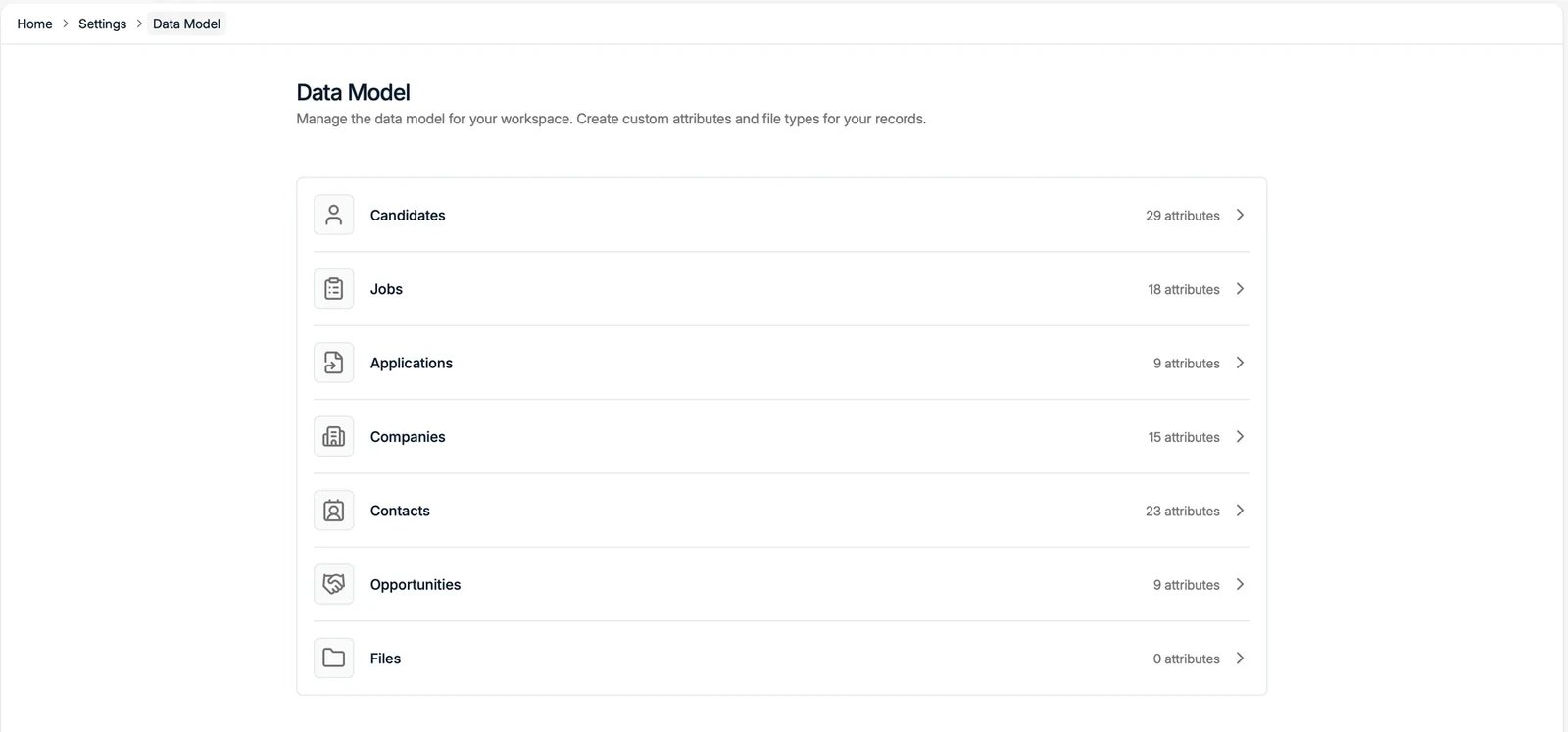
The Data Model lists every record type with the number of attributes it has:
Candidates, Jobs, Applications, Companies, Contacts, Opportunities, and Files. Click a
record type to manage its attributes.
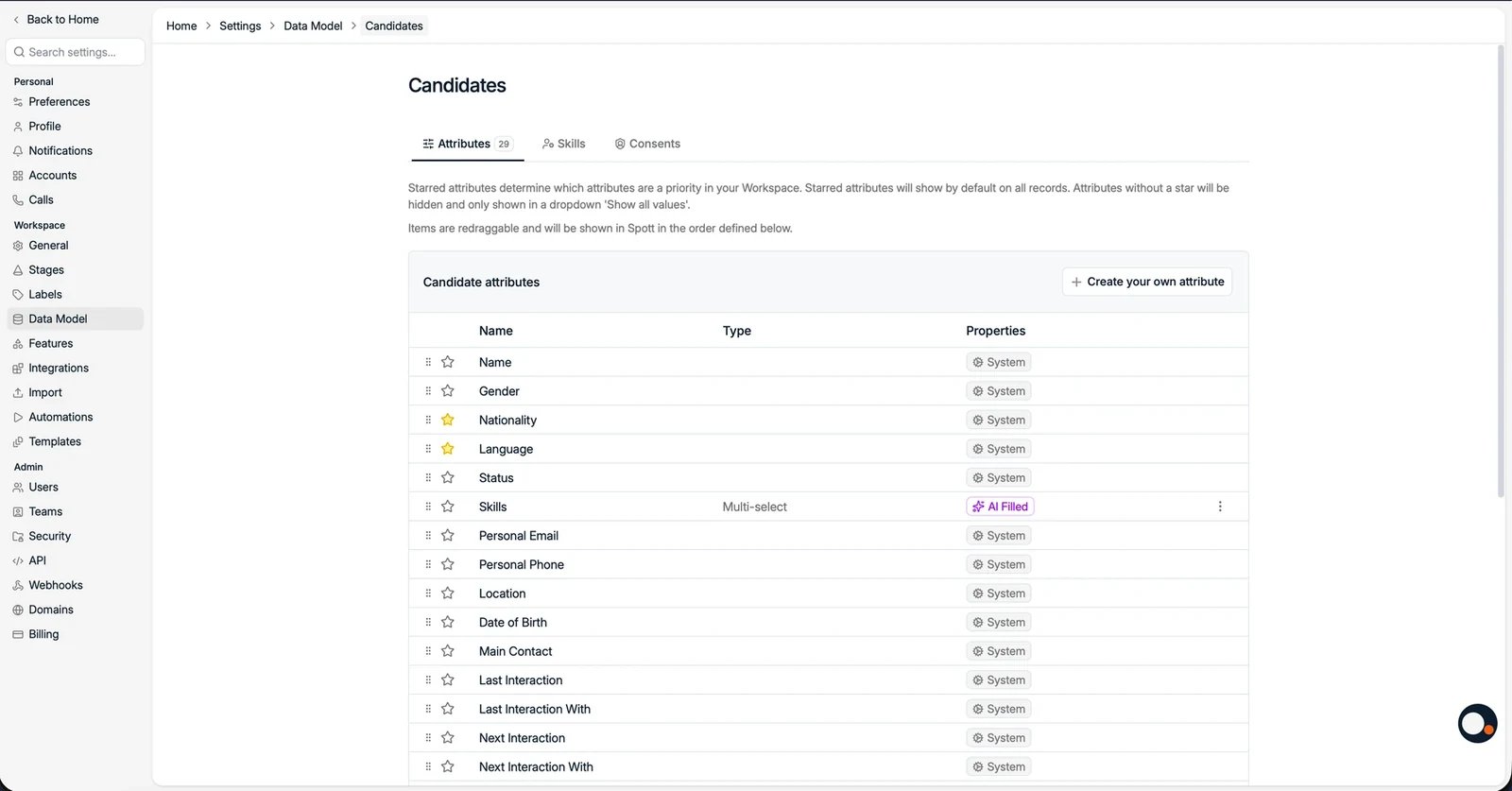
Inside a record type, the Attributes tab lists every field. For each attribute you
can see its Type and Properties:
System attributes are built in and cannot be deleted, but you can archive one your
team does not use. An archived attribute is hidden from then on, so records and forms
only show the fields you actually work with.
Attributes marked AI Filled are completed automatically by AI. See
AI-filled columns.
Starred attributes show by default on records. Unstarred attributes are hidden
behind Show all values. Drag attributes to set the order they appear in, both on
the record and in the create dialog for candidates, contacts, companies, jobs, and
opportunities, so a new record is filled in the order your team thinks about it. Fixed
fields such as the name keep their place, and the placement dialog follows the
placement form instead.
Use Create your own attribute to add a custom field. See
custom attributes for the data types
and how to work with them.A custom attribute can carry a description. Write one whenever the field’s name
does not fully settle how it should be filled in: what counts as “Seniority”, which
currency a rate is in, whether a date is the start or the signature. The description is
where that convention lives, so a new colleague does not have to ask or guess.
Some attributes are marked System required and cannot be changed. They are the ones a
record cannot meaningfully exist without: a job needs a Company, a Job title, and a
Status.
Any other attribute can be set to warn. Open the attribute’s ⋮ menu, choose Configure
required field, tick Warn user when the field is missing, and save. The list then shows
a Warn when missing badge against it.
When someone creates a record without one of these, Spott raises a Required fields are
missing dialog naming exactly which ones, and offers Fill in fields or Add candidate
anyway.The same warning is available on Companies and Opportunities: configure it under their attributes in the same way, and the dialog offers
Create company anyway or Create opportunity anyway.The check runs in the create dialog only. Editing a record later, importing a CSV, and
creating records through the API do not raise it.
The name of the setting is the honest one: it warns, it does not block. Anyone can
choose Add candidate anyway, and the record saves with the field empty. Use it to keep
data complete by default, not to guarantee it is.
That distinction matters downstream. A warning on Email or Nationality keeps most records
complete, but a report, a filter, or an automation that assumes
every record has one will still meet the exceptions. If something truly cannot cope with an
empty value, handle the empty case there rather than relying on this.
Files are part of the data model too. You can define file types shared across
records, for example contracts or certificates, and give those types their own
attributes, such as an expiry date on a certificate. Configure them here in the same
way as record attributes. Everything is also accessible via the
API.
On the Candidates record type, the Consents tab manages the consent purposes you
can track. See consent management.
Was this page helpful?
{"docsConfig":{"theme":"mint","$schema":"https://mintlify.com/docs.json","name":"Spott","description":"Documentation for Spott — the AI-native recruitment platform.","colors":{"primary":"#f0610f","light":"#f0610f","dark":"#f0610f"},"logo":{"light":"https://mintcdn.com/spott-docs/Zvbuq2vKGY56oD57/logo/light.svg?fit=max\u0026auto=format\u0026n=Zvbuq2vKGY56oD57\u0026q=85\u0026s=914d6f30a1192b291746dbcd2fc7e0fa","dark":"https://mintcdn.com/spott-docs/Zvbuq2vKGY56oD57/logo/dark.svg?fit=max\u0026auto=format\u0026n=Zvbuq2vKGY56oD57\u0026q=85\u0026s=e88bff4f96607e119e55398351566d54"},"favicon":"https://mintcdn.com/spott-docs/DowUiFW036iA_b71/favicon.png?fit=max\u0026auto=format\u0026n=DowUiFW036iA_b71\u0026q=85\u0026s=4729be45c4d1269ed0fafc43f45bc501","appearance":{"default":"light"},"navbar":{"links":[{"href":"https://spott.io","label":"Website"}],"primary":{"type":"button","label":"Go to app","href":"https://app.spott.io"}},"footer":{"socials":{"linkedin":"https://www.linkedin.com/company/spottai","website":"https://spott.io"}},"integrations":{"ga4":{"measurementId":"G-5GMF3213NR"}},"styling":{"latex":false},"navigation":{"global":{"anchors":[{"anchor":"Go to app","icon":"arrow-up-right-from-square","href":"https://app.spott.io"},{"anchor":"Support","icon":"life-ring","href":"/docs/get-started/faq"}]},"languages":[{"language":"en","default":true,"href":""},{"language":"fr","href":"fr"},{"language":"nl","href":"nl"},{"language":"de","href":"de"},{"language":"es","href":"es"}]}},"deployment":{"deploymentMetadataValue":{"subdomain":"spott-docs","hasAudioNarration":false,"actualSubdomain":"spott-docs","customDomains":["docs.spott.io"],"gitSource":{"type":"github","owner":"spott-hr","repo":"spott-docs-external","deployBranch":"main","contentDirectory":"","isPrivate":true,"mountPath":"","label":""},"chroma":{"collectionId":"f0073665-2f52-4bb5-aaa0-43ce286699bb","liveDeploymentHistoryId":"6adf7247b1764000030afb98","schemaVersion":"v3","latestBuiltDeploymentHistoryId":"6adf7247b1764000030afb98"},"feedback":{"thumbs":true},"entitlements":{},"buildId":"6adf7247b1764000030afb98","clientVersion":"0.0.3971","searchFilterCounts":[{"language":"en","tag":"API","count":215},{"language":"en","tag":"Private API","count":211},{"language":"de","tag":"Anleitungen","count":90},{"language":"en","tag":"Guides","count":90},{"language":"es","tag":"Guías","count":90},{"language":"fr","tag":"Guides","count":90},{"language":"nl","tag":"Gidsen","count":90},{"language":"en","tag":"Webhooks","count":55},{"language":"en","tag":"Webhook events","count":54},{"language":"en","tag":"Candidates","count":46},{"language":"de","tag":"Integrationen","count":36},{"language":"en","tag":"Integrations","count":36},{"language":"es","tag":"Integraciones","count":36},{"language":"fr","tag":"Intégrations","count":36},{"language":"nl","tag":"Integraties","count":36},{"language":"de","tag":"Einstellungen und Verwaltung","count":26},{"language":"en","tag":"Settings \u0026 Admin","count":26},{"language":"es","tag":"Configuración y administración","count":26},{"language":"fr","tag":"Paramètres et administration","count":26},{"language":"nl","tag":"Instellingen en beheer","count":26},{"language":"en","tag":"Jobs","count":24},{"language":"en","tag":"Custom Attributes","count":22},{"language":"de","tag":"Einstieg","count":16},{"language":"es","tag":"Primeros pasos","count":16},{"language":"fr","tag":"Prise en main","count":16},{"language":"nl","tag":"Onboarding","count":16},{"language":"de","tag":"Stellen","count":12},{"language":"es","tag":"Vacantes","count":12},{"language":"fr","tag":"Postes","count":12},{"language":"nl","tag":"Vacatures","count":12},{"language":"de","tag":"Kandidaten","count":11},{"language":"de","tag":"Unternehmen, Kontakte und Opportunities","count":11},{"language":"de","tag":"Erste Schritte","count":11},{"language":"de","tag":"Telefonie und Messaging","count":11},{"language":"es","tag":"Candidatos","count":11},{"language":"es","tag":"Empresas, contactos y oportunidades","count":11},{"language":"es","tag":"Introducción","count":11},{"language":"es","tag":"Telefonía y mensajería","count":11},{"language":"fr","tag":"Candidats","count":11},{"language":"fr","tag":"Entreprises, contacts et opportunités","count":11},{"language":"fr","tag":"Démarrer","count":11},{"language":"fr","tag":"Téléphonie et messagerie","count":11},{"language":"nl","tag":"Kandidaten","count":11},{"language":"nl","tag":"Bedrijven, contacten en opportuniteiten","count":11},{"language":"nl","tag":"Aan de slag","count":11},{"language":"nl","tag":"Telefonie en berichten","count":11},{"language":"de","tag":"Kommunikation","count":10},{"language":"es","tag":"Comunicación","count":10},{"language":"fr","tag":"Communication","count":10},{"language":"nl","tag":"Communicatie","count":10}]},"assistantConfig":{"enableAskAiButton":false,"enableStarterQuestions":false,"enableContextualStarterQuestions":false,"enableAskAiSearchBar":true},"basePath":"","hasChatPermissions":false,"hasWebMcpPermissions":false,"toggles":[{"name":"kill-isr","enabled":true,"variant":{"name":"disabled","enabled":false,"feature_enabled":true},"impressionData":false},{"name":"agent-mintlify-slack","enabled":true,"variant":{"name":"disabled","enabled":false,"feature_enabled":true},"impressionData":false},{"name":"editor-v7-file-tree","enabled":true,"variant":{"name":"disabled","enabled":false,"feature_enabled":true},"impressionData":false},{"name":"agent-integrations-settings","enabled":true,"variant":{"name":"disabled","enabled":false,"feature_enabled":true},"impressionData":false},{"name":"automations-pr-grouping","enabled":true,"variant":{"name":"disabled","enabled":false,"feature_enabled":true},"impressionData":false},{"name":"custom-prefix","enabled":true,"variant":{"name":"disabled","enabled":false,"feature_enabled":true},"impressionData":false},{"name":"analytics-v7","enabled":true,"variant":{"name":"disabled","enabled":false,"feature_enabled":true},"impressionData":false},{"name":"user-flows-analytics","enabled":true,"variant":{"name":"disabled","enabled":false,"feature_enabled":true},"impressionData":false},{"name":"no-publish-flow","enabled":true,"variant":{"name":"disabled","enabled":false,"feature_enabled":true},"impressionData":false},{"name":"workos-onboarding","enabled":true,"variant":{"name":"disabled","enabled":false,"feature_enabled":true},"impressionData":false},{"name":"llms-txt-v2","enabled":true,"variant":{"name":"disabled","enabled":false,"feature_enabled":true},"impressionData":false},{"name":"pause-universal-search-reconcile","enabled":true,"variant":{"name":"disabled","enabled":false,"feature_enabled":true},"impressionData":false},{"name":"snapshot-serving-live","enabled":true,"variant":{"name":"disabled","enabled":false,"feature_enabled":true},"impressionData":false},{"name":"stripTemperatureMiddleware","enabled":true,"variant":{"name":"disabled","enabled":false,"feature_enabled":true},"impressionData":false},{"name":"per-site-search-delta","enabled":true,"variant":{"name":"disabled","enabled":false,"feature_enabled":true},"impressionData":false},{"name":"support-platform-pylon-zendesk","enabled":true,"variant":{"name":"disabled","enabled":false,"feature_enabled":true},"impressionData":false},{"name":"snapshot-serving","enabled":true,"variant":{"name":"disabled","enabled":false,"feature_enabled":true},"impressionData":false},{"name":"instant-rollback","enabled":true,"variant":{"name":"disabled","enabled":false,"feature_enabled":true},"impressionData":false},{"name":"granular-notifications-server","enabled":true,"variant":{"name":"disabled","enabled":false,"feature_enabled":true},"impressionData":false},{"name":"granular-notifications","enabled":true,"variant":{"name":"disabled","enabled":false,"feature_enabled":true},"impressionData":false},{"name":"editor-private-page-search","enabled":true,"variant":{"name":"disabled","enabled":false,"feature_enabled":true},"impressionData":false},{"name":"automations-fable","enabled":true,"variant":{"name":"disabled","enabled":false,"feature_enabled":true},"impressionData":false},{"name":"fixed-ai-action-pricing","enabled":true,"variant":{"name":"disabled","enabled":false,"feature_enabled":true},"impressionData":false},{"name":"automation-resolve-merge-conflict","enabled":true,"variant":{"name":"disabled","enabled":false,"feature_enabled":true},"impressionData":false},{"name":"scoped-publishing","enabled":true,"variant":{"name":"disabled","enabled":false,"feature_enabled":true},"impressionData":false},{"name":"mintql","enabled":true,"variant":{"name":"disabled","enabled":false,"feature_enabled":true},"impressionData":false},{"name":"page-level-analytics","enabled":true,"variant":{"name":"disabled","enabled":false,"feature_enabled":true},"impressionData":false},{"name":"editor-version-history-v2","enabled":true,"variant":{"name":"disabled","enabled":false,"feature_enabled":true},"impressionData":false},{"name":"editor-nav-generations","enabled":true,"variant":{"name":"disabled","enabled":false,"feature_enabled":true},"impressionData":false},{"name":"billing-page-v2","enabled":true,"variant":{"name":"disabled","enabled":false,"feature_enabled":true},"impressionData":false},{"name":"workspace-projects","enabled":true,"variant":{"name":"disabled","enabled":false,"feature_enabled":true},"impressionData":false},{"name":"assistant-v5","enabled":true,"variant":{"name":"disabled","enabled":false,"feature_enabled":true},"impressionData":false},{"name":"byok-sep-25","enabled":true,"variant":{"name":"disabled","enabled":false,"feature_enabled":true},"impressionData":false},{"name":"fork-pr-previews","enabled":true,"variant":{"name":"disabled","enabled":false,"feature_enabled":true},"impressionData":false},{"name":"revalidation-jwt","enabled":true,"variant":{"name":"disabled","enabled":false,"feature_enabled":true},"impressionData":false},{"name":"vite-origin","enabled":true,"variant":{"name":"disabled","enabled":false,"feature_enabled":true},"impressionData":false},{"name":"editor-agent-model-picker","enabled":true,"variant":{"name":"disabled","enabled":false,"feature_enabled":true},"impressionData":false},{"name":"billing-updated-9-15","enabled":true,"variant":{"name":"disabled","enabled":false,"feature_enabled":true},"impressionData":false},{"name":"workos-sso-scim","enabled":true,"variant":{"name":"disabled","enabled":false,"feature_enabled":true},"impressionData":false},{"name":"hobby-abuse-scan","enabled":true,"variant":{"name":"disabled","enabled":false,"feature_enabled":true},"impressionData":false},{"name":"dashboard-inbox","enabled":true,"variant":{"name":"disabled","enabled":false,"feature_enabled":true},"impressionData":false},{"name":"workos-signup","enabled":true,"variant":{"name":"disabled","enabled":false,"feature_enabled":true},"impressionData":false},{"name":"workos-enabled","enabled":true,"variant":{"name":"disabled","enabled":false,"feature_enabled":true},"impressionData":false}],"isAtlas":false,"googleFontsInlined":false},"customCss":[{"filePath":"style.css","content":"@media (min-width:1024px){#sidebar{top:112px!important;height:calc(100dvh - 112px)!important}}.your-turn{margin:2rem 0;padding:1.25rem 1.5rem;border:1px solid rgb(240 97 15/.25);border-left:3px solid #f0610f;border-radius:.75rem;background:rgb(240 97 15/.04)}.dark .your-turn{border-color:rgb(240 97 15/.3);border-left-color:#f0610f;background:rgb(240 97 15/.07)}.your-turn h2{margin-top:0;margin-bottom:.75rem;font-size:.8125rem;font-weight:600;letter-spacing:.06em;text-transform:uppercase;color:#f0610f}.your-turn>:last-child{margin-bottom:0}.your-turn ul.contains-task-list{margin:0;padding-left:0;list-style:none}.your-turn ul.contains-task-list li.task-list-item{position:relative;margin:0;padding:.25rem 0 .25rem 1.75rem;list-style:none}.your-turn ul.contains-task-list li.task-list-item::before,.your-turn ul.contains-task-list li.task-list-item::marker{content:none;display:none}.your-turn li.task-list-item input[type=checkbox]{position:absolute;left:0;top:.45rem;width:1rem;height:1rem;margin:0;accent-color:#f0610f}.your-turn[data-interactive=true] li.task-list-item,.your-turn[data-interactive=true] li.task-list-item input[type=checkbox]{cursor:pointer}.your-turn[data-interactive=true] li.task-list-item:hover{color:#f0610f}.your-turn li.task-list-item.is-done{opacity:.55;text-decoration:line-through;text-decoration-color:rgb(240 97 15/.5)}.in-this-section{margin:0 0 2rem;padding:1rem 1.25rem;border:1px solid rgb(15 23 42/.08);border-radius:.75rem;background:rgb(15 23 42/.025);font-size:.9375rem;line-height:1.65}.dark .in-this-section{border-color:rgb(255 255 255/.1);background:rgb(255 255 255/.03)}.in-this-section>:first-child{margin-top:0}.in-this-section>:last-child{margin-bottom:0}.in-this-section .section-links{margin-top:.875rem;padding-top:.875rem;border-top:1px solid rgb(15 23 42/.08)}.dark .in-this-section .section-links{border-top-color:rgb(255 255 255/.1)}.in-this-section .section-links ol{margin:0;padding-left:1.25rem}.in-this-section .section-links li{margin:.25rem 0}.nav-hint{margin:0 0 2rem;font-size:.875rem;line-height:1.6;color:rgb(15 23 42/.6)}.dark .nav-hint{color:rgb(255 255 255/.55)}.nav-hint strong{font-weight:600;color:inherit}.nav-hint>:first-child{margin-top:0}.nav-hint>:last-child{margin-bottom:0}.dark img[src*=\"/brands/chatgpt\"],.dark img[src*=\"/integrations/logos/daidalo\"],.dark img[src*=\"/integrations/logos/juicebox\"],.dark img[src*=\"/integrations/logos/pin.\"]{background:#fff;border-radius:3px;padding:1px;box-sizing:border-box}.mdx-content img[src^=\"/images/\"]{border-radius:12px}.shots{display:flex;flex-wrap:wrap;align-items:flex-start;gap:.75rem;margin:1rem 0 1.5rem}.shots>p,.shots>span{margin:0}.mdx-content .shots img{width:220px;max-width:100%;height:auto;margin:0;border:1px solid rgb(15 23 42/.1);border-radius:8px;box-shadow:0 1px 2px rgb(15 23 42/.06);cursor:zoom-in;transition:box-shadow .15s ease,border-color .15s ease}.mdx-content .shots img:hover{border-color:rgb(240 97 15/.5);box-shadow:0 4px 12px rgb(15 23 42/.12)}.dark .mdx-content .shots img{border-color:rgb(255 255 255/.12)}"}],"page":{"pagePath":"docs/settings/data-model","slug":"/docs/settings/data-model","pageMetadata":{"title":"Data Model","icon":"table-cells","description":"Manage the attributes and consent purposes on every record type in your workspace.","href":"/docs/settings/data-model"},"description":{"compiledSource":"\"use strict\";\nconst {jsx: _jsx} = arguments[0];\nconst {useMDXComponents: _provideComponents} = arguments[0];\nfunction _createMdxContent(props) {\n const _components = {\n p: \"p\",\n ..._provideComponents(),\n ...props.components\n };\n return _jsx(_components.p, {\n children: \"Manage the attributes and consent purposes on every record type in your workspace.\"\n });\n}\nfunction MDXContent(props = {}) {\n const {wrapper: MDXLayout} = {\n ..._provideComponents(),\n ...props.components\n };\n return MDXLayout ? _jsx(MDXLayout, {\n ...props,\n children: _jsx(_createMdxContent, {\n ...props\n })\n }) : _createMdxContent(props);\n}\nreturn {\n default: MDXContent\n};\n","frontmatter":{},"scope":{}},"pageType":"default","mdx":{"mdxSource":{"compiledSource":"\"use strict\";const{Fragment:_Fragment,jsx:_jsx,jsxs:_jsxs}=arguments[0];const{useMDXComponents:_provideComponents}=arguments[0];function _createMdxContent(props){const _components={a:`a`,em:`em`,li:`li`,p:`p`,strong:`strong`,ul:`ul`,..._provideComponents(),...props.components},{Frame,Heading,Note,OptimizedImage,Warning}=_components;if(!Frame)_missingMdxReference(`Frame`,true);if(!Heading)_missingMdxReference(`Heading`,true);if(!Note)_missingMdxReference(`Note`,true);if(!OptimizedImage)_missingMdxReference(`OptimizedImage`,true);if(!Warning)_missingMdxReference(`Warning`,true);return _jsxs(_Fragment,{children:[_jsxs(_components.p,{children:[_jsx(_components.strong,{children:`Settings → Data Model`}),` is where you shape the fields on your records. You can create\ncustom attributes and file types for each record type in your workspace.`]}),`\n`,_jsx(Heading,{level:`2`,id:`record-types`,children:`Record types`}),`\n`,_jsx(_components.p,{children:`The Data Model lists every record type with the number of attributes it has:\nCandidates, Jobs, Applications, Companies, Contacts, Opportunities, and Files. Click a\nrecord type to manage its attributes.`}),`\n`,_jsx(Frame,{children:_jsx(OptimizedImage,{src:`https://mintcdn.com/spott-docs/lDU_xVu3wPZWcJCf/images/settings/data-model.webp?fit=max\u0026auto=format\u0026n=lDU_xVu3wPZWcJCf\u0026q=85\u0026s=5885ad5e43e9da72042bcd20fc5ee0e8`,alt:`The Data Model overview with attribute counts per record type`,\"data-og-width\":`1600`,width:`1600`,\"data-og-height\":`747`,height:`747`,\"data-path\":`images/settings/data-model.webp`,\"data-optimize\":`true`,\"data-opv\":`3`,srcset:`https://mintcdn.com/spott-docs/lDU_xVu3wPZWcJCf/images/settings/data-model.webp?w=280\u0026fit=max\u0026auto=format\u0026n=lDU_xVu3wPZWcJCf\u0026q=85\u0026s=4dcd471e3c81a44e6b78c779bb6eafac 280w, https://mintcdn.com/spott-docs/lDU_xVu3wPZWcJCf/images/settings/data-model.webp?w=560\u0026fit=max\u0026auto=format\u0026n=lDU_xVu3wPZWcJCf\u0026q=85\u0026s=9e67513de93e842ecaf05ef507c8a827 560w, https://mintcdn.com/spott-docs/lDU_xVu3wPZWcJCf/images/settings/data-model.webp?w=840\u0026fit=max\u0026auto=format\u0026n=lDU_xVu3wPZWcJCf\u0026q=85\u0026s=f4ef59fd209623aa01a99ea277b62477 840w, https://mintcdn.com/spott-docs/lDU_xVu3wPZWcJCf/images/settings/data-model.webp?w=1100\u0026fit=max\u0026auto=format\u0026n=lDU_xVu3wPZWcJCf\u0026q=85\u0026s=7d527383736dfae6dd8b19de6414632d 1100w, https://mintcdn.com/spott-docs/lDU_xVu3wPZWcJCf/images/settings/data-model.webp?w=1650\u0026fit=max\u0026auto=format\u0026n=lDU_xVu3wPZWcJCf\u0026q=85\u0026s=fc6aa65a56da86d6865dbc23c7c65e52 1650w, https://mintcdn.com/spott-docs/lDU_xVu3wPZWcJCf/images/settings/data-model.webp?w=2500\u0026fit=max\u0026auto=format\u0026n=lDU_xVu3wPZWcJCf\u0026q=85\u0026s=c2e2901263b7a09524de84f5eeb90bb3 2500w`})}),`\n`,_jsx(Heading,{level:`2`,id:`attributes`,children:`Attributes`}),`\n`,_jsxs(_components.p,{children:[`Inside a record type, the `,_jsx(_components.strong,{children:`Attributes`}),` tab lists every field. For each attribute you\ncan see its `,_jsx(_components.strong,{children:`Type`}),` and `,_jsx(_components.strong,{children:`Properties`}),`:`]}),`\n`,_jsxs(_components.ul,{children:[`\n`,_jsxs(_components.li,{children:[_jsx(_components.strong,{children:`System`}),` attributes are built in and cannot be deleted, but you can `,_jsx(_components.strong,{children:`archive`}),` one your\nteam does not use. An archived attribute is hidden from then on, so records and forms\nonly show the fields you actually work with.`]}),`\n`,_jsxs(_components.li,{children:[`Attributes marked `,_jsx(_components.strong,{children:`AI Filled`}),` are completed automatically by AI. See\n`,_jsx(_components.a,{href:`/docs/settings/ai-filled-columns`,children:`AI-filled columns`}),`.`]}),`\n`,_jsxs(_components.li,{children:[_jsx(_components.strong,{children:`Starred`}),` attributes show by default on records. Unstarred attributes are hidden\nbehind `,_jsx(_components.strong,{children:`Show all values`}),`. Drag attributes to set the order they appear in, both on\nthe record and in the create dialog for candidates, contacts, companies, jobs, and\nopportunities, so a new record is filled in the order your team thinks about it. Fixed\nfields such as the name keep their place, and the placement dialog follows the\n`,_jsx(_components.a,{href:`/docs/placements/placements`,children:`placement form`}),` instead.`]}),`\n`]}),`\n`,_jsxs(_components.p,{children:[`Use `,_jsx(_components.strong,{children:`Create your own attribute`}),` to add a custom field. See\n`,_jsx(_components.a,{href:`/docs/settings/customizing-candidate-profiles`,children:`custom attributes`}),` for the data types\nand how to work with them.`]}),`\n`,_jsxs(_components.p,{children:[`A custom attribute can carry a `,_jsx(_components.strong,{children:`description`}),`. Write one whenever the field’s name\ndoes not fully settle how it should be filled in: what counts as “Seniority”, which\ncurrency a rate is in, whether a date is the start or the signature. The description is\nwhere that convention lives, so a new colleague does not have to ask or guess.`]}),`\n`,_jsx(Frame,{children:_jsx(OptimizedImage,{src:`https://mintcdn.com/spott-docs/lDU_xVu3wPZWcJCf/images/settings/data-model-candidates.webp?fit=max\u0026auto=format\u0026n=lDU_xVu3wPZWcJCf\u0026q=85\u0026s=42196a5b00a0208c6e181e1ef686044b`,alt:`The candidate attributes list with system and AI-filled fields`,\"data-og-width\":`1600`,width:`1600`,\"data-og-height\":`837`,height:`837`,\"data-path\":`images/settings/data-model-candidates.webp`,\"data-optimize\":`true`,\"data-opv\":`3`,srcset:`https://mintcdn.com/spott-docs/lDU_xVu3wPZWcJCf/images/settings/data-model-candidates.webp?w=280\u0026fit=max\u0026auto=format\u0026n=lDU_xVu3wPZWcJCf\u0026q=85\u0026s=c897f5c0c8e609e6e17f3127f34bdd5a 280w, https://mintcdn.com/spott-docs/lDU_xVu3wPZWcJCf/images/settings/data-model-candidates.webp?w=560\u0026fit=max\u0026auto=format\u0026n=lDU_xVu3wPZWcJCf\u0026q=85\u0026s=887afffa2ce039833b78e8c789fb9d26 560w, https://mintcdn.com/spott-docs/lDU_xVu3wPZWcJCf/images/settings/data-model-candidates.webp?w=840\u0026fit=max\u0026auto=format\u0026n=lDU_xVu3wPZWcJCf\u0026q=85\u0026s=a890fc03e7d1220583d88170216f61be 840w, https://mintcdn.com/spott-docs/lDU_xVu3wPZWcJCf/images/settings/data-model-candidates.webp?w=1100\u0026fit=max\u0026auto=format\u0026n=lDU_xVu3wPZWcJCf\u0026q=85\u0026s=41807cd294fde37f14fe7ff113ae2ed7 1100w, https://mintcdn.com/spott-docs/lDU_xVu3wPZWcJCf/images/settings/data-model-candidates.webp?w=1650\u0026fit=max\u0026auto=format\u0026n=lDU_xVu3wPZWcJCf\u0026q=85\u0026s=d344010f5b1749630328c337904e2b6c 1650w, https://mintcdn.com/spott-docs/lDU_xVu3wPZWcJCf/images/settings/data-model-candidates.webp?w=2500\u0026fit=max\u0026auto=format\u0026n=lDU_xVu3wPZWcJCf\u0026q=85\u0026s=6929b4dcd5c2ba066e83c3362082be89 2500w`})}),`\n`,_jsx(Heading,{level:`2`,id:`required-fields`,children:`Required fields`}),`\n`,_jsx(Note,{children:_jsxs(_components.p,{children:[`Required fields are an `,_jsx(_components.strong,{children:`Enterprise`}),` plan feature. They are not included in the `,_jsx(_components.strong,{children:`Pro`}),`\nplan.`]})}),`\n`,_jsxs(_components.p,{children:[`The `,_jsx(_components.strong,{children:`Required`}),` column on the attributes list shows whether an attribute has to be filled\nin, and there are two kinds.`]}),`\n`,_jsx(Heading,{level:`3`,id:`system-required`,children:`System required`}),`\n`,_jsxs(_components.p,{children:[`Some attributes are marked `,_jsx(_components.strong,{children:`System required`}),` and cannot be changed. They are the ones a\nrecord cannot meaningfully exist without: a job needs a `,_jsx(_components.strong,{children:`Company`}),`, a `,_jsx(_components.strong,{children:`Job`}),` title, and a\n`,_jsx(_components.strong,{children:`Status`}),`.`]}),`\n`,_jsx(Frame,{children:_jsx(OptimizedImage,{src:`https://mintcdn.com/spott-docs/kld93HZqs1PQlbyf/images/settings/attributes-system-required.webp?fit=max\u0026auto=format\u0026n=kld93HZqs1PQlbyf\u0026q=85\u0026s=18d16a29989b4a5fe61a7aa25919bbb3`,alt:`Job attributes with several marked System required`,\"data-og-width\":`1024`,width:`1024`,\"data-og-height\":`393`,height:`393`,\"data-path\":`images/settings/attributes-system-required.webp`,\"data-optimize\":`true`,\"data-opv\":`3`,srcset:`https://mintcdn.com/spott-docs/kld93HZqs1PQlbyf/images/settings/attributes-system-required.webp?w=280\u0026fit=max\u0026auto=format\u0026n=kld93HZqs1PQlbyf\u0026q=85\u0026s=07b926c680d851db9b7090854015bb84 280w, https://mintcdn.com/spott-docs/kld93HZqs1PQlbyf/images/settings/attributes-system-required.webp?w=560\u0026fit=max\u0026auto=format\u0026n=kld93HZqs1PQlbyf\u0026q=85\u0026s=98ff01459c7bffbe104c34f7deb105f7 560w, https://mintcdn.com/spott-docs/kld93HZqs1PQlbyf/images/settings/attributes-system-required.webp?w=840\u0026fit=max\u0026auto=format\u0026n=kld93HZqs1PQlbyf\u0026q=85\u0026s=ae4c2393e1c17a4edf38b85472cf8e83 840w, https://mintcdn.com/spott-docs/kld93HZqs1PQlbyf/images/settings/attributes-system-required.webp?w=1100\u0026fit=max\u0026auto=format\u0026n=kld93HZqs1PQlbyf\u0026q=85\u0026s=d631dd7ccdfe027e6b55d723a5157ff0 1100w, https://mintcdn.com/spott-docs/kld93HZqs1PQlbyf/images/settings/attributes-system-required.webp?w=1650\u0026fit=max\u0026auto=format\u0026n=kld93HZqs1PQlbyf\u0026q=85\u0026s=2845f484079b761f34bf868c2d699542 1650w, https://mintcdn.com/spott-docs/kld93HZqs1PQlbyf/images/settings/attributes-system-required.webp?w=2500\u0026fit=max\u0026auto=format\u0026n=kld93HZqs1PQlbyf\u0026q=85\u0026s=8a9327d57fd5b2aed5403b98818522f6 2500w`})}),`\n`,_jsx(Heading,{level:`3`,id:`warn-when-missing`,children:`Warn when missing`}),`\n`,_jsxs(_components.p,{children:[`Any other attribute can be set to warn. Open the attribute’s `,_jsx(_components.strong,{children:`⋮`}),` menu, choose `,_jsx(_components.strong,{children:`Configure\nrequired field`}),`, tick `,_jsx(_components.strong,{children:`Warn user when the field is missing`}),`, and save. The list then shows\na `,_jsx(_components.strong,{children:`Warn when missing`}),` badge against it.`]}),`\n`,_jsx(Frame,{children:_jsx(OptimizedImage,{src:`https://mintcdn.com/spott-docs/kld93HZqs1PQlbyf/images/settings/required-field-menu.webp?fit=max\u0026auto=format\u0026n=kld93HZqs1PQlbyf\u0026q=85\u0026s=c463385561766a94e2a1b146751d1f5d`,alt:`The Configure required field option on an attribute`,\"data-og-width\":`289`,width:`289`,\"data-og-height\":`203`,height:`203`,\"data-path\":`images/settings/required-field-menu.webp`,\"data-optimize\":`true`,\"data-opv\":`3`,srcset:`https://mintcdn.com/spott-docs/kld93HZqs1PQlbyf/images/settings/required-field-menu.webp?w=280\u0026fit=max\u0026auto=format\u0026n=kld93HZqs1PQlbyf\u0026q=85\u0026s=8f54115e57806683b19a59b99bcd171e 280w, https://mintcdn.com/spott-docs/kld93HZqs1PQlbyf/images/settings/required-field-menu.webp?w=560\u0026fit=max\u0026auto=format\u0026n=kld93HZqs1PQlbyf\u0026q=85\u0026s=16f33b1c4aef272b7e7312e77238c42a 560w, https://mintcdn.com/spott-docs/kld93HZqs1PQlbyf/images/settings/required-field-menu.webp?w=840\u0026fit=max\u0026auto=format\u0026n=kld93HZqs1PQlbyf\u0026q=85\u0026s=9caf6a0c654493c6dedbfce37629ae97 840w, https://mintcdn.com/spott-docs/kld93HZqs1PQlbyf/images/settings/required-field-menu.webp?w=1100\u0026fit=max\u0026auto=format\u0026n=kld93HZqs1PQlbyf\u0026q=85\u0026s=93f7a7a2da7b1d428cb32f7bd2e1eb7d 1100w, https://mintcdn.com/spott-docs/kld93HZqs1PQlbyf/images/settings/required-field-menu.webp?w=1650\u0026fit=max\u0026auto=format\u0026n=kld93HZqs1PQlbyf\u0026q=85\u0026s=99283f0e4d33863b1d2b80fb3eeb45c6 1650w, https://mintcdn.com/spott-docs/kld93HZqs1PQlbyf/images/settings/required-field-menu.webp?w=2500\u0026fit=max\u0026auto=format\u0026n=kld93HZqs1PQlbyf\u0026q=85\u0026s=ee27631cf66576534be82e85ef0c06cb 2500w`})}),`\n`,_jsx(Frame,{children:_jsx(OptimizedImage,{src:`https://mintcdn.com/spott-docs/kld93HZqs1PQlbyf/images/settings/required-field-rule.webp?fit=max\u0026auto=format\u0026n=kld93HZqs1PQlbyf\u0026q=85\u0026s=7426b190372a8cb19c965c995b38de30`,alt:`The required field rule, with a single warn-when-missing option`,\"data-og-width\":`471`,width:`471`,\"data-og-height\":`161`,height:`161`,\"data-path\":`images/settings/required-field-rule.webp`,\"data-optimize\":`true`,\"data-opv\":`3`,srcset:`https://mintcdn.com/spott-docs/kld93HZqs1PQlbyf/images/settings/required-field-rule.webp?w=280\u0026fit=max\u0026auto=format\u0026n=kld93HZqs1PQlbyf\u0026q=85\u0026s=6e69f98f4c5c4db63fa4f6323484a0b0 280w, https://mintcdn.com/spott-docs/kld93HZqs1PQlbyf/images/settings/required-field-rule.webp?w=560\u0026fit=max\u0026auto=format\u0026n=kld93HZqs1PQlbyf\u0026q=85\u0026s=1b6581aacb70f08baf26fdf13ac14b17 560w, https://mintcdn.com/spott-docs/kld93HZqs1PQlbyf/images/settings/required-field-rule.webp?w=840\u0026fit=max\u0026auto=format\u0026n=kld93HZqs1PQlbyf\u0026q=85\u0026s=f156a965071568641d27a728fc54ab62 840w, https://mintcdn.com/spott-docs/kld93HZqs1PQlbyf/images/settings/required-field-rule.webp?w=1100\u0026fit=max\u0026auto=format\u0026n=kld93HZqs1PQlbyf\u0026q=85\u0026s=af129c9807cee5bc215845044822f2a4 1100w, https://mintcdn.com/spott-docs/kld93HZqs1PQlbyf/images/settings/required-field-rule.webp?w=1650\u0026fit=max\u0026auto=format\u0026n=kld93HZqs1PQlbyf\u0026q=85\u0026s=d38c1bc60371d490f039167874e87364 1650w, https://mintcdn.com/spott-docs/kld93HZqs1PQlbyf/images/settings/required-field-rule.webp?w=2500\u0026fit=max\u0026auto=format\u0026n=kld93HZqs1PQlbyf\u0026q=85\u0026s=09526d7416afe0ba8555519c9b539ed9 2500w`})}),`\n`,_jsx(Heading,{level:`3`,id:`what-the-warning-actually-does`,children:`What the warning actually does`}),`\n`,_jsxs(_components.p,{children:[`When someone creates a record without one of these, Spott raises a `,_jsx(_components.strong,{children:`Required fields are\nmissing`}),` dialog naming exactly which ones, and offers `,_jsx(_components.strong,{children:`Fill in fields`}),` or `,_jsx(_components.strong,{children:`Add candidate\nanyway`}),`.`]}),`\n`,_jsxs(_components.p,{children:[`The same warning is available on `,_jsx(_components.strong,{children:`Companies`}),` and `,_jsx(_components.strong,{children:`Opportunities`}),`: configure it under their attributes in the same way, and the dialog offers\n`,_jsx(_components.strong,{children:`Create company anyway`}),` or `,_jsx(_components.strong,{children:`Create opportunity anyway`}),`.`]}),`\n`,_jsxs(_components.p,{children:[`The check runs in the `,_jsx(_components.strong,{children:`create dialog`}),` only. Editing a record later, importing a CSV, and\ncreating records through the API do not raise it.`]}),`\n`,_jsx(Warning,{children:_jsxs(_components.p,{children:[`The name of the setting is the honest one: it `,_jsx(_components.strong,{children:`warns`}),`, it does not block. Anyone can\nchoose `,_jsx(_components.em,{children:`Add candidate anyway`}),`, and the record saves with the field empty. Use it to keep\ndata complete by default, not to guarantee it is.`]})}),`\n`,_jsxs(_components.p,{children:[`That distinction matters downstream. A warning on Email or Nationality keeps most records\ncomplete, but a report, a filter, or an `,_jsx(_components.a,{href:`/docs/settings/automations`,children:`automation`}),` that assumes\nevery record has one will still meet the exceptions. If something truly cannot cope with an\nempty value, handle the empty case there rather than relying on this.`]}),`\n`,_jsx(Heading,{level:`2`,id:`files-and-attachments`,children:`Files and attachments`}),`\n`,_jsxs(_components.p,{children:[`Files are part of the data model too. You can define `,_jsx(_components.strong,{children:`file types shared across\nrecords`}),`, for example contracts or certificates, and give those types their own\nattributes, such as an expiry date on a certificate. Configure them here in the same\nway as record attributes. Everything is also accessible via the\n`,_jsx(_components.a,{href:`/docs/developers/api-overview`,children:`API`}),`.`]}),`\n`,_jsx(Heading,{level:`2`,id:`consents`,children:`Consents`}),`\n`,_jsxs(_components.p,{children:[`On the Candidates record type, the `,_jsx(_components.strong,{children:`Consents`}),` tab manages the consent purposes you\ncan track. See `,_jsx(_components.a,{href:`/docs/settings/gdpr-consent`,children:`consent management`}),`.`]})]})}function MDXContent(props={}){const{wrapper:MDXLayout}={..._provideComponents(),...props.components};return MDXLayout?_jsx(MDXLayout,{...props,children:_jsx(_createMdxContent,{...props})}):_createMdxContent(props)}return{default:MDXContent};function _missingMdxReference(id,component){throw new Error(`Expected `+(component?`component`:`object`)+\" `\"+id+\"` to be defined: you likely forgot to import, pass, or provide it.\")}","frontmatter":{},"scope":{"config":{},"pageMetadata":{"title":"Data Model","icon":"table-cells","description":"Manage the attributes and consent purposes on every record type in your workspace.","href":"/docs/settings/data-model"}}},"mdxSourceWithNoJs":null},"mdxExtracts":{"tableOfContents":[{"title":"Record types","slug":"record-types","depth":2,"children":[]},{"title":"Attributes","slug":"attributes","depth":2,"children":[]},{"title":"Required fields","slug":"required-fields","depth":2,"children":[{"title":"System required","slug":"system-required","depth":3,"children":[]},{"title":"Warn when missing","slug":"warn-when-missing","depth":3,"children":[]},{"title":"What the warning actually does","slug":"what-the-warning-actually-does","depth":3,"children":[]}]},{"title":"Files and attachments","slug":"files-and-attachments","depth":2,"children":[]},{"title":"Consents","slug":"consents","depth":2,"children":[]}],"codeExamples":{}},"jsLinks":[],"subdomain":"spott-docs","siteName":"Spott","title":"Data Model - Spott","navMaps":{"firstHrefInVersion":{},"firstHrefInLanguage":{"en":{"href":"/docs/settings/data-model","matchLevel":0},"fr":{"href":"/fr/docs/settings/data-model","matchLevel":1},"nl":{"href":"/nl/docs/settings/data-model","matchLevel":1},"de":{"href":"/de/docs/settings/data-model","matchLevel":1},"es":{"href":"/es/docs/settings/data-model","matchLevel":1}}},"lastModified":"2026-10-15T13:05:19.050Z","originalFileLocation":"docs/settings/data-model.mdx","locale":"en"},"headHtml":"\u003cscript data-mint-head>(function(){var d=document.documentElement,p=null;if(!p){try{p=localStorage.getItem(\"isDarkMode\")}catch(e){}if(p==='true')p='dark';else if(p==='false')p='light';if(p!=='light'\u0026\u0026p!=='dark'\u0026\u0026p!=='system')p=\"light\"}var r=p==='system'?(matchMedia(\"(prefers-color-scheme: dark)\").matches?'dark':'light'):p;d.classList.remove(r==='dark'?'light':'dark');d.classList.add(r);d.setAttribute(\"data-theme-preference\",p)})();\u003c/script>\u003cmeta data-mint-head name=\"description\" content=\"Manage the attributes and consent purposes on every record type in your workspace.\">\u003cmeta data-mint-head name=\"application-name\" content=\"Spott\">\u003cmeta data-mint-head name=\"generator\" content=\"Mintlify\">\u003clink data-mint-head rel=\"icon\" type=\"image/png\" sizes=\"192x192\" href=\"/mintlify-assets/_mintlify/favicons/spott-docs/TptR6ytKqBew31dM/_generated/favicon/android-chrome-192x192.png\" media=\"(prefers-color-scheme: light)\">\u003clink data-mint-head rel=\"apple-touch-icon\" type=\"image/png\" sizes=\"180x180\" href=\"/mintlify-assets/_mintlify/favicons/spott-docs/TptR6ytKqBew31dM/_generated/favicon/apple-touch-icon.png\">\u003clink data-mint-head rel=\"icon\" type=\"image/png\" sizes=\"16x16\" href=\"/mintlify-assets/_mintlify/favicons/spott-docs/TptR6ytKqBew31dM/_generated/favicon/favicon-16x16.png\" media=\"(prefers-color-scheme: light)\">\u003clink data-mint-head rel=\"icon\" type=\"image/png\" sizes=\"32x32\" href=\"/mintlify-assets/_mintlify/favicons/spott-docs/TptR6ytKqBew31dM/_generated/favicon/favicon-32x32.png\" media=\"(prefers-color-scheme: light)\">\u003clink data-mint-head rel=\"shortcut icon\" type=\"image/x-icon\" href=\"/mintlify-assets/_mintlify/favicons/spott-docs/TptR6ytKqBew31dM/_generated/favicon/favicon.ico\" media=\"(prefers-color-scheme: light)\">\u003clink data-mint-head rel=\"icon\" type=\"image/png\" sizes=\"192x192\" href=\"/mintlify-assets/_mintlify/favicons/spott-docs/TptR6ytKqBew31dM/_generated/favicon-dark/android-chrome-192x192.png\" media=\"(prefers-color-scheme: dark)\">\u003clink data-mint-head rel=\"icon\" type=\"image/png\" sizes=\"16x16\" href=\"/mintlify-assets/_mintlify/favicons/spott-docs/TptR6ytKqBew31dM/_generated/favicon-dark/favicon-16x16.png\" media=\"(prefers-color-scheme: dark)\">\u003clink data-mint-head rel=\"icon\" type=\"image/png\" sizes=\"32x32\" href=\"/mintlify-assets/_mintlify/favicons/spott-docs/TptR6ytKqBew31dM/_generated/favicon-dark/favicon-32x32.png\" media=\"(prefers-color-scheme: dark)\">\u003clink data-mint-head rel=\"shortcut icon\" type=\"image/x-icon\" href=\"/mintlify-assets/_mintlify/favicons/spott-docs/TptR6ytKqBew31dM/_generated/favicon-dark/favicon.ico\" media=\"(prefers-color-scheme: dark)\">\u003cmeta data-mint-head property=\"og:title\" content=\"Data Model - Spott\">\u003cmeta data-mint-head property=\"og:description\" content=\"Manage the attributes and consent purposes on every record type in your workspace.\">\u003cmeta data-mint-head property=\"og:site_name\" content=\"Spott\">\u003cmeta data-mint-head property=\"og:url\" content=\"https://docs.spott.io/docs/settings/data-model\">\u003cmeta data-mint-head property=\"og:type\" content=\"website\">\u003cmeta data-mint-head property=\"og:image\" content=\"https://spott-docs.mintlify.app/_mintlify/api/og/v2?division=Settings+%26+Admin\u0026amp;title=Data+Model\u0026amp;description=Manage+the+attributes+and+consent+purposes+on+every+record+type+in+your+workspace.\u0026amp;theme=0d0ef5e0ee35d235d111fccd\u0026amp;signature=12327a252a330148502f8a92eee3970f49092cd8dff28062c6c680676126a21f\">\u003cmeta data-mint-head property=\"og:image:width\" content=\"1200\">\u003cmeta data-mint-head property=\"og:image:height\" content=\"630\">\u003cmeta data-mint-head name=\"twitter:card\" content=\"summary_large_image\">\u003cmeta data-mint-head name=\"twitter:title\" content=\"Data Model - Spott\">\u003cmeta data-mint-head name=\"twitter:description\" content=\"Manage the attributes and consent purposes on every record type in your workspace.\">\u003cmeta data-mint-head name=\"twitter:image\" content=\"https://spott-docs.mintlify.app/_mintlify/api/og/v2?division=Settings+%26+Admin\u0026amp;title=Data+Model\u0026amp;description=Manage+the+attributes+and+consent+purposes+on+every+record+type+in+your+workspace.\u0026amp;theme=0d0ef5e0ee35d235d111fccd\u0026amp;signature=12327a252a330148502f8a92eee3970f49092cd8dff28062c6c680676126a21f\">\u003cmeta data-mint-head name=\"twitter:image:width\" content=\"1200\">\u003cmeta data-mint-head name=\"twitter:image:height\" content=\"630\">\u003cmeta data-mint-head name=\"msapplication-config\" content=\"/mintlify-assets/_mintlify/favicons/spott-docs/TptR6ytKqBew31dM/_generated/favicon/browserconfig.xml\">\u003cmeta data-mint-head name=\"apple-mobile-web-app-title\" content=\"Spott\">\u003cmeta data-mint-head name=\"msapplication-TileColor\" content=\"#f0610f\">\u003clink data-mint-head rel=\"canonical\" href=\"https://docs.spott.io/docs/settings/data-model\">\u003clink data-mint-head rel=\"alternate\" type=\"application/xml\" href=\"/sitemap.xml\">\u003clink data-mint-head rel=\"alternate\" type=\"text/markdown\" href=\"/docs/settings/data-model.md\">\u003clink data-mint-head rel=\"alternate\" hreflang=\"en\" href=\"https://docs.spott.io/docs/settings/data-model\">\u003clink data-mint-head rel=\"alternate\" hreflang=\"fr\" href=\"https://docs.spott.io/fr/docs/settings/data-model\">\u003clink data-mint-head rel=\"alternate\" hreflang=\"nl\" href=\"https://docs.spott.io/nl/docs/settings/data-model\">\u003clink data-mint-head rel=\"alternate\" hreflang=\"de\" href=\"https://docs.spott.io/de/docs/settings/data-model\">\u003clink data-mint-head rel=\"alternate\" hreflang=\"es\" href=\"https://docs.spott.io/es/docs/settings/data-model\">\u003clink data-mint-head rel=\"alternate\" hreflang=\"x-default\" href=\"https://docs.spott.io/docs/settings/data-model\">\u003cscript data-mint-head type=\"application/ld+json\">{\"@context\":\"https://schema.org\",\"@graph\":[{\"@type\":\"Organization\",\"@id\":\"https://docs.spott.io/#organization\",\"name\":\"Spott\",\"url\":\"https://docs.spott.io\",\"logo\":{\"@type\":\"ImageObject\",\"url\":\"https://mintcdn.com/spott-docs/Zvbuq2vKGY56oD57/logo/light.svg?fit=max\u0026auto=format\u0026n=Zvbuq2vKGY56oD57\u0026q=85\u0026s=914d6f30a1192b291746dbcd2fc7e0fa\"}},{\"@type\":\"WebSite\",\"@id\":\"https://docs.spott.io#website\",\"name\":\"Spott\",\"url\":\"https://docs.spott.io\",\"publisher\":{\"@id\":\"https://docs.spott.io/#organization\"}},{\"@type\":\"WebPage\",\"@id\":\"https://docs.spott.io/docs/settings/data-model#webpage\",\"url\":\"https://docs.spott.io/docs/settings/data-model\",\"name\":\"Data Model\",\"description\":\"Manage the attributes and consent purposes on every record type in your workspace.\",\"dateModified\":\"2026-10-15T13:05:19.050Z\",\"isPartOf\":{\"@id\":\"https://docs.spott.io#website\"},\"breadcrumb\":{\"@id\":\"https://docs.spott.io/docs/settings/data-model#breadcrumb\"}},{\"@type\":\"BreadcrumbList\",\"@id\":\"https://docs.spott.io/docs/settings/data-model#breadcrumb\",\"itemListElement\":[{\"@type\":\"ListItem\",\"position\":1,\"name\":\"Settings \u0026 Admin\",\"item\":\"https://docs.spott.io/docs/settings/overview\"},{\"@type\":\"ListItem\",\"position\":2,\"name\":\"Data Model\",\"item\":\"https://docs.spott.io/docs/settings/data-model\"}]},{\"@type\":[\"Article\",\"TechArticle\"],\"@id\":\"https://docs.spott.io/docs/settings/data-model#article\",\"headline\":\"Data Model\",\"name\":\"Data Model\",\"description\":\"Manage the attributes and consent purposes on every record type in your workspace.\",\"url\":\"https://docs.spott.io/docs/settings/data-model\",\"mainEntityOfPage\":{\"@id\":\"https://docs.spott.io/docs/settings/data-model#webpage\"},\"dateModified\":\"2026-10-15T13:05:19.050Z\",\"publisher\":{\"@id\":\"https://docs.spott.io/#organization\"},\"isPartOf\":{\"@id\":\"https://docs.spott.io#website\"}}]}\u003c/script>\u003cscript data-mint-head type=\"application/ld+json\">{\"@context\":\"https://schema.org\",\"@type\":\"WebSite\",\"name\":\"Spott\",\"creator\":{\"@type\":\"Organization\",\"name\":\"Mintlify\",\"url\":\"https://mintlify.com\"}}\u003c/script>","siteName":"Spott","nav":{"global":{"anchors":[{"anchor":"Go to app","icon":"arrow-up-right-from-square","href":"https://app.spott.io"},{"anchor":"Support","icon":"life-ring","href":"/docs/get-started/faq"}]},"languages":[{"language":"en","default":true,"tabs":[{"tab":"Guides","groups":[{"group":"Get Started","icon":"rocket","pages":[{"title":"Welcome to Spott","icon":"house","href":""},{"title":"Quickstart","icon":"rocket","href":"/quickstart"},{"title":"Spott in Five Minutes","icon":"sitemap","href":"/docs/get-started/how-spott-is-organized"},{"title":"Global Search","icon":"magnifying-glass","href":"/docs/get-started/global-search"},{"title":"Fill a role, end to end","icon":"diagram-project","href":"/docs/get-started/recruiting-workflow"},{"title":"AI in Spott","icon":"wand-magic-sparkles","href":"/docs/get-started/ai-in-spott"},{"title":"Ask Spott","icon":"comments","href":"/docs/get-started/ask-spott"},{"title":"Ask Spott - Skills","icon":"wand-magic-sparkles","href":"/docs/get-started/ask-spott-skills"},{"title":"Dashboard","icon":"gauge","href":"/docs/get-started/dashboard"},{"title":"Data Migration","icon":"database","href":"/docs/get-started/data-migration"},{"title":"FAQ","icon":"circle-question","href":"/docs/get-started/faq"}]},{"group":"Candidates","icon":"user","pages":[{"title":"Adding Candidates","icon":"user-plus","href":"/docs/candidates/adding-candidates"},{"title":"Import from CSV or Excel","icon":"file-import","href":"/docs/get-started/import-csv"},{"title":"Updating a Candidate Profile","icon":"id-card","href":"/docs/candidates/update-profile-from-cv"},{"title":"Managing Candidates","icon":"users-gear","href":"/docs/candidates/managing-candidates"},{"title":"Merging Duplicate People","icon":"clone","href":"/docs/candidates/merge-duplicates"},{"title":"Tracking Applications","icon":"file-lines","href":"/docs/candidates/candidate-applications"},{"title":"Presenting Candidates","icon":"share","href":"/docs/candidates/presenting-candidates"},{"title":"CVs \u0026 Client Documents","icon":"file-word","href":"/docs/candidates/client-documents"},{"title":"Interview Scorecards","icon":"clipboard-check","href":"/docs/candidates/interview-scorecards"},{"title":"Searching Candidates","icon":"magnifying-glass","href":"/docs/candidates/search-candidates"},{"title":"Contact Enrichment","icon":"user-plus","href":"/docs/candidates/contact-enrichment"},{"title":"Last Interaction","icon":"clock-rotate-left","href":"/docs/candidates/last-interaction"}]},{"group":"Companies, Contacts \u0026 Opportunities","icon":"building","pages":[{"title":"Companies Quickstart","icon":"building","href":"/docs/companies/quickstart"},{"title":"Adding a Company","icon":"building-circle-arrow-right","href":"/docs/companies/adding-a-company"},{"title":"The Company Record","icon":"building","href":"/docs/companies/company-record"},{"title":"Company Hierarchy","icon":"sitemap","href":"/docs/companies/company-hierarchy"},{"title":"Organizing Companies","icon":"folder-tree","href":"/docs/companies/organizing-companies"},{"title":"Merging Records","icon":"code-merge","href":"/docs/companies/merge-companies"},{"title":"Contacts Quickstart","icon":"address-book","href":"/docs/contacts/quickstart"},{"title":"Adding and Managing Contacts","icon":"user-plus","href":"/docs/contacts/adding-a-contact"},{"title":"Import from CSV or Excel","icon":"file-import","href":"/docs/get-started/import-csv"},{"title":"Searching Contacts","icon":"magnifying-glass","href":"/docs/contacts/search-contacts"},{"title":"Opportunities","icon":"handshake","href":"/docs/opportunities/opportunities"}]},{"group":"Jobs","icon":"briefcase","pages":[{"title":"Jobs Quickstart","icon":"briefcase","href":"/docs/jobs/quickstart"},{"title":"Adding and Managing Jobs","icon":"plus","href":"/docs/jobs/adding-a-job"},{"title":"Searching Jobs","icon":"magnifying-glass","href":"/docs/jobs/search-jobs"},{"group":"Working with a job","icon":"folder-open","pages":[{"title":"Job Overview","icon":"circle-info","href":"/docs/jobs/job-details"},{"title":"Job Visibility","icon":"eye-slash","href":"/docs/jobs/job-visibility"},{"title":"Job Matching","icon":"wand-magic-sparkles","href":"/docs/jobs/matching"},{"title":"Job Pipeline","icon":"bars-staggered","href":"/docs/jobs/job-pipeline"},{"title":"The Application Record","icon":"file-lines","href":"/docs/jobs/applications"},{"title":"Advertising","icon":"globe","href":"/docs/jobs/job-portal"},{"title":"LinkedIn Job Board Posts","icon":"linkedin","href":"/docs/jobs/linkedin-job-posting"},{"title":"Inbound Applications","icon":"inbox","href":"/docs/jobs/inbound-applications"},{"title":"Company Portal","icon":"building-user","href":"/docs/jobs/company-portal"},{"title":"Job Tasks","icon":"list-check","href":"/docs/jobs/job-tasks"}]}]},{"group":"Placements","icon":"handshake-angle","pages":[{"title":"Placements","icon":"handshake-angle","href":"/docs/placements/placements"},{"title":"Timesheets","icon":"clock","href":"/docs/placements/timesheets"}]},{"group":"Communication","icon":"comments","pages":[{"title":"Inbox","icon":"inbox","href":"/docs/inbox/inbox"},{"title":"Message Templates","icon":"envelope","href":"/docs/inbox/message-templates"},{"title":"SMS","icon":"comment-sms","href":"/docs/inbox/sms"},{"title":"Phone Calls","icon":"phone","href":"/docs/calls/phone-calls"},{"title":"Scheduler","icon":"calendar","href":"/docs/calendar/scheduler"},{"title":"Calendar","icon":"calendar-plus","href":"/docs/calendar/schedule-a-meeting"},{"title":"Notes Quickstart","icon":"note-sticky","href":"/docs/notes/quickstart"},{"title":"Adding Notes","icon":"pen","href":"/docs/notes/adding-notes"},{"title":"Note Taker","icon":"microphone","href":"/docs/notes/note-taker"},{"title":"Comments","icon":"comment-dots","href":"/docs/notes/comments"}]},{"group":"Tasks \u0026 Lists","icon":"list-check","pages":[{"title":"Tasks","icon":"square-check","href":"/docs/tasks/tasks"},{"title":"Lists","icon":"list","href":"/docs/lists/lists"}]},{"group":"Outreach \u0026 Analytics","icon":"chart-line","pages":[{"title":"Campaigns","icon":"bullhorn","href":"/docs/outreach/campaigns"},{"title":"Marketing","icon":"envelopes-bulk","href":"/docs/outreach/marketing"},{"title":"Email Deliverability Best Practices","icon":"envelope-circle-check","href":"/docs/outreach/email-deliverability"},{"title":"Reports","icon":"chart-line","href":"/docs/outreach/reports"},{"title":"Building Reports","icon":"chart-mixed","href":"/docs/get-started/reports"}]},{"group":"Settings \u0026 Admin","icon":"gear","pages":[{"title":"Settings Overview","icon":"gear","href":"/docs/settings/overview"},{"title":"Personal Preferences","icon":"sliders","href":"/docs/settings/preferences"},{"title":"Your Profile","icon":"user","href":"/docs/settings/profile"},{"title":"Notifications","icon":"bell","href":"/docs/settings/notifications"},{"title":"Connected Accounts","icon":"link","href":"/docs/settings/accounts"},{"title":"Workspace \u0026 Branding","icon":"building","href":"/docs/settings/general"},{"title":"Pipeline Stages","icon":"bars-staggered","href":"/docs/settings/stages"},{"title":"Multi-track Pipelines","icon":"code-branch","href":"/docs/settings/job-multi-track"},{"title":"Labels","icon":"tags","description":"Create labels to categorize notes, tasks, rejections, and emails across your workspace.","href":"/docs/settings/labels"},{"title":"Data Model","icon":"table-cells","href":"/docs/settings/data-model"},{"title":"Custom Attributes","icon":"sliders","description":"Create custom attributes for Jobs, Candidates, Companies, and Contacts to track, filter, and search the information relevant to your business.","href":"/docs/settings/customizing-candidate-profiles"},{"title":"Features","icon":"toggle-on","href":"/docs/settings/features"},{"title":"Auto-updating Profiles","icon":"arrows-rotate","href":"/docs/settings/auto-updating-profiles"},{"title":"Templates","icon":"copy","href":"/docs/settings/templates"},{"title":"Prompts","icon":"message-code","href":"/docs/settings/prompts"},{"title":"Automations","icon":"robot","href":"/docs/settings/automations"},{"title":"Managing Access","icon":"lock","href":"/docs/settings/managing-access"},{"title":"Managing Teams","icon":"users","href":"/docs/settings/managing-teams"},{"title":"Sending Domains","icon":"globe","href":"/docs/settings/domains"},{"title":"Billing \u0026 Credits","icon":"credit-card","href":"/docs/settings/billing"},{"title":"Using Views","icon":"table-cells","href":"/docs/settings/using-views"},{"title":"AI-Filled Columns","icon":"wand-magic-sparkles","href":"/docs/settings/ai-filled-columns"},{"title":"Browser Extension","icon":"https://mintlify.s3.us-west-1.amazonaws.com/spott-docs/images/brands/chrome-extension.png","href":"/docs/settings/chrome-extension"},{"title":"Keyboard Shortcuts","icon":"keyboard","href":"/docs/settings/keyboard-shortcuts"},{"title":"Consent Management","icon":"shield-halved","href":"/docs/settings/gdpr-consent"},{"title":"Compliance","icon":"clipboard-check","href":"/docs/settings/compliance"}]}]},{"tab":"Get Onboarded","pages":[{"title":"Get Onboarded","href":"/docs/onboarding/welcome"}]},{"tab":"Integrations","pages":[{"title":"Integrations","href":"/docs/integrations/overview"}]},{"tab":"Mobile","pages":[{"title":"Mobile","href":"/docs/mobile/overview"}]},{"tab":"API","pages":[{"title":"API","href":"/docs/developers/api-overview"}]},{"tab":"MCP","pages":[{"title":"MCP","href":"/docs/developers/mcp"}]},{"tab":"Webhooks","pages":[{"title":"Webhooks","href":"/docs/developers/webhooks"}]},{"tab":"What's New","pages":[{"title":"What's New","href":"/whats-new"}]}]},{"language":"fr","pages":[{"title":"fr","href":"/fr/docs/settings/data-model"}]},{"language":"nl","pages":[{"title":"nl","href":"/nl/docs/settings/data-model"}]},{"language":"de","pages":[{"title":"de","href":"/de/docs/settings/data-model"}]},{"language":"es","pages":[{"title":"es","href":"/es/docs/settings/data-model"}]}]},"title":"Data Model - Spott","buildId":"dpl_DFJrtvUi8HS5F9nkooKuDJsuD5BM","deploymentId":"dpl_DFJrtvUi8HS5F9nkooKuDJsuD5BM","dynamics":["07c022d89b","a74be98ba7"],"chunks":["Frame-COGkNuA6.js","DynamicMarkdown-85clUA0i.js","zoom-image-lightbox-BZxD9MAj.js","lightbox-handle-r17bVUz3.js"]}