

Common use cases
- Build a custom dashboard on your Spott data.
- Push data from external systems into Spott, for example custom intake forms or an HRIS sync.
- Pull data out of Spott for BI tools and data warehouses.
- Trigger downstream workflows when something happens in Spott, combined with webhooks.
Authentication
- The base URL is
https://api.gospott.com. - Private endpoints require an
x-api-keyheader with your API key. - Public endpoints (for example, job board content) need no key; they are scoped by
the
publicTenantSlugpath parameter instead.
API keys
Generate keys under Settings → API, where you also find links to this API documentation and the MCP setup (admin permissions required):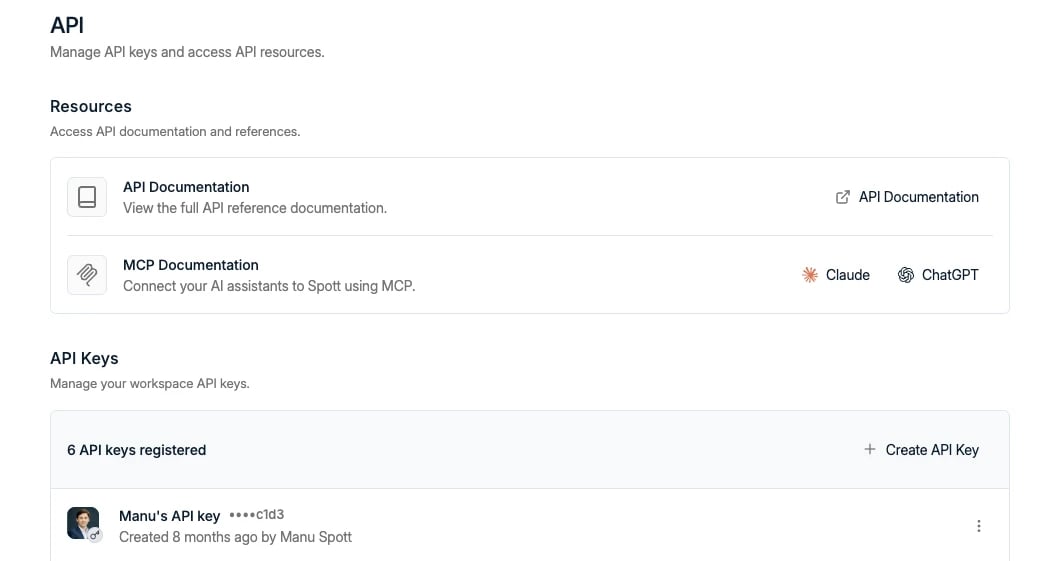
- Copy the key immediately. It is shown only once; if you lose it, generate a new one.
- Each key is bound to both the workspace and the user who created it. Every action performed with the key is attributed to that user; there is no way to pass a different actor in the request. This protects audit trails and prevents impersonation.
- If your integration acts on behalf of multiple users, each user needs their own API key.
Rate limits and pagination
- Limits are set per endpoint, per workspace. Most endpoints allow 600 requests per minute; a few heavier ones allow less, and the reference lists the limit on each endpoint. Trial workspaces are capped lower, and a higher limit can be arranged through support.
- Every response tells you where you stand.
RateLimit-Policygives the quota in force for your workspace on that endpoint, andRateLimithow many requests are left in the current window. Read these rather than hardcoding a number, since the limit in force can differ from the published one. - Exceeding the limit returns
429 Too Many Requestswith aRetry-Afterheader: the number of seconds to wait before trying again. - List endpoints use cursor-based pagination: pass the
cursorvalue from the previous response to fetch the next page.
Three ways to build on Spott
- REST API: traditional integrations, scripts, and data sync at scale.
- Webhooks: Spott pushes events to your endpoint.
- MCP: AI assistants interact with Spott conversationally.