> ## Documentation Index
> Fetch the complete documentation index at: https://docs.spott.io/llms.txt
> Use this file to discover all available pages before exploring further.
# Facturatie en credits
> Controleer uw zetels, lees uw creditsaldo af en koop bij wanneer u bijna door uw tegoed heen bent.
In dit onderdeel leert u waar u uw plan en actieve zetels controleert, hoe u uw creditsaldo
leest, hoe u extra credits koopt en welke acties ze verbruiken.
1. [Onderdeel Billing](#1-onderdeel-billing)
2. [Onderdeel Credits](#2-onderdeel-credits)
3. [Waar credits naartoe gaan](#3-waar-credits-naartoe-gaan)
Klik linksboven op het Spott-logo en kies **Billing** om het te openen.
Billing is een beheerdersonderdeel. Ziet u het niet in de zijbalk van de instellingen, dan
heeft uw rol er geen toegang toe.
## 1. Onderdeel Billing
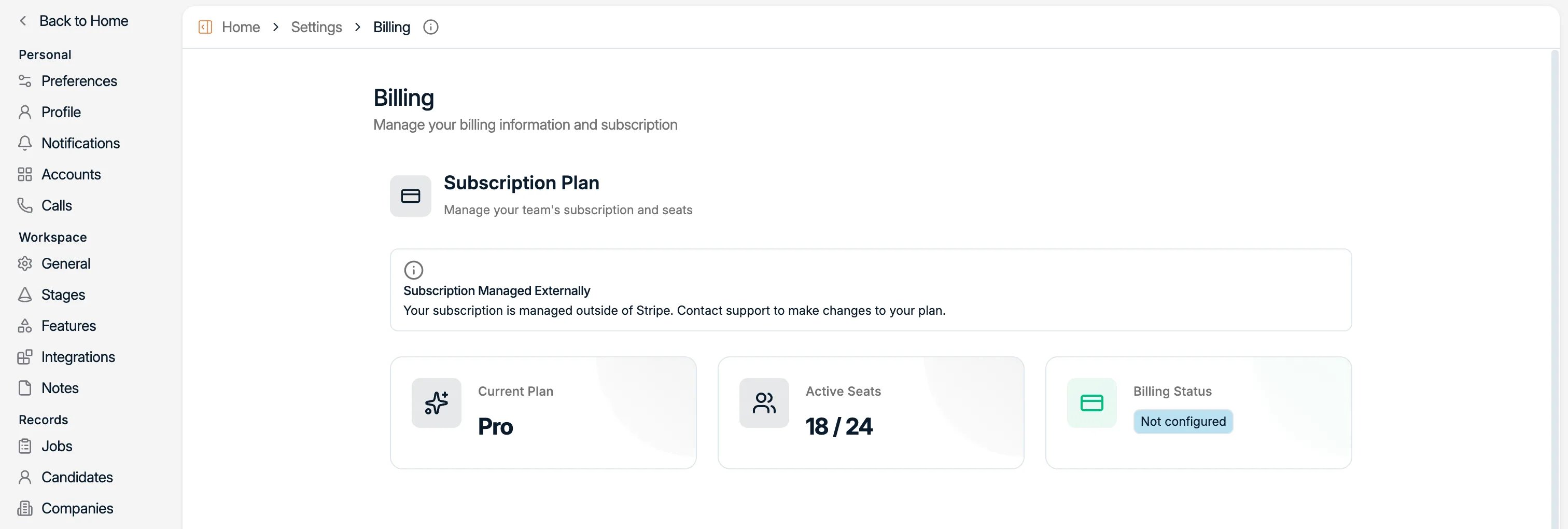
Hier vindt u het aantal actieve zetels tegenover wat uw plan toelaat, samen met uw huidige
plan en de facturatiestatus.
 ## 2. Onderdeel Credits
Credits zijn wat AI-acties in Spott verbruiken: een profiel verrijken, een record automatisch
bijwerken en dergelijke. Dit onderdeel toont uw saldo en laat u bijkopen.
## 2. Onderdeel Credits
Credits zijn wat AI-acties in Spott verbruiken: een profiel verrijken, een record automatisch
bijwerken en dergelijke. Dit onderdeel toont uw saldo en laat u bijkopen.
 ### 2.1 Wat u ziet
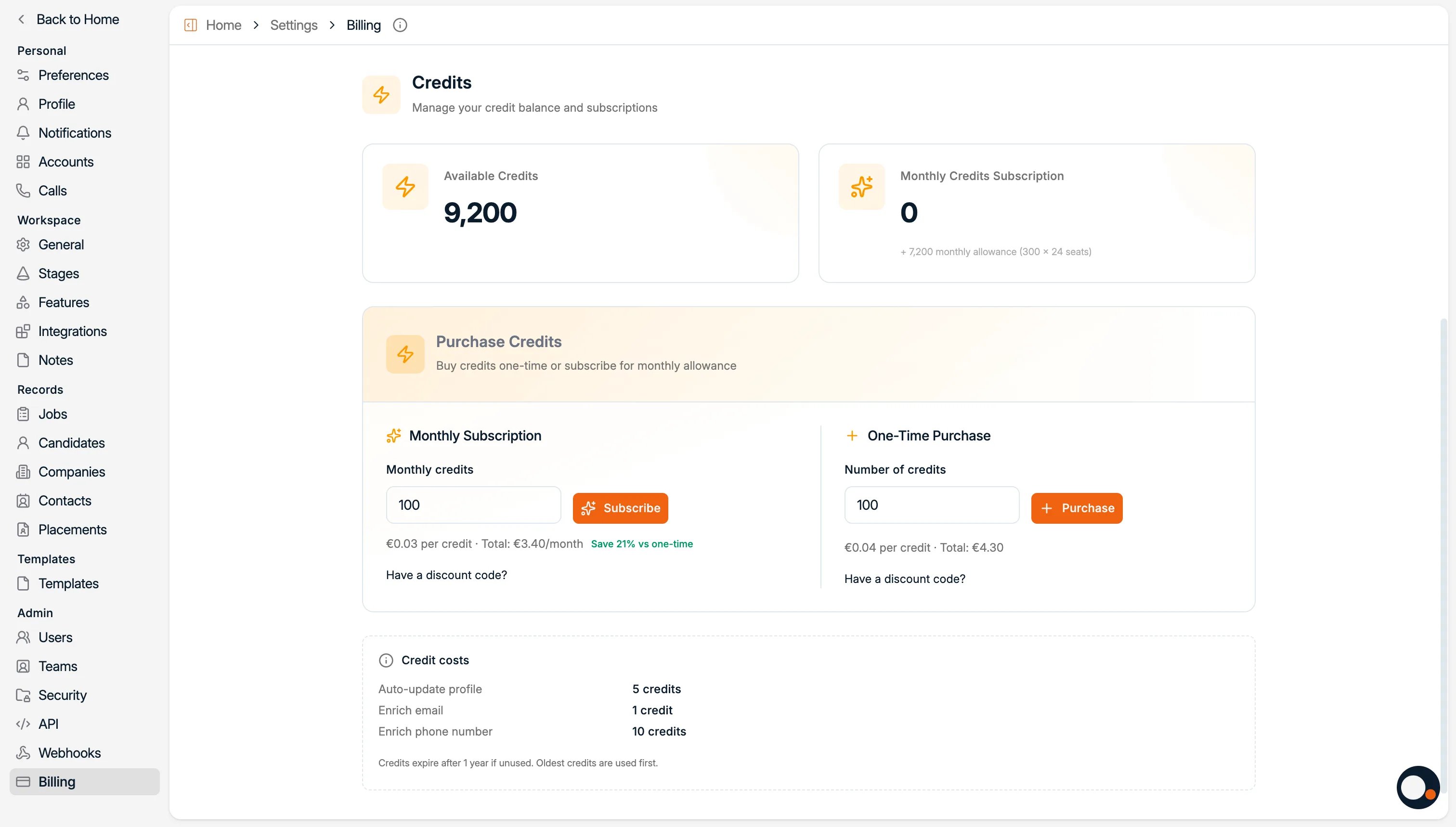
* **Available credits**: wat u nu kunt gebruiken.
* **Monthly subscription**: de credits die u elke maand ontvangt, als u geabonneerd bent.
* **Credit costs**: hoeveel credits elke actie verbruikt.
### 2.2 Wat u kunt doen
* **Maandelijks abonneren** voor credits aan een lagere prijs.
* **Eenmalig credits kopen** wanneer u ze nodig hebt.
Credits worden op het niveau van de workspace gebundeld, dus het saldo dat u ziet, wordt
door uw hele team gedeeld en staat niet per gebruiker apart.
## 3. Waar credits naartoe gaan
Enrichment verbruikt veruit de meeste credits. Wilt u het volledige plaatje van wat elke
actie kost voordat u functies aanzet, dan gaan de referentiepagina's dieper:
Wat enrichment vindt, en wat elke opzoeking kost.
Houd profielen automatisch actueel, en wat dat kost.
Zet functies die credits verbruiken aan of uit voor de workspace.
Alles wat de AI van Spott doet, zodat u weet waarvoor u betaalt.
### 2.1 Wat u ziet
* **Available credits**: wat u nu kunt gebruiken.
* **Monthly subscription**: de credits die u elke maand ontvangt, als u geabonneerd bent.
* **Credit costs**: hoeveel credits elke actie verbruikt.
### 2.2 Wat u kunt doen
* **Maandelijks abonneren** voor credits aan een lagere prijs.
* **Eenmalig credits kopen** wanneer u ze nodig hebt.
Credits worden op het niveau van de workspace gebundeld, dus het saldo dat u ziet, wordt
door uw hele team gedeeld en staat niet per gebruiker apart.
## 3. Waar credits naartoe gaan
Enrichment verbruikt veruit de meeste credits. Wilt u het volledige plaatje van wat elke
actie kost voordat u functies aanzet, dan gaan de referentiepagina's dieper:
Wat enrichment vindt, en wat elke opzoeking kost.
Houd profielen automatisch actueel, en wat dat kost.
Zet functies die credits verbruiken aan of uit voor de workspace.
Alles wat de AI van Spott doet, zodat u weet waarvoor u betaalt.
## Nu is het aan u
* [ ] Vergelijk uw **actieve zetels** met wat uw plan toelaat
* [ ] Lees uw **creditsaldo** af
* [ ] Kies tussen een **maandabonnement** en een **eenmalige aankoop**
Nu uw workspace en gegevens klaar zijn, kunt u met de records aan de slag.