> ## Documentation Index
> Fetch the complete documentation index at: https://docs.spott.io/llms.txt
> Use this file to discover all available pages before exploring further.
# Opportunities
> Track deals and business development in Spott with opportunities: stages, weighted pipeline forecasts, and conversion to jobs.
**Opportunities** track deals: anything you are working to close that is not a
specific recruitment job yet. Think consulting and advisory engagements, framework
agreements, or multi-placement deals at one client. Other CRMs call the same concept
"deals".
Opportunities sit on the CRM side of Spott, next to companies and contacts. They are
most useful when your agency has a distinct sales motion: sales reps work
opportunities, recruiters work jobs. Many agencies manage fine with company or
contact stages alone; opportunities are the step up when that is not enough.
You can quickly navigate to Opportunities with `G` then `Y`.
## Enable opportunities
Opportunities are off by default. An admin turns them on in **Settings → Features**
with **Enable Opportunities**. After enabling:
* **Opportunities** appears in the sidebar under CRM.
* **Settings → Data Model** gains an Opportunities section for custom fields.
* Opportunity **stages** become configurable under **Settings → Stages**.
## Stages and the weighted pipeline
Configure your own stages (for example Pitching, Negotiation, Proposal sent, Closed
won, Closed lost). Each stage has a **Closing Rate Percentage**: the likelihood that
a deal at that stage will close.
With estimated values on opportunities and closing rates on stages, the **Board
view** shows per stage:
* **Total Est. Value**: the raw sum of the deals in that stage
* **Weighted Value**: the sum multiplied by the stage's closing rate
That gives you a realistic forecast instead of an over-counted raw total.
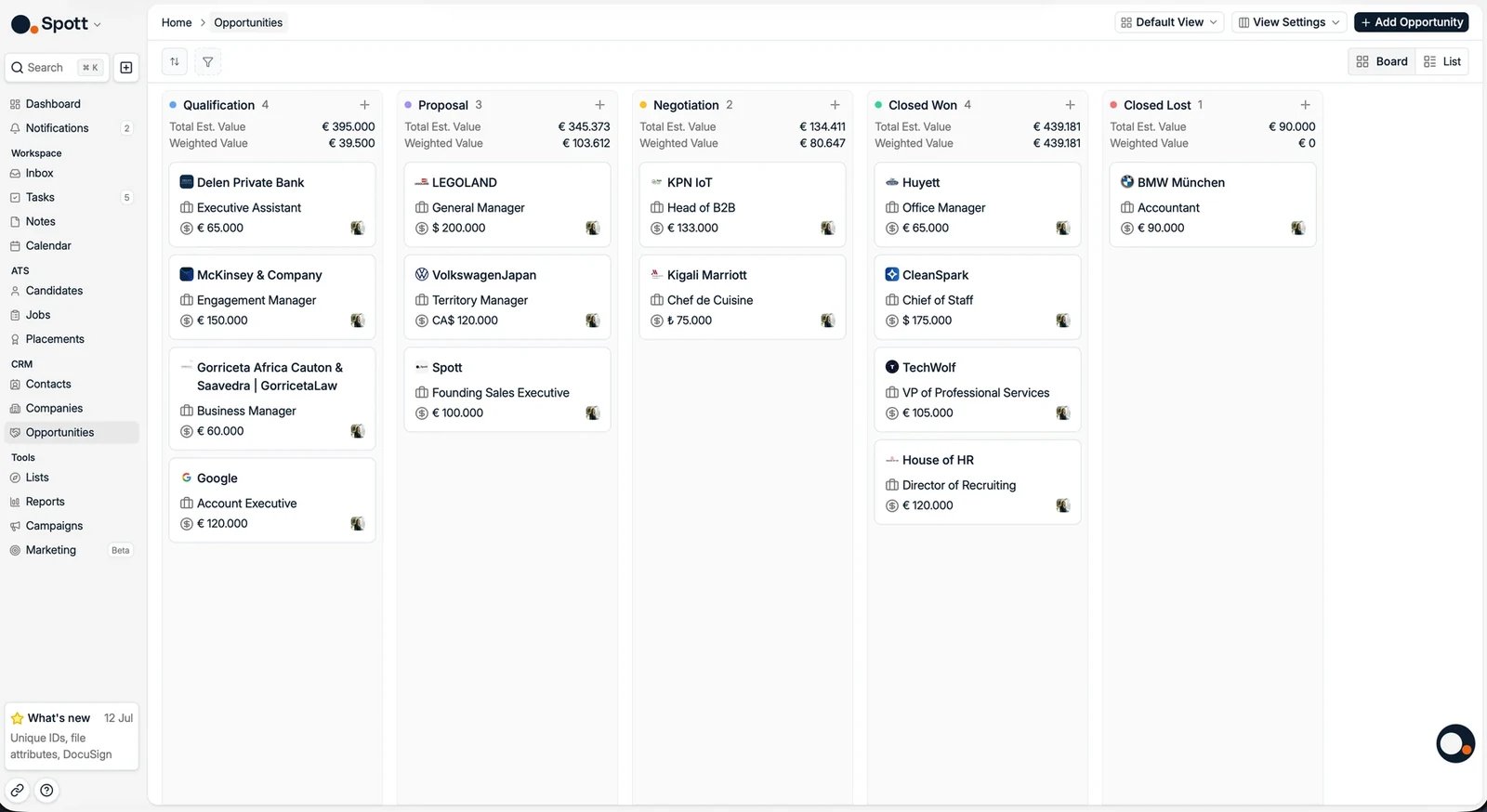 Drag opportunities between stages as deals progress. A **List view** with filters,
sorting, saved views, and a **Group by company** toggle is also available. See
[using views](/docs/settings/using-views).
## Create an opportunity
Click **Add Opportunity** (or press `A` then `Y` anywhere). Fill in the **Name**
(for example "Backend hiring plan 2026"), the **Company**, and the **Stage**, then
click **Create Opportunity**.
As on jobs, you do not have to type it all in. **Import from URL** takes the link to a
public posting and reads it into the opportunity's fields, and the
[browser extension](/docs/settings/chrome-extension) creates an opportunity from the
page you are looking at.
Drag opportunities between stages as deals progress. A **List view** with filters,
sorting, saved views, and a **Group by company** toggle is also available. See
[using views](/docs/settings/using-views).
## Create an opportunity
Click **Add Opportunity** (or press `A` then `Y` anywhere). Fill in the **Name**
(for example "Backend hiring plan 2026"), the **Company**, and the **Stage**, then
click **Create Opportunity**.
As on jobs, you do not have to type it all in. **Import from URL** takes the link to a
public posting and reads it into the opportunity's fields, and the
[browser extension](/docs/settings/chrome-extension) creates an opportunity from the
page you are looking at.
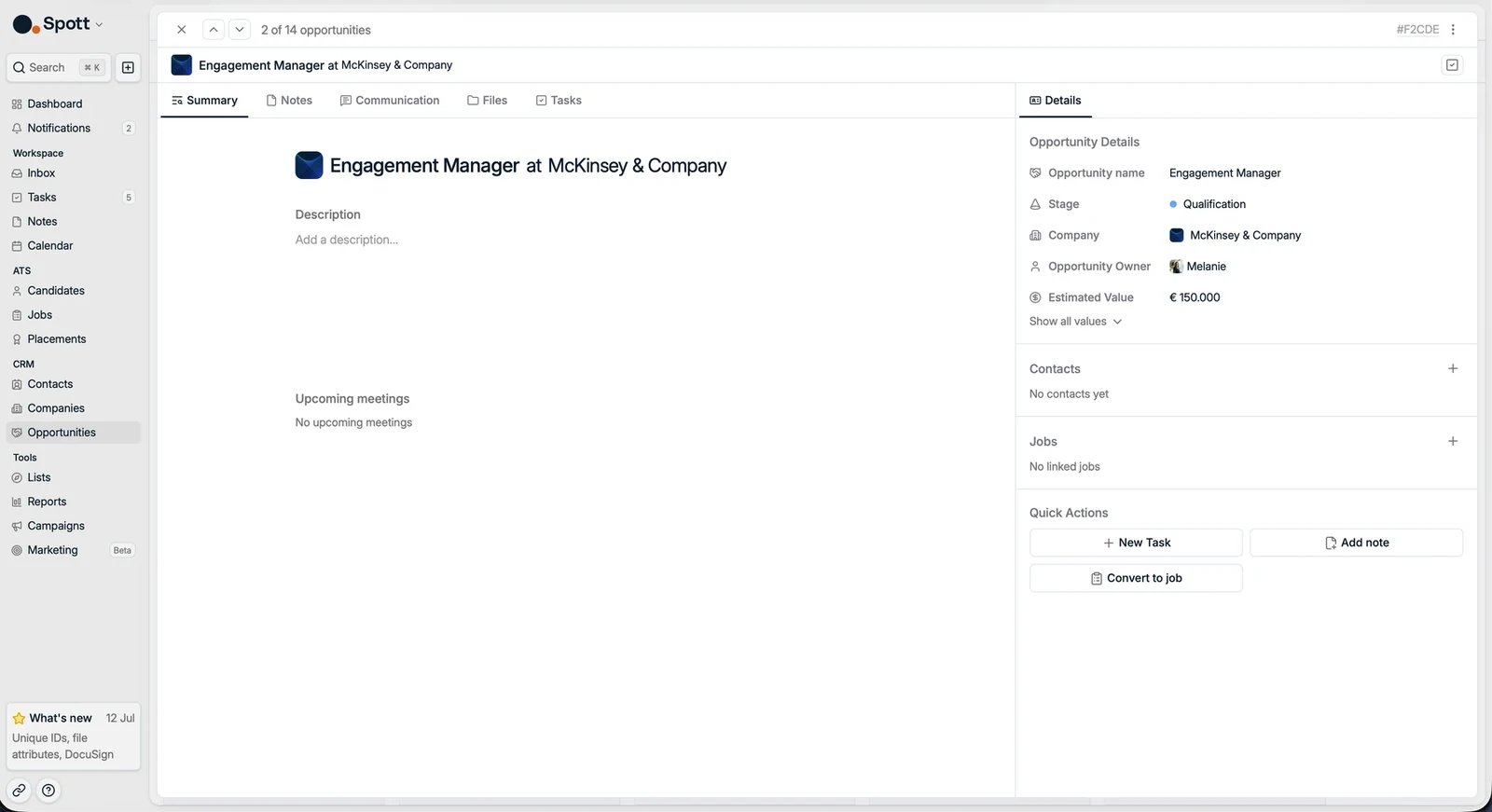 On the opportunity record you can then set:
* **Estimated Value** and **Target Close** date
* The **Opportunity Owner**
* Linked **client contacts**: emails, calls, and meetings with them surface on the
opportunity
* **Notes**, **Files**, **Tasks**, and **Communication**, in their own tabs
* Any custom fields your workspace has configured
## Convert an opportunity to a job
When a deal turns into recruitment work, click **Convert to job** in the
opportunity's quick actions. The new job is pre-filled with the opportunity's
company, name, and contacts, ready for the recruiter to pick up.
The opportunity itself is not deleted: move it to Closed won and keep its history.
The opportunity and the job stay linked, so you can trace a placement back to the
deal that won it. For deals with multiple roles, convert into one job per role.
**Candidates are not linked to opportunities.** An opportunity tracks the deal; you
pipeline candidates only once it converts to a job. This is the usual source of
confusion between jobs and opportunities: jobs have a candidate pipeline,
opportunities do not.
On the opportunity record you can then set:
* **Estimated Value** and **Target Close** date
* The **Opportunity Owner**
* Linked **client contacts**: emails, calls, and meetings with them surface on the
opportunity
* **Notes**, **Files**, **Tasks**, and **Communication**, in their own tabs
* Any custom fields your workspace has configured
## Convert an opportunity to a job
When a deal turns into recruitment work, click **Convert to job** in the
opportunity's quick actions. The new job is pre-filled with the opportunity's
company, name, and contacts, ready for the recruiter to pick up.
The opportunity itself is not deleted: move it to Closed won and keep its history.
The opportunity and the job stay linked, so you can trace a placement back to the
deal that won it. For deals with multiple roles, convert into one job per role.
**Candidates are not linked to opportunities.** An opportunity tracks the deal; you
pipeline candidates only once it converts to a job. This is the usual source of
confusion between jobs and opportunities: jobs have a candidate pipeline,
opportunities do not.