> ## Documentation Index
> Fetch the complete documentation index at: https://docs.spott.io/llms.txt
> Use this file to discover all available pages before exploring further.
# The Spott API
> Build integrations on your Spott data with the REST API: authentication, API keys, rate limits, and where to find the full reference.
Spott offers an extensive **REST API** to build integrations on top of your data. It
exposes most of Spott's records and actions: candidates, jobs, companies, contacts,
applications, placements, notes, tasks, and more.
The full endpoint reference, with request and response shapes, an interactive
"Try it" playground, and pagination behavior, is in the **sidebar** of this tab,
grouped by record type (Candidates, Jobs, Applications, and more).
## Common use cases
* Build a custom dashboard on your Spott data.
* Push data from external systems into Spott, for example custom intake forms or an
HRIS sync.
* Pull data out of Spott for BI tools and data warehouses.
* Trigger downstream workflows when something happens in Spott, combined with
[webhooks](/docs/developers/webhooks).
## Authentication
* The base URL is `https://api.gospott.com`.
* Private endpoints require an **`x-api-key`** header with your API key.
* Public endpoints (for example, job board content) need no key; they are scoped by
the `publicTenantSlug` path parameter instead.
## API keys
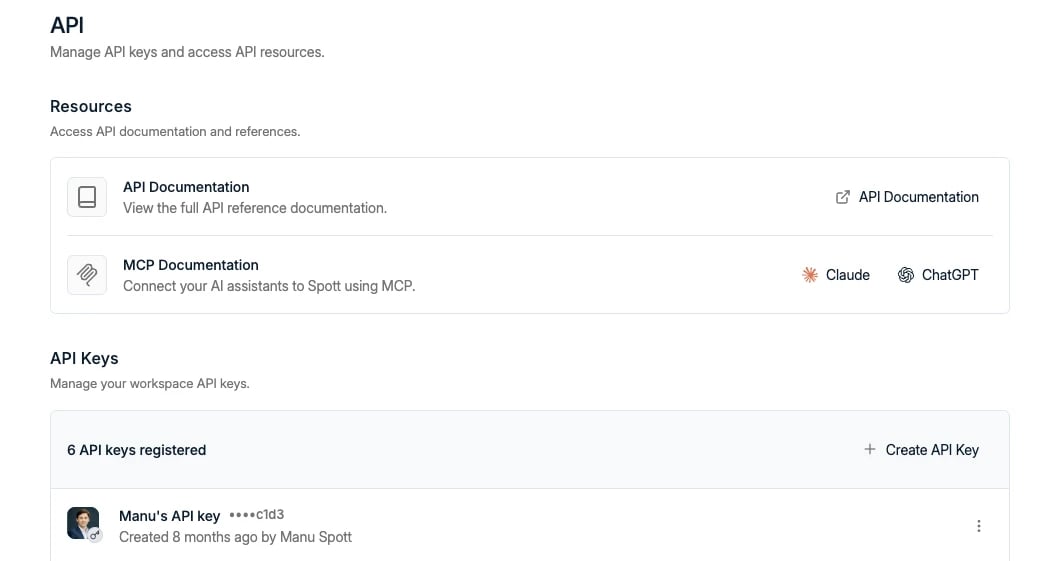
Generate keys under **Settings → API**, where you also find links to this API
documentation and the [MCP](/docs/developers/mcp) setup (admin permissions required):
 * **Copy the key immediately.** It is shown only once; if you lose it, generate a
new one.
* Each key is bound to **both the workspace and the user who created it**. Every
action performed with the key is attributed to that user; there is no way to pass
a different actor in the request. This protects audit trails and prevents
impersonation.
* If your integration acts on behalf of multiple users, **each user needs their own
API key**.
## Rate limits and pagination
* Endpoints are rate limited at **600 requests per minute**. Exceeding the limit
returns `429 Too Many Requests`.
* List endpoints use **cursor-based pagination**: pass the `cursor` value from the
previous response to fetch the next page.
## Three ways to build on Spott
* **REST API**: traditional integrations, scripts, and data sync at scale.
* **[Webhooks](/docs/developers/webhooks)**: Spott pushes events to your endpoint.
* **[MCP](/docs/developers/mcp)**: AI assistants interact with Spott conversationally.
They are complementary: webhooks tell you something happened, the API lets you fetch
and change the details, and MCP puts an AI assistant in the loop.
* **Copy the key immediately.** It is shown only once; if you lose it, generate a
new one.
* Each key is bound to **both the workspace and the user who created it**. Every
action performed with the key is attributed to that user; there is no way to pass
a different actor in the request. This protects audit trails and prevents
impersonation.
* If your integration acts on behalf of multiple users, **each user needs their own
API key**.
## Rate limits and pagination
* Endpoints are rate limited at **600 requests per minute**. Exceeding the limit
returns `429 Too Many Requests`.
* List endpoints use **cursor-based pagination**: pass the `cursor` value from the
previous response to fetch the next page.
## Three ways to build on Spott
* **REST API**: traditional integrations, scripts, and data sync at scale.
* **[Webhooks](/docs/developers/webhooks)**: Spott pushes events to your endpoint.
* **[MCP](/docs/developers/mcp)**: AI assistants interact with Spott conversationally.
They are complementary: webhooks tell you something happened, the API lets you fetch
and change the details, and MCP puts an AI assistant in the loop.