> ## Documentation Index
> Fetch the complete documentation index at: https://docs.spott.io/llms.txt
> Use this file to discover all available pages before exploring further.
# Company Hierarchy
> Link a client's parent company, subsidiaries, business units, and divisions so you see the whole group from any record in it.
Big clients are rarely one company. A group can hold separate legal entities per
country, business units with their own hiring managers, and divisions per product line.
The **Hierarchy** tab on a [company record](/docs/companies/company-record) connects
those records so you can see the whole group from any company inside it, instead of
keeping the structure in your head.
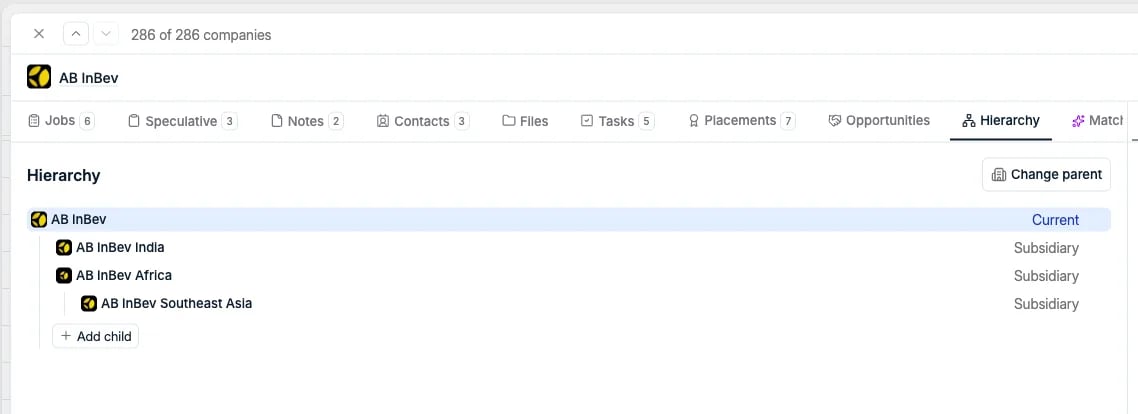 The tab shows the whole group as a tree. The company you are on is marked **Current**,
and every other company shows its relationship to the company above it. Open the
Hierarchy tab from any company in the group and you see the same tree.
## Add companies to the group
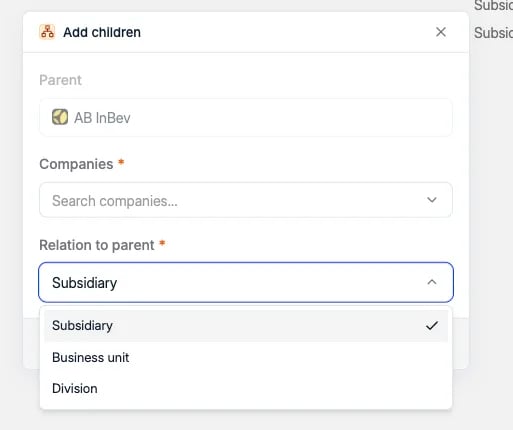
Click **Add child** to attach the companies that belong to this one. In the **Add
children** dialog, the parent is already filled in. Search for one or more companies,
pick the **Relation to parent**, and click **Add children**.
The tab shows the whole group as a tree. The company you are on is marked **Current**,
and every other company shows its relationship to the company above it. Open the
Hierarchy tab from any company in the group and you see the same tree.
## Add companies to the group
Click **Add child** to attach the companies that belong to this one. In the **Add
children** dialog, the parent is already filled in. Search for one or more companies,
pick the **Relation to parent**, and click **Add children**.
 Use **Change parent** in the top right to attach the company you are on to a group, or
to move it under a different parent.
Every company in the tree has a **⋮** menu with the rest of the actions:
* **Add child**: hang another company under that one, which is how you build a tree more
than two levels deep.
* **Change relation to parent**: correct the relationship type afterwards.
* **Remove from hierarchy**: detach that company from the group.
Use **Change parent** in the top right to attach the company you are on to a group, or
to move it under a different parent.
Every company in the tree has a **⋮** menu with the rest of the actions:
* **Add child**: hang another company under that one, which is how you build a tree more
than two levels deep.
* **Change relation to parent**: correct the relationship type afterwards.
* **Remove from hierarchy**: detach that company from the group.
 ## Types of relationships
The relation is set on the link between a company and its parent, so one group can mix
all three. It is required and defaults to **Subsidiary**.
| Relationship | Use it for |
| ----------------- | -------------------------------------------------------------------------------------------------------------------- |
| **Subsidiary** | A separate legal entity owned by the parent, such as a country entity or an acquired company that kept its own name. |
| **Business unit** | A commercial unit inside the group, often with its own budget and its own hiring managers. |
| **Division** | A structural part of the parent, for example split by product line or region. |
## Types of relationships
The relation is set on the link between a company and its parent, so one group can mix
all three. It is required and defaults to **Subsidiary**.
| Relationship | Use it for |
| ----------------- | -------------------------------------------------------------------------------------------------------------------- |
| **Subsidiary** | A separate legal entity owned by the parent, such as a country entity or an acquired company that kept its own name. |
| **Business unit** | A commercial unit inside the group, often with its own budget and its own hiring managers. |
| **Division** | A structural part of the parent, for example split by product line or region. |
 Picking the right type matters when you report on a client group or need to know which
entity actually signs the contract.
## How deep a hierarchy goes
A hierarchy is a tree, not a single parent-child pair. A child company can have its own
children, as in the example above where a regional entity sits under another subsidiary,
so a group with a holding, national entities, and divisions under those is one connected
structure. Each company sits in **one hierarchy at a time**, with a single parent, which
keeps the tree unambiguous.
Picking the right type matters when you report on a client group or need to know which
entity actually signs the contract.
## How deep a hierarchy goes
A hierarchy is a tree, not a single parent-child pair. A child company can have its own
children, as in the example above where a regional entity sits under another subsidiary,
so a group with a holding, national entities, and divisions under those is one connected
structure. Each company sits in **one hierarchy at a time**, with a single parent, which
keeps the tree unambiguous.