> ## Documentation Index
> Fetch the complete documentation index at: https://docs.spott.io/llms.txt
> Use this file to discover all available pages before exploring further.
# Presenting candidates
> Send a candidate to your client contacts for a role, with their CV or a generated report attached.
**Presenting** a candidate emails them to your client contacts, usually hiring
managers, for a specific role. You can present a candidate who has applied to a job, or
make a **speculative presentation** when there is no active role yet.
## Present a candidate
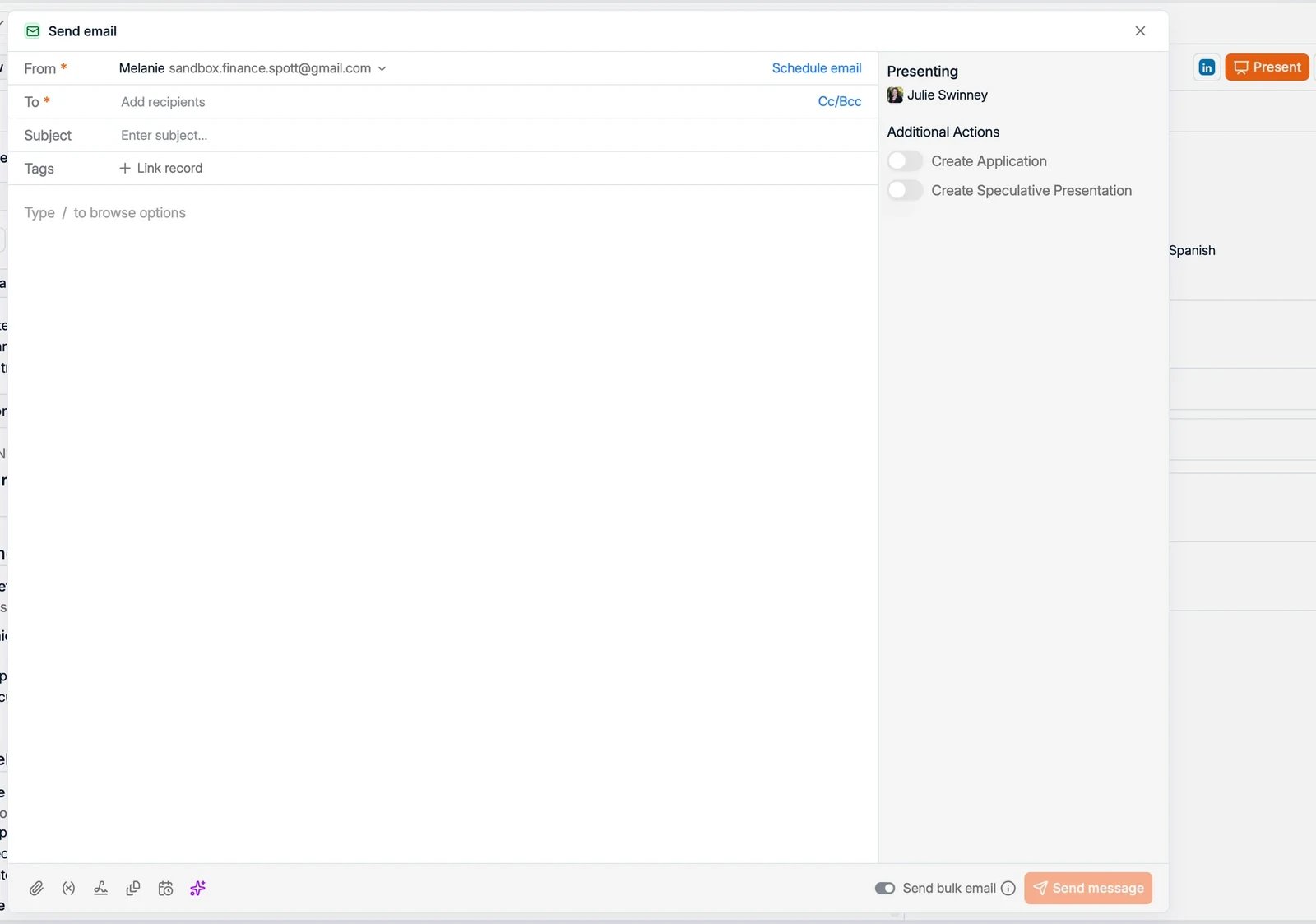
1. Open the candidate, or their application, and click **Present** in the top right.
2. A **Send email** opens, set up for presenting the candidate. The subject is filled
in for you, for example "Presenting Steven Brower for Account executive".
3. Add the client **recipients** and write your message.
 ## Attach a CV or report
In the panel on the right, under **Browse attachments for** the job and candidate, you
can attach:
* the candidate's original **CV**,
* a **Reformatted CV**: a Spott-generated, formatted version of the CV, available per
language (for example EN-GB or FR),
* a **candidate report**: click **Generate candidate report** to create one.
## Additional actions
While presenting, you can also do either of the following in the same step:
* **Create Application**: add the candidate to the job's pipeline as you present them.
* **Create Speculative Presentation**: log the presentation when there is no active
role for the candidate.
## Present to several contacts at once
Turn on **Send bulk email** to present the candidate to multiple client contacts in one
action. You can also bulk-present several candidates at once from the Candidate table or
from a job pipeline.
## Next steps
Score candidates against the job's criteria.
Follow each candidate through the pipeline.
## Attach a CV or report
In the panel on the right, under **Browse attachments for** the job and candidate, you
can attach:
* the candidate's original **CV**,
* a **Reformatted CV**: a Spott-generated, formatted version of the CV, available per
language (for example EN-GB or FR),
* a **candidate report**: click **Generate candidate report** to create one.
## Additional actions
While presenting, you can also do either of the following in the same step:
* **Create Application**: add the candidate to the job's pipeline as you present them.
* **Create Speculative Presentation**: log the presentation when there is no active
role for the candidate.
## Present to several contacts at once
Turn on **Send bulk email** to present the candidate to multiple client contacts in one
action. You can also bulk-present several candidates at once from the Candidate table or
from a job pipeline.
## Next steps
Score candidates against the job's criteria.
Follow each candidate through the pipeline.